Questions, discussions, news and updates regarding the Thinkwise Platform.
Recently active
We have a HTTP connector flow, very simple GET toch check if a code exists. It uses basic authentication. The HTTP connector flow works. I added the same to a web connector with the base URL and basic authentication and the endpoints. The only difference is I get a 401 not authorized via de web connector but not via the HTTP connector. There is no logging to debug further. How to proceed?
Hi,For a project we have the acceptance, development environment on the same server.But the performance and speed of the application is very slow. Is it possible to remove the development environment from server and keep only the acceptance env, so that the speed will be improved? Thanks,Rucha
When trying to upload a pdf file to azure blob using write_file_connector, we get the following warning: The file did get upload to the azure blob. We checked the file storage location in the SF and the max size in MB is empty. It seems to be a problem in the process action. What could be the reason for it?
We have plans to start to use the Universal GUI instead of the Windows GUI. But we are running into an issue regarding screen types. On all our screen types we try to maintain a standard layout for the taskbar, prefilters and the combinded filter. This looks like this: In the Windows GUI it looks like this: But in the Universal GUI it seems to show it in the opposite order, first the combined filter then the prefilters and then we see a action bar and then the tasks. This looks like this:And user prefilters are also not grouped and all over the place: If we would insert an actionbar screen component in the screen type, we do get the correct order in the Universal GUI: But then the Windows GUI isn't correct anymore: So it seems the Universal GUI is showing something completely differrent than what has been setup in the SF, or are we missing something?Is there a way to have the same layout in the Windows GUI and the Universal GUI?
We currently have a screen type with a component tab page containing a grid, prefilter bar, and task bar. Next to this is another component tab page with only a form.In Universal, the prefilter and task bar are displayed on both the grid and form, resulting in prefilters being shown in the form.Is this by design, or is it a bug? Can we expect this to be resolved in the future? In my opinion, showing prefilters in a form is a waste of space, especially when space is limited on phones or tablets.
We like to execute a windows command from inside a system flowExample:DIR "\\sharename\queue" /b /s >”\\sharename\cmd\queue.txt"What is de best approach?
Hi,In Universal I would like to have Auto-edit in grid on, and have multi-select - so a user can execute the tasks. However, it appears it's on or the other. Is this correct?Thanks, Blommetje
In Universal I now use card lists more and more. These work well in many cases, especially on smaller devices.Users are now asking if it is possible to sort the list.Any idea this option is available to end users?
Context: Ive created a task that creates agreements. A few fields are mandatory and some are not.Mandatory: Supplier, Description, Year, Startdate, Enddate, type and managers.There's functionality written in order to automaticly determine the startdate and enddate. For instance. when inserting 2023, startdate becomes 1-1-2023 and endate becomes 31-12-2023. There's also functionality written to determine the managers based on the first selected supplier. Problems: Can't close my task popup if execute is clicked but the mandatory fields are not supplied.Year functionality stopped working on start and enddate, now I need to select dates manually.Gif of the behavior below.Steps to reproduce:Create bonus agreement Fill in Supplier 1, no multiple suppliers (category and assistant category manager will be filled in) Fill in Description Click Execute (all error messages for fields that are not filled in will appear here) Fill in Year Click Cancel - this does not work Fill in start and end date
Sometimes when I am working on a dynamic model for example, it is difficult to figure out which database value for a domain in the SF database translates to a particular translation in the GUI. For example, figuring out the database value in the table col for column 'calculated_field_type' when it is an expression or when it is a calculated column can be quite tedious. I usually then look for a column in the UI with the particular value I am looking for, and then query the database to find out what database value is associated with this. What is the easiest way to figure this out? Is there a data dictionary somewhere I can refer to?
As a junior developer I find it really cool how much power you have with the Thinkwise platform. I've been able to deliver a tool to our customer in one month, with database, integration etc.As a Thinkwise partner, however, I think that's a pity that the learning curve is so steep. I have some experience with other no-code platforms that are so rich in feedback, that's you learn so much quicker. And probably, the growth of the Thinkwise platform will be highly limited by this learning curve. What I found is that the way to learn is to really f*^k up you branch (if your lucky to know how that works), and you'll need a senior to fix it. That's a really hard situation if there is no senior around. Ive broken versions because I changed a domain, or made a field mandatory and it broke de upgrade. After that, feedback is extremely poor, and thebwaybtondig yourself deeper into problems is way easier than finding the solution. You can create domains that do not exist and I will remember other
We have a task defined, which is not linked to any subject. We are developing a separate API which needs to execute this task, but Indicium Universal keeps throwing a 404.Is there a way to execute a task through Indicium Universal which is not linked to a subject?Thanks in advance!
After upgrading the SF to 2024.2 it comes up with the following messages when generating the definition, how to solve this? Cannot insert duplicate key in object 'dbo.indx'.
Hello, It is there a possibility to recognize which tab is active from a screen? I want to create a context to show me the detail tab A when the detail tab B is active.
When accessing the development environment (without the intervention of an IAM) directly through the SF, I get the following error message when opening the log in URL.The error message is not given when I access the URL directly from the server running IIS.How can we get the “Invalid OData URL. The path '“//i_ui_usr”' is invalid” message? This problem seems to have arisen after the 2024.2 upgrade, possibly this is still related? Error - Invalid OData URL. The path '"//i_ui_usr"' is invalid. { "defaultApplication": "", "loginOptionsDisabled": true, "loginOptionsHidden": false, "installNotificationDisabled": false, "installNotificationExpirationInDays": 10, "useFormFieldBackgroundColor": true, "serviceUrl": "https://office-dev.niverplast.com/indicium/iam/sf", "defaultPlatform": 3}Universal - config.json
Looking at ways to increase the performance of search options being used by users, the index option “full-text” crossed my eyes. Reading up on what it does and how it works, I am not entirely sure what the intended purpose is in the Thinkwise product.I was hoping I could use it for the combined filter, but those make “LIKE” statements on the view/tabel it is used on and for full-text it needs “CONTAINS”.Could someone enlighten me?I am also open to hear about cases where someone has used the full-text in his/her functionality to get an idea of how it might benefit.
In the Universal GUI there is a build-in animation in the form edit-mode: A label of an empty field has a bigger font and is positioned more in the center, when you click on the field the label becomes smaller and moves to the top (see example images below). The same thing happens for lookup-fields when starting the edit-mode. The GUI seems to start the lookup fields empty field and put in the values a little bit later which seem to trigger the animation. Our users find the animation distracting and sometimes even confusing for distinguishing the label from a value. Thus we would like to turn off the animation so that empty field labels have the same position/size as non-empty fields.(How) would this be possible? Unit field is empty (label is big and centered)Unit field is selected (label is small and at the top)
Hi, In my applications that I've build so far in my training, i've struggle finding a way to change the format of dates shown in my pages. At the moment it's like this: mm/dd/yyyy But what I want is this: dd-mm-yyyy What is the proper way to achieve this?
hi,We use a view in a detail tab where we combine two tables, a record can be added in the row. We use an instead of trigger to insert the records in het underlying tables. After adding the record, the message “saved data can not be displayed on this screen”, but surprise, the new record is shown! Because of the two tables, two primary keys are added in this view, can this be the problem? Should I create a dummy primary key for this view?Anybody an idea how to fix this?
For our application we want to embed a viewer for all kinds of 3D CAD files (both native, and neutral format.The idea is to look for a stand alone viewer that is embedded as iframe.I am wondering if there is already created something like that in a thinkwise application, and hope that some experience can be shared.Thanks in advance!
I tried to upgrade the upcycler from 2023.3 to 2024.1 from the deployment package.. It gave the following error:2024-05-14 14:24:03.302 -03:00 [Error] Graph does not contain the provided target vertex. (Parameter 'target')System.ArgumentException: Graph does not contain the provided target vertex. (Parameter 'target')
Since we upgraded the indicium to the latest version, we have the following scenario: We perform the same API-call: {{BASE_URL}}/api_call_a?$expand=detail_ref_api_call_a_api_call_b,detail_ref_api_call_a_api_call_c,api_call_a_api_call_dIf we perform this API-call using “Basic Auth” it is working as expectedif we perform this API-call using “Bearer token” it is not working (error 502) If I remove the latest 2 expands, it works with the “Bearer token” again. The error-logs are clean and this case is reproducable in Postman. Bearer token is a token based on the same user as the basic-auth login. Prefilters are used in these API's502 error: <html> <head> <title>502 Bad Gateway</title></head> <body> <center> <h1>502 Bad Gateway</h1> </center> <hr> <center>nginx/1.22.1</center></body> </html>
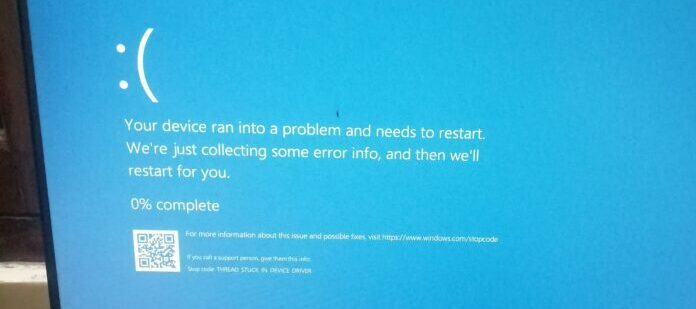
Hi everyone,The latest Windows security update (KB5035853) has been linked to instances of Blue Screen of Death (BSOD) errors for Windows 11 users. These errors can also occur when using the Thinkwise Windows GUI.More information here: Windows 11 Update Causing Serious Problems For Millions Of PC Users (forbes.com)For users who have not yet installed the update (KB5035853), it is recommended to postpone the installation until Microsoft releases a possible fix. For users currently experiencing BSOD errors or Thinkwise application issues after installing the update, we recommend uninstalling the update using standard Windows update uninstall procedures.Microsoft has acknowledged that it is investigating these issues and is expected to provide a fix in the near future.
I am pretty sure that before the last .13 GUI release the target of deep-links where not overruled by a default _blank. I really want this to be a setting or ignored. We use quite some deep links to get from pieces of HTML to the next functionality in the Universal GUI. Now they all end up opening new tabs/windows. This is not wanted.
Hello, we want to print a certain label from the web gui. We have a report setup with the report action set to Print. We have a working printer attached to it, but it is not printing anything when the button is clicked. Instead it generates the label and shows it to us in the browser. Here is how we've set up the task: I have also made the report_action manually changeable in the screen when the button to print the report is clicked, but the screen doesn't open and it just opens the document in a new browser tab.
Already have an account? Login
Enter your E-mail address. We'll send you an e-mail with instructions to reset your password.