Questions, discussions, news and updates regarding the Thinkwise Platform.
Recently active
We have a MAIN branch, TEST branch, and several DEV branches. I want each branch to have a different theme; the only important distinction I want to make is that MAIN has a black menu, TEST has a red menu and the DEV branches have a green menu. While we were using only Windows, this worked. Now that we are also using Universal, somehow the themes are not matching the branch, and the themes differ between users. I am also trying user group group preferences, but the theme doesn’t seem to change to the one I set in the platform settings. In the documentation on themes https://docs.thinkwisesoftware.com/docs/sf/themesI can only find how to set one default theme for a whole application.Please explain if it is possible to control which theme is used in which branch and have both a theme for Universal and Windows.
Hi all,I'm experiencing an issue with images in Thinkwise reports:Photos taken in portrait mode are displayed correctly after upload in the app.However, when a report is exported/downloaded, some images are rotated to landscape.My suspicion is that this is related to the EXIF orientation metadata.Has anyone encountered this before, and does anyone know of a solution or workaround for this behavior?Thanks in advance!
Creating Custom Components in Universal: A Step-by-Step Guide The Universal GUI in the Thinkwise Platform offers a versatile environment for developing custom components to enhance your application’s functionality. Our platform delivers a lot of standard ‘LEGO’ components, but sometimes you just need a block that is unique to your organisation. This guide will walk you through configuring the Software Factory (SF), setting up the Internet Information Services (IIS) directory, and configuring a custom component, along with event message settings.Universal has a dark and a light theme setting. This blog will show you how to follow that theme in a custom component.Let's get started!Custom components run with the same authentication session as Universal, so calls to Indicium inherit the user's credentials automatically.When calling external services or endpoints, treat all outgoing data with care: apply modern security standards, send only what is strictly necessary, and never transmit sen
We are focused on building an application that can be used without a mouse. I noticed something that could be a bug: When I use the escape key to cancel editing, there is no focus in the grid anymore, and I cannot navigate anymore with up and down arrows.Reproduce: Go to a grid where inline editing is possible, e.g.: https://insights.thinkwise.app/universal/#application=insights/subject=country Use cursor up and down to select the record Ctrl-E to edit Escape to stop editing Problem: Cursor up and down stopped workingUpdate: When focus is on a checkbox, after escape, up and down still work. When focus is on a textfield, up and down stop working...
Process flow started from a table task hangs until row change in subject.We are experiencing a problem where a table task is not finished by Indicium until the subject is switched to another row. Then the process flow proceeds and finishes successfully.Steps that have been taken to get this problem:Select a row in the subject (see 1 in first image).Click the table task that starts the process flow (see 2 in first image).After executing step 2 the connected process flow starts and executes the start table task action, then starts the OpenDocumentAction. However, this action remains started but does not complete. See the 2nd screenshot.After switching a row in the subject by clicking it, or using the arrow keys (see 3 in first image). The process flow continues and finishes. See the 3rd screenshot. RemarksThis only occurs in Universal GUI, Windows executes the logic without the need to switch the row. Seems like similar behaviour as to where a filter is only applied after filling in the
We configured in IAM the extended property CustomTimeMask with value ‘H:mm’ to hide the seconds for time and date time fields.But with Universal 2025.3+, this seems not longer supported. It is still coming now including the seconds: In IAM we only have option to show the date part in some different format, but the time part is not taken into account. Is there an option to have the (date)time fields showed again without seconds as that detailed level is not needed?
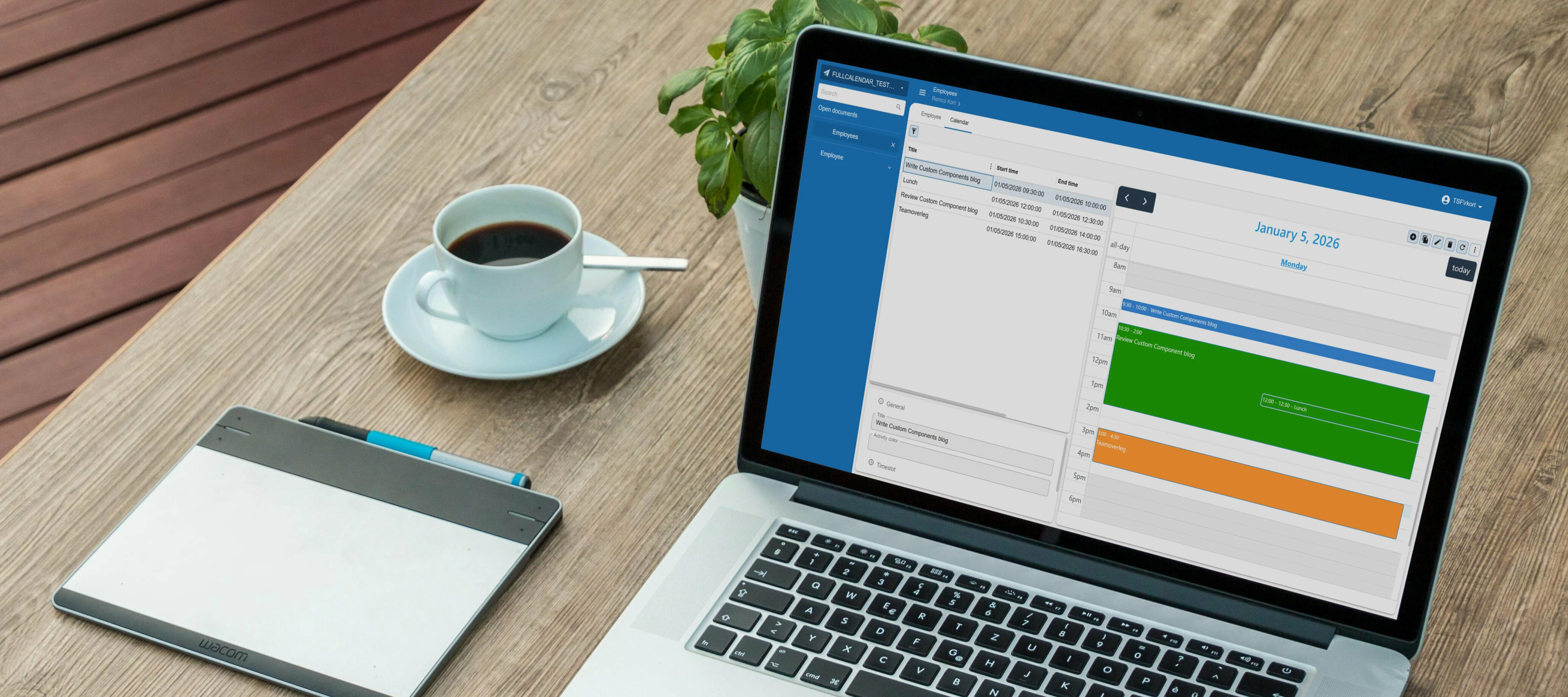
The Thinkwise platform offers a comprehensive suite of built-in features that cover most application development needs. However, there are occasions when you need to extend your application with functionality that falls outside the platform's standard offerings. With version 2025.3, Thinkwise introduced a more structured approach to implementing custom components, opening up new possibilities for enriching your applications.Custom components enable you to integrate specialized views and tools that align perfectly with your business requirements. For example implementing a calendar view for activity management, embedding business process modelers for workflow visualization, or displaying interactive 3D product models for your catalogue. These additions can transform a functional application into one that precisely matches your operational needs.This blog builds upon our initial guide on custom component set up in Thinkwise applications, which you can find here:What You'll LearnIn this b
Hi there,I understand that it is possible to add an icon to Prefilter Groups. However, I am unsure how these icons are displayed within the Universal GUI. Could someone please clarify how this works?Kind regards!
Preparing for the releases in 2026.1, we are attempting to create an IAM user in the SF.Upon successful registration in the IAM and role / main adminstrator rights, the user can not access the applications through the Indicium of this SF install. 404 errors when querying the API routes for applications.The following error when logging into the UGUI.
We have a form that is open to edits from the user, set to auto-edit, and auto-save. After edits the user can press a button which updates the record in the background (using some data from an external source). After the background update the record is refreshed using “Refresh table”, resulting in visible updated data in the form as well.Now what happens when the user makes another edit is where the problem lies, the error "The record could not be saved because it was modified by another party after the edit action was started. Please refresh the data and try again." shows up.If we take this error literally, then it is correct, the edit action never ended because the same form is still up and all that happened is that it was updated in the background and then refreshed, meaning that the edit was now started before the refresh happened.I think this would be solved by restarting the edit action on table refresh. I’ve currently opted to disable auto-edit, and require the user to click the
For a process I want to send files from a file path into base64 format to an external webservice. For this purpose i used the read file connector inside a process flow. However the setup i seem to fail at getting the setting right. In the process flow choosing the storage location as required. However in our log i keep getting the error returned. Is there any specifics to handle the formatting for the file path? Any help/examples would help.
In update SF2025.3 the column appl_lang_id has been removed from the usr table. It seems that the SF view i_api_usr still references that column.
Hallo, I tried to use a custom.css to overwrite the below class to make the padding 0 and border none, below snippet works perfectly, but I understand from the document that we should not be using this, but rather use a data-testid .tsf-emotion-17bogqm { padding: 0; /* removes any padding */ border-bottom: none; /* removes the bottom border */} a sample using data-testid is below, but it doesn't work i tried many variation but how override the styles currently applied by the dynamically generated class tsf-emotion-17bogqm?1) [data-testid="cardlist__item__1__content"] [data-testid$="timeline_cardlist"] { padding: 0 !important; border-bottom: none !important;} [data-testid="cardlist__item__timeline-cardlist"] { padding: 0; border-bottom: none; margin: 0; display: flex; align-items: flex-start; } Here's the div styles applied from the page, <li class="MuiListItem-root MuiListItem-gutters MuiListItem-padd
Hello Thinkwise Community,I’m working in Universal (version 2025.3) and I want to automatically fill street and city fields based on a postal code and house number using the Company.info API, so that the address information is always up-to-date.The main challenge is that I cannot call the API while inserting/editing a row in the default screen. Additionally, I want to ensure data integrity: if the API fails or does not return a valid address, the original values in the record should remain unchanged. I’ve seen solutions using an auto-commit approach, but that can leave fields empty if the API doesn’t find a match, which I want to avoid.Requirements / constraints: Universal environment (2025.3) Call an external postcode/address API to populate street and city Triggered when editing a record On API failure or missing data, revert the record to its original state Has anyone implemented a similar solution in Universal? Are there best practices for safely calling an external API from
Hi all, happy new year! 🎆 Is there a more efficient way to solve the user question below? User:'I need access to "Invoice summaries"'Okay, lets go:Use SF "Translations" to find candidate entities, tasks and reports Use SF "Menu --> shortest path" to find candiate screens where this property is found use the provided screenshot and user impersonisation to find the actual screen in the end application Use Alt-F1/"Location" in the end application to find the property name. It turns out not to be the screen "Invoice summaries", but the report that is generated via a task The task name is task_summarize_invoices, it uses report invoice_overview Use SF "Model rights", tab Tasks, and filter task_summarize_invoices There are five roles that have this task: "all_rights", "invoicing_all_rights", "accounting_overview_all", "invoice_basic" and "create_invoice_summary" I think I want to give the user access to "create_invoice_summary" or "invoice_basic", as they are not in accounting, and cert
I noticed that the Crystal Reports rpt files are shown in the IAM under Applications > General settings > Report: I can replace the rpt file with a newer version here I suppose?But when I tried I still got the old report that was defined in the SF.How is this supposed to work? Is it supposed to work in the Windows GUI or maybe only Universal GUI?Currently we usually update the report in the SF and redeploy every time the customer sends us a new version. Would be great if he could do that himself in the IAM ;)
"You need to select the correct meta source." "When you run creation, it is important to first generate a model definition if you have made any changes." "It is important to synchronize to IAM to make your application model available to the runtime environment." Does this sound unfamiliar to you? If you're just starting out with the Thinkwise platform, chances are you have encountered phrases like these and wondered what they mean. Our platform is a powerful tool for application development, and learning the language is a key part of mastering it.To make that learning curve a little smoother, we have compiled a Glossary of Terms. In this glossary, we define and explain key terms and concepts used throughout our documentation and platform. With the glossary at your disposal, you can speed up your learning process and get back to what matters most: building great applications.The glossary is a living document. As the platform evolves, we will continue to expand and refine it over time. W
Reading a response by Arie I saw the mention of “Start empty with filter” option that on can use on Subject. Excited that this is seemingly working in Universal, I tried the feature. The result is however different than what I was expecting.Windows GUI:When opening a screen from the menu, you will have it load without results and a Filter Form popup will happen.You can choose to straight away filter or click “OK” without entering filter data. In the last situation all the data will load as if you had never chosen to enable the option “Start empty with filter”.Universal GUI:When opening a screen from the menu, you will have it load without results and it will show a text in the grid “Use find or filter to view data”.I have to open the Filter Form myself if I want to use it or start using the Combined Filter.So far this is acceptable even though it works a bit different. The part where it does not actually do what I would like, is that I can never get the full data show anymore. After I
I noticed that there is an option to add custom colors in the SF under “ Advanced menu - Master data - Model - Colors”.I have added some of our company brand colors, but in my model I don’t see them when a color can be set, for example for the Theme or Subject conditional format.So the question is where there colors can be used ?
Hi,we recently developed our first custom API based on a Process Flow, which will be an integration from an external platform to execute some GET and POST-actions in our application.As we are used to have a Swagger (or other documentation) of an API on which we make an integration, we are wondering how we can achieve a good documentation for our own developed API's.The way we build our API is like described by 2 posts by Anne Buit some while ago ()Is there something in the SF we could use for this, or any pest practices ?Thanks
In the scheduler I’ve created 3 views: Default:DefaultResult: This is oke as we see both the hours and quarters. Zoomed InZoomed InResult:For this we miss the upper level hours, which is needed as there are multiple hours included in the timescale. Zoomed OutZoomed OutResult: For this we miss the upper level days are multiple days are included in the timescale. Is there a way to adjust view 2 and 3 to get the upper level timescale ?
Hallo, From the document https://docs.thinkwisesoftware.com/docs/sf/themes_universal#logo there's a sample of css were we can update application login logo using custom.css just for understanding is there an existing custom.css by default in the system that we can download? and from there we can just modify and upload to IAM? or we just create custom.css from scratch following the documentation sample if we need to adjust the css class? example if we want to change the logo only below sample is the content of the custom.css? Thanks
With the 2025.3 release, you can now connect to any generative AI model that offers an OpenAI compatible API, such as Gemini, Claude or Ollama. Giving you the freedom to select providers based on your technical requirements, compliance mandates, and budget without being locked into a single ecosystem.With this new capability you can use multiple models simultaneously, assigning lighter models to routine tasks like simple content generation or basic classification while reserving more powerful options for complex challenges such as detailed analysis or sophisticated reasoning tasks. This approach optimizes both performance and costs, allowing you to scale your AI usage economically without sacrificing quality where it matters most.When you want to switch providers or adopt newer models, you simply update your generative AI provider settings rather than rewriting your integration. This means you can adapt quickly as your needs evolve, as better models become available, or as pricing stru
For a form we would like all the 'amount’ fields to be below each other.However we seem to be running into a problem where there is not enough space for the fields to be added to the next row by using the 'field in next column’ setting. This setting is enabled for the 'opbouw vordering’ group.By raising the 'field number of positions further’ I can force the 'opbouw vordering’ group to the next column. However this also forces the 'betalingstatus’ group to a new column.When I set the settings to a number of columns of four it reverts back to the following situation. What suprises me is that the form does now have enough room for all the fields to be below each other but I can not seem to get the groups below each other. Does anybody have an idea what settings I would need to change to achieve this?Kind regards,Mark
We are trying to start using MFA for our Universal environment and configured a user with login verification "Password and TOTP token”.When we are on our LAN, the login into the Universal GUI is working as expected and after login on the main login-screen the user is automatically forwarded to https://{base_url}/indicium/account/ui/totp/loginWhen at an external location the Universal GUI is working without TOTP, but when trying to login with a user with TOTP configured we get an "An unknown error occured” when he should be forwarded to the totp-redirect location.In the indicium log there is no error mentioned.So what can be the issue in here ? Maybe on our firewall/WAF ? IIS ? Or something else ?
Already have an account? Login
Enter your E-mail address. We'll send you an e-mail with instructions to reset your password.