


Solved

Scheduler timescale upper level

  • December 9, 2025
  • 4 replies
  • 53 views

C. Lousberg
Captain
Forum|alt.badge.img+5

In the scheduler I’ve created 3 views:


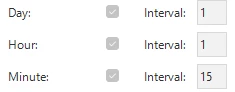
  1. Default:
Default

Result:


This is oke as we see both the hours and quarters.


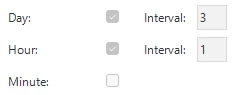
  1. Zoomed In
Zoomed In

Result:


For this we miss the upper level hours, which is needed as there are multiple hours included in the timescale.


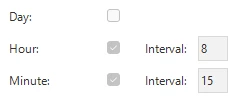
  1. Zoomed Out
Zoomed Out

Result:


For this we miss the upper level days are multiple days are included in the timescale.


Is there a way to adjust view 2 and 3 to get the upper level timescale ?

Best answer by C. Lousberg

just checked Universal GUI 2025.3.13 rc1.0 and can confirm that it's working in there.
Thanks.

4 replies

Leroy Witteveen
Moderator
Forum|alt.badge.img+3

Hi ​@C. Lousberg,

Which version of Universal are you on? You can see this by clicking on the profile menu in the top right and then clicking “About”.

If you are on an older Universal version than 2025.3.12, could you try this out on that version please and let us know how that behaves?

Thanks in advance!

Kind regards,
Leroy Witteveen


C. Lousberg
Captain
Forum|alt.badge.img+5
  • Author
  • Captain
  • December 10, 2025

hi ​@Leroy Witteveen 

GUI:  2025.3.11.0.0
Platform:  2025.2
Indicium: 2025.3.11.1


Remco
Moderator
Forum|alt.badge.img+3
  • Moderator
  • December 22, 2025

Hi ​@C. Lousberg

Did you try Leroy his suggestion to use the latest version of the Universal GUI to see if the behaviour changes?


Kind regards,

Remco Radix


C. Lousberg
Captain
Forum|alt.badge.img+5
  • Author
  • Captain
  • Answer
  • December 22, 2025

just checked Universal GUI 2025.3.13 rc1.0 and can confirm that it's working in there.
Thanks.