



Solved

changing report file in IAM

  • January 5, 2026
  • 5 replies
  • 46 views

Forum|alt.badge.img+6

I noticed that the Crystal Reports rpt files are shown in the IAM under Applications > General settings > Report:
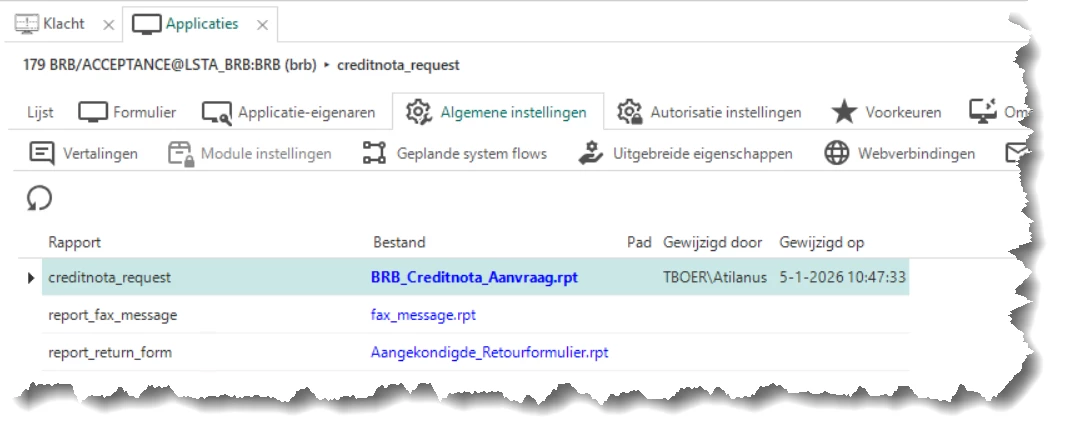
 

I can replace the rpt file with a newer version here I suppose?
But when I tried I still got the old report that was defined in the SF.

How is this supposed to work? Is it supposed to work in the Windows GUI or maybe only Universal GUI?

Currently we usually update the report in the SF and redeploy every time the customer sends us a new version. Would be great if he could do that himself in the IAM ;)

Best answer by Mark Jongeling

Hi Alban,

The sf_report table contains all reports as synchronized from the Software Factory into IAM. The iam_report holds only the overrides that are done on a report.

With this, you can indeed upload a different version of the report for a specific Application. This could be helpful if your report shows Tenant specific images, has different content attributes or something else.

However, the Report definition has to be the same. It cannot contain more or less Report parameters, nor can it be of a different type, e.g., a CR report may only be replaced by another CR report. 

More info on it here: Applications | Thinkwise Documentation

Hope this helps!

5 replies

Forum|alt.badge.img+6
  • Author
  • Hero
  • January 5, 2026

It seems that there is a difference between SF reports and IAM reports?
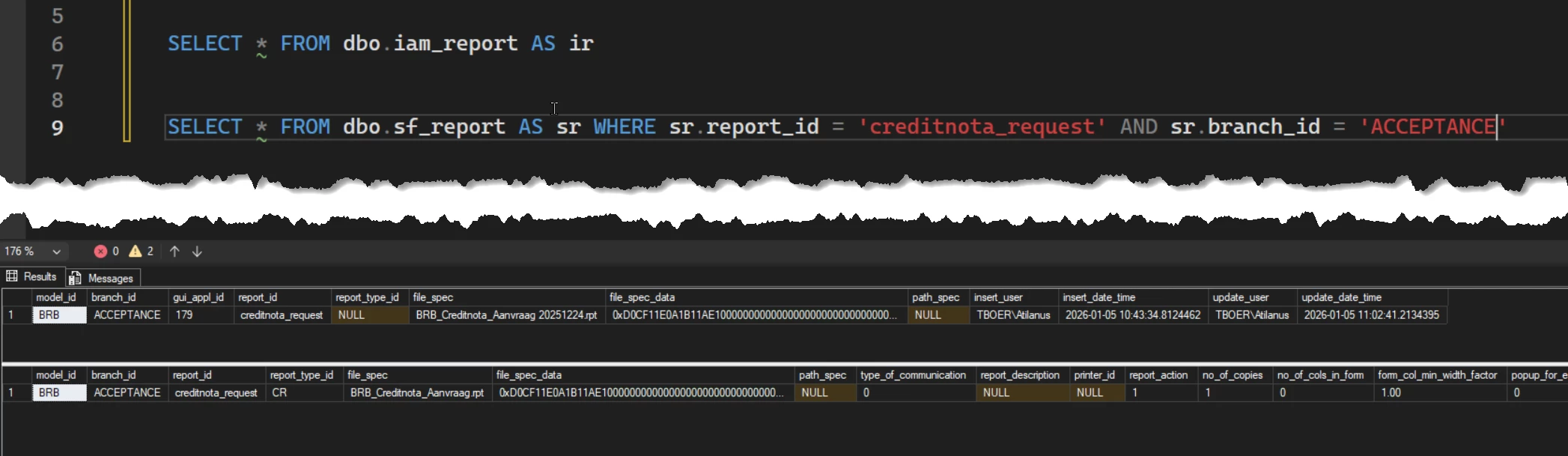
I see in the IAM db a dbo.iam_report which only contains my new report and a dbo.sf_report which contains all other reports:


That makes me wonder even more how this works :p 


Mark Jongeling
Administrator
Forum|alt.badge.img+23
  • Administrator
  • Answer
  • January 5, 2026

Hi Alban,

The sf_report table contains all reports as synchronized from the Software Factory into IAM. The iam_report holds only the overrides that are done on a report.

With this, you can indeed upload a different version of the report for a specific Application. This could be helpful if your report shows Tenant specific images, has different content attributes or something else.

However, the Report definition has to be the same. It cannot contain more or less Report parameters, nor can it be of a different type, e.g., a CR report may only be replaced by another CR report. 

More info on it here: Applications | Thinkwise Documentation

Hope this helps!


Forum|alt.badge.img+6
  • Author
  • Hero
  • January 6, 2026

Hi Alban,

The sf_report table contains all reports as synchronized from the Software Factory into IAM. The iam_report holds only the overrides that are done on a report.

With this, you can indeed upload a different version of the report for a specific Application. This could be helpful if your report shows Tenant specific images, has different content attributes or something else.

However, the Report definition has to be the same. It cannot contain more or less Report parameters, nor can it be of a different type, e.g., a CR report may only be replaced by another CR report. 

More info on it here: Applications | Thinkwise Documentation

Hope this helps!

I feel my report ticks all the boxes but I keep getting the old sf version.
I did notice in my screenshot that report_type_id is null for the IAM_report while it is set to CR for SF-report.
The report has the same parameters and uses the same SP to collect its data.
When I remove the cache folder and restart the application I see that the rpt files are placed thare but that is the SF version and not the IAM version.


Mark Jongeling
Administrator
Forum|alt.badge.img+23

Hi Alban,

I think you might be using the Windows GUI as I see it listed in the tags of this post. This functionality is not available in Windows GUI as far as I'm aware of. Any report generated by Windows GUI itself will still use the SF version of the report. 

However, you can use the Generate report process action in a System flow to generate the new report. Then simply write the file to a storage location or place it in a varbinary(max) column so you can preview it in the Windows GUI using the Preview screen component.


Forum|alt.badge.img+6
  • Author
  • Hero
  • January 6, 2026

Hi Alban,

I think you might be using the Windows GUI as I see it listed in the tags of this post. This functionality is not available in Windows GUI as far as I'm aware of. Any report generated by Windows GUI itself will still use the SF version of the report. 

However, you can use the Generate report process action in a System flow to generate the new report. Then simply write the file to a storage location or place it in a varbinary(max) column so you can preview it in the Windows GUI using the Preview screen component.

haha, that makes sense.
Guess you missed my: “ Is it supposed to work in the Windows GUI or maybe only Universal GUI?” in the original post.

Thanks, I need to get this customer to Universal GUI anyway.

