Solved

custom css to update login logo

  • December 18, 2025
  • 4 replies
  • 61 views

Forum|alt.badge.img+1

Hallo,


From the document https://docs.thinkwisesoftware.com/docs/sf/themes_universal#logo  there's a sample of css were we can update application login logo using custom.css


just for understanding is there an existing custom.css by default in the system that we can download? and from there we can just modify and upload to IAM?  


or we just create custom.css from scratch following the documentation sample if we need to adjust the css class? 

example if we want to change the logo only below sample is the content of the custom.css?
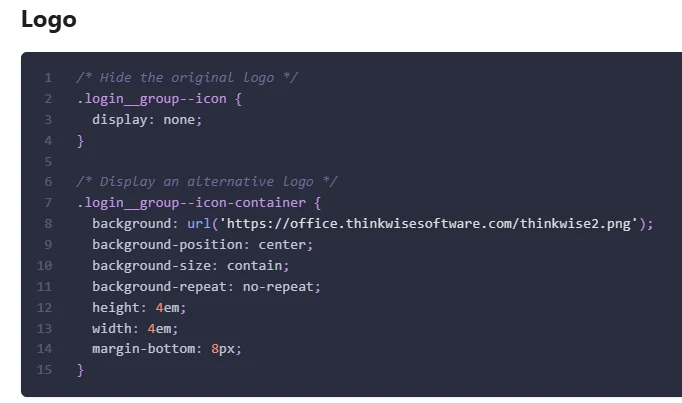
 

Thanks

Best answer by poonam

There is no default custom.css you can download.

custom.css is only used when you provide one yourself, so the intended approach is to create it from scratch and add only the overrides you need. The example in the docs is indeed how it’s meant to be used.

So yes, if you only want to change the login logo, a custom.css containing just that snippet is perfectly fine.

4 replies

poonam
Moderator
Forum|alt.badge.img+2
  • Moderator
  • Answer
  • December 18, 2025

There is no default custom.css you can download.

custom.css is only used when you provide one yourself, so the intended approach is to create it from scratch and add only the overrides you need. The example in the docs is indeed how it’s meant to be used.

So yes, if you only want to change the login logo, a custom.css containing just that snippet is perfectly fine.


Forum|alt.badge.img+1
  • Author
  • Vanguard
  • December 18, 2025

Hi Poonam,


Noted. But is it always a need to restart the system application pool when uploading css? or is there a way to avoid restarting? Because I just upload css but it doesn't reflect.


Thanks


poonam
Moderator
Forum|alt.badge.img+2
  • Moderator
  • December 18, 2025

hi ​@Jheng,

yes a system application pool restart is required; there is currently no hot-reload for custom.css.


Arie V
Community Manager
Forum|alt.badge.img+12
  • Community Manager
  • December 19, 2025

@Jheng Small correction on ​@poonam’s remark: the latest Indicium version 2025.3.13 now ensures changes like this are reloaded within 1 minute after deploying. Note that the browser might have cached it though, so make sure to test with a clean cache/private window.