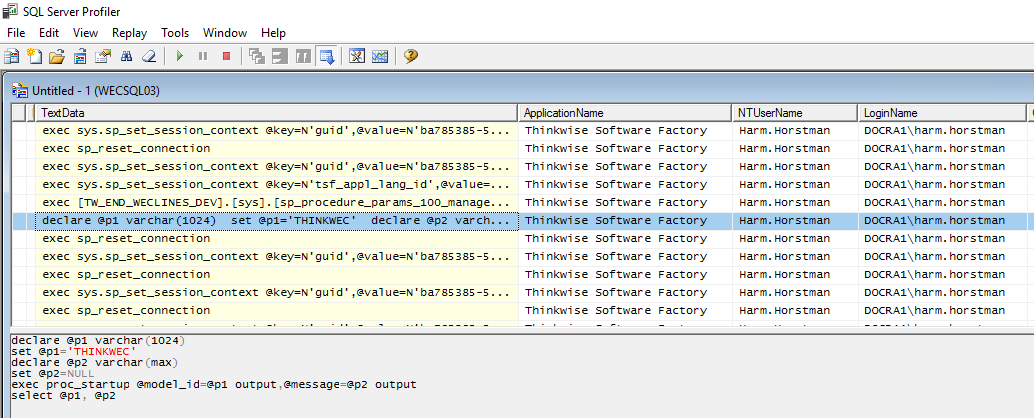
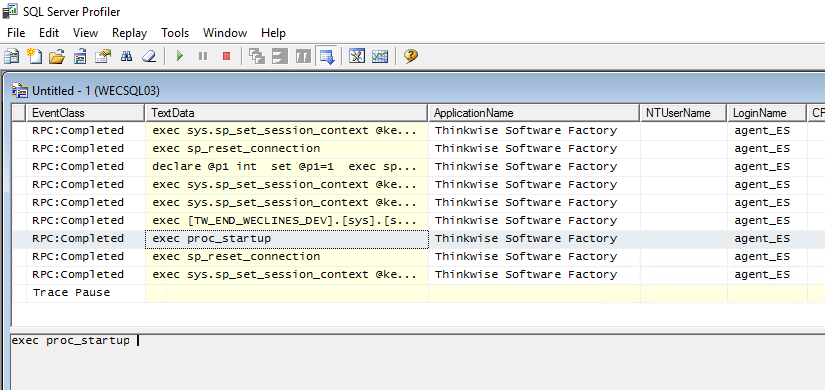
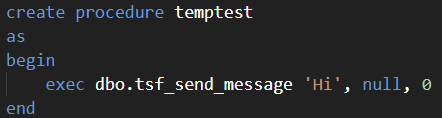
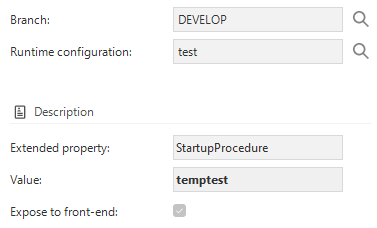
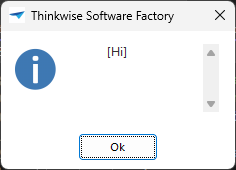
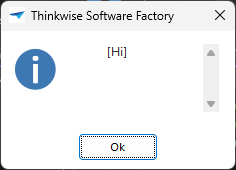
It looks like that the StartupProcedure no longer works?
Has something changed?
Last test shows that it only works for the Windows GUI and users with Windows Authentication.
I thought it should work for all GUI's and any type of user authentication, correct?
Windows GUI + Windows Authentication
Windows GUI + SQL Authentication
Best answer by Mark Jongeling
You're right about that Harm. Currently that indeed has to be configured in IAM itself. However, using Post synchronization code, you are able to set Start objects after synchronizing the model to IAM (or include it in the Deployment package). Using an insert query on table usr_grp_pref_start_object, you technically could add start objects to all tenants and user groups that have access to a particular IAM application. We also use this for the Software Factory. Example:
1-- Add start object for all sf developers
2insert into usr_grp_pref_start_object
3(
4 tenant_id,
5 usr_grp_id,
6 model_id,
7 branch_id,
8 gui_appl_id,
9 start_object_id,
10 start_object_type,
11 task_id,
12 order_no,
13 abs_order_no,
14 insert_user,
15 insert_date_time,
16 update_user,
17 update_date_time
18)
19select
201, -- Default tenant
21'sf_developers',
22 g.model_id,
23 g.branch_id,
24 g.gui_appl_id,
25'check_sf_upgrade_msg',
261,
27'check_sf_upgrade_msg',
281,
291,
30system_user,
31 sysdatetime(),
32system_user,
33 sysdatetime()
34from gui_appl g
35where g.model_id =@model_id
36and g.branch_id =@branch_id
37andnotexists
38 (select1
39from usr_grp_pref_start_object p
40where p.tenant_id =1-- Default tenant
41and p.usr_grp_id ='sf_developers'
42and p.model_id = g.model_id
43and p.branch_id = g.branch_id
44and p.gui_appl_id = g.gui_appl_id
45and p.start_object_id ='check_sf_upgrade_msg')
You could argue that it would be more convenient for developers to be able to set Start objects inside the Software Factory in a way, and/or configure a StartupProcedure or ShutdownProcedure.
Feel free to create an Idea for this. I do feel that we could improve upon the StartupProcedure and implement a native way of allowing a Task/Procedure to run on startup (and on shutdown even)
18EXEC dbo.tsf_send_message 'This is just a test', NULL, 0
19
20end
21go
22
23grantexecuteon "proc_startup" to public
24go
and
1createoralterprocedure "proc_startup"
2
3as
4begin
5
6-- Do not count affected rows for performance
7SET NOCOUNT ON;
8
9--control_proc_id: proc_startup
10--template_id: proc_startup
11--prog_object_item_id: proc_startup
12--template_description:
13
14EXEC dbo.tsf_send_message 'This is just a test', NULL, 0
15
16end
17go
18
19grantexecuteon "proc_startup" to public
20go
I still see different behavior for the Windows- and Universal GUI and Windows- and RDBMS authentication.
Windows GUI (2023.2.11) + Windows Authentication: No problems
Windows GUI (2023.2.11) + RDBMS Authentication: Stored procedure 'proc_startup' generated an error while deriving the parameters.
Information: Parameter 0 - model_id (model_id): An SqlParameter with ParameterName '@model_id' is not contained by this SqlParameterCollection. Parameter 1 - message (message): An SqlParameter with ParameterName '@message' is not contained by this SqlParameterCollection.
Universal GUI Nothing happens at all
Does the startup procedure need the parameters model_id and message?
Can you confirm that the startup procedure also works for the Universal GUI?
I'm not sure the StartupProcedure can have parameters, I didn't check that. But I also wouldn't know how values could be given to these parameters. Not sure why the login authentication type would cause different behavior. According to your description, we can classify this as a bug. Could you create a ticket in TCP? Linking this topic would most likely give enough information for a reproduction.
The extended property StartupProcedure is not available to the Universal GUI.
Ok it is clear to me that using the StartupProcedure is not a good approach anymore, because it won't work for users that are using Universal or make use of the platform via Indicium.
According your response to the Question below, using a StartObject and start a task is a better approach.
You're right about that Harm. Currently that indeed has to be configured in IAM itself. However, using Post synchronization code, you are able to set Start objects after synchronizing the model to IAM (or include it in the Deployment package). Using an insert query on table usr_grp_pref_start_object, you technically could add start objects to all tenants and user groups that have access to a particular IAM application. We also use this for the Software Factory. Example:
1-- Add start object for all sf developers
2insert into usr_grp_pref_start_object
3(
4 tenant_id,
5 usr_grp_id,
6 model_id,
7 branch_id,
8 gui_appl_id,
9 start_object_id,
10 start_object_type,
11 task_id,
12 order_no,
13 abs_order_no,
14 insert_user,
15 insert_date_time,
16 update_user,
17 update_date_time
18)
19select
201, -- Default tenant
21'sf_developers',
22 g.model_id,
23 g.branch_id,
24 g.gui_appl_id,
25'check_sf_upgrade_msg',
261,
27'check_sf_upgrade_msg',
281,
291,
30system_user,
31 sysdatetime(),
32system_user,
33 sysdatetime()
34from gui_appl g
35where g.model_id =@model_id
36and g.branch_id =@branch_id
37andnotexists
38 (select1
39from usr_grp_pref_start_object p
40where p.tenant_id =1-- Default tenant
41and p.usr_grp_id ='sf_developers'
42and p.model_id = g.model_id
43and p.branch_id = g.branch_id
44and p.gui_appl_id = g.gui_appl_id
45and p.start_object_id ='check_sf_upgrade_msg')
You could argue that it would be more convenient for developers to be able to set Start objects inside the Software Factory in a way, and/or configure a StartupProcedure or ShutdownProcedure.
Feel free to create an Idea for this. I do feel that we could improve upon the StartupProcedure and implement a native way of allowing a Task/Procedure to run on startup (and on shutdown even)
We use 3 different kinds of cookies. You can choose which cookies you want to accept. We need basic cookies to make this site work, therefore these are the minimum you can select. Learn more about our cookies.