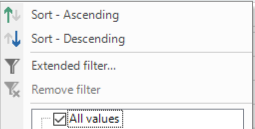
What settings steer the functionality of filtering in the grid?
I have 4 similar lookup fields, ID with lookup to base table.. and as far as I can see 2 have a filter option like below and 2 don't.. what setting causes this difference? I want all fields to have a similar filter option.
Best answer by Dick van den Brink
Hi Freddy,
There are some occasions when the Excel style filter is not visible - When it is a blob type - When the control type is Multiline/RTF/HTML/SQLEditor/Password/Signature - When Visible for filter is set to Never (column setting) - When the Field width (px) of the column is <= 0 (column setting) Could one of the above be the case?
There are some occasions when the Excel style filter is not visible - When it is a blob type - When the control type is Multiline/RTF/HTML/SQLEditor/Password/Signature - When Visible for filter is set to Never (column setting) - When the Field width (px) of the column is <= 0 (column setting) Could one of the above be the case?
There are some occasions when the Excel style filter is not visible - When it is a blob type - When the control type is Multiline/RTF/HTML/SQLEditor/Password/Signature - When Visible for filter is set to Never (column setting) - When the Field width (px) of the column is <= 0 (column setting) Could one of the above be the case?
Hi @Dick van den Brink
Found it. The lookup from the ones that didn't work had a multi-line control type.