Solved

Task to control a process flow

  • January 18, 2019
  • 4 replies
  • 241 views

Forum|alt.badge.img+14
Sometimes I use a task (button) to start a process flow. The task in itself actually does nothing, it only calls the process flow. For these kind of tasks I use the tasktype ‘Stored procedure’ and leave the template empty. I noticed that there are other tasktypes available that are not described (like ITP Interface). Could one of these tasktypes be a better option here?

Best answer by Jasper

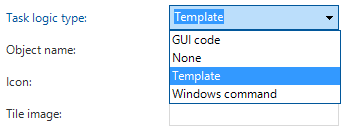
In version 2018.2 we added the task type None specifically for this purpose.
This topic has been closed for replies.

4 replies

Diederik van Duuren
Apprentice
The tasktype 'Stored Procedure' appears to be a fine option for this construction. It's not necessary to link a template to the task.
The ITP Interface is not supported anymore. This used to be a link to the ITP document generation system.

Jasper
Superhero
  • Answer
  • January 30, 2019
In version 2018.2 we added the task type None specifically for this purpose.

Robert Jan de Nie
Thinkwise blogger
Forum|alt.badge.img+6
Is 'none' the right name for this? I mean, the only purpouse is (I guess) starting a process flow. Why not call it what it is, something like 'Manual process flow execution'?

Edit: Thinking about this, 'none' could also be used to retrieve additional information, where the fields can be filled from the default procedure. This saves space, by not needing a tab or even a complete form on a list of (read-only) information.

Anne Buit
Community Manager
Forum|alt.badge.img+5
  • Community Manager
  • February 1, 2019
When you compare it to 2018.2, 'None' might seem a bit weird. However, all types have been renamed in 2018.3 to better reflect the type of logic that is used in this task.


This is why it's called 'None'.