


Since release 2026.1.11, we have introduced a new format for our release notes. You can now find all updates of the Thinkwise Platform, Indicium, and the Universal UI in one release blog. This supports our full-stack approach and provides a better overview of the changes in each release.
Hello everyone,
This release brings several noteworthy improvements to the Universal UI and the Software Factory. You can now update all data in a grid using the renewed Update wizard, making bulk data updates faster and more intuitive. We have also added a None action type for reports, allowing you to use a report button as the starting point for a process flow. For developers, refreshing the model no longer triggers pop-ups related to unsaved changes or edit mode in Developer mode, streamlining the development process.
For users who work across sessions, the Universal UI now automatically restores open documents after a model refresh, so you can pick up where you left off. The Universal UI now automatically detects connection loss and switches between online and offline mode, improving the experience for users with unstable internet connections. In addition, filtering improvements from 2026.1 are now available for older platform versions so that more users can benefit from the extended filtering capabilities.
This release includes breaking changes, such as a rolled back DB2 .NET Core driver version and an updated syntax for refreshModel=true in the URL. Check the breaking changes and the data model changes to ensure a smooth upgrade.
This is a short-term support (STS) release of the Thinkwise Platform. STS release support expires as soon as a new release is made available. For example, support for version 2026.1.12 ends when version 2026.1.13 is released.
See our Lifecycle policy for information about supported versions.
Contents
Before you upgrade
- Features for the Software Factory and the Intelligent Application Manager are only compatible with this STS version of the Thinkwise Platform.
- Indicium and Universal UI features are backward compatible with previous Thinkwise Platform versions, unless otherwise noted.
Demo and download
Breaking
Rolled back the DB2 .NET Core driver version
breaking Indicium DB2
Due to an IBM bug in the DB2 .NET Core driver, we rolled back from version 9.0.0.400 to version 8.0.0.511. If you are using Indicium with a DB2 .NET Core driver, you must use this version.
To ensure everything continues to work as expected:
- Download DB2 .NET Core driver version 8.0.0.511. You can only use this driver if you have a valid license.
- Update the
clidriverfolder in Indicium with the new files.
For more information, see Use DB2 .NET Core drivers.
Updated syntax for 'refreshModel=true'
breaking Universal UI
In a previous release, we noted that you can use refreshModel=true in the URL to automatically refresh the model when the Universal UI is loaded. We have updated its syntax to use a path segment (/) instead of a query parameter (?). This makes the parameter consistent with other routing parameters in the Universal UI.
Before, the URL would look like this: https://myuniversalui.com/universal/#application=myAppl?refreshModel=true. Now, the URL should be: https://myuniversalui.com/universal/#application=myAppl/refreshModel=true.
To ensure everything continues to work as expected:
- Update any URLs in your model that use
refreshModel=trueto the new syntax to ensure they continue to work as expected. refreshModel=trueis only recognized as the final path segment in the URL; placing it mid-URL has no effect.
Filtering is available for older platform versions
new Universal UI
breaking
In previous releases, we extended the filter capabilities for the Universal UI, but these were only available for Thinkwise Platform 2026.1 and higher.
We have now made the following filtering capabilities available for all supported older platform versions:
Check the lifecycle policy for more information about supported versions.
The following limitations apply:
-
For saving filters as a prefilter, Date(time) columns with an Interval type other than Date and time are not saved as a prefilter. For example, filters with a Year, Quarter, or Month interval type are not saved.
-
For saving filters as a custom cube view, only In and Equal to operators are supported. The following filter settings are not saved:
- Column filters that do not match a predefined or model cube field. Column name and (group) interval type are used for matching.
- Reference filter conditions.
- Advanced filters, other than All of the following filter group.
- Column filters with an IN operator filtering empty values.
Filters will remain active if the user saves them, but are not restored when the subject is refreshed.
As part of this update, we have included default translations for interval filtering in English and Dutch for older platform versions. From Thinkwise Platform 2026.1 onwards, these translations are added to your model. This allows you to add translations for additional languages if needed.
Breaking: When a subject contains a cube definition, the filters from the first active cube view will be applied to the subject’s data, regardless of which components are available in the screen type.
New and changed
Processes - Report action type 'None' added
new Software Factory Indicium
We have added support to set a Report action to None. If a report action is set to None, no report will be generated. This works similarly to setting a Task logic type to None for a task. This option allows you to use a report button as a starting point for a process flow. This is especially relevant when replacing the deprecated TSFReportMailer with the Thinkstore Reporting Service.
Updated NuGet package for Oracle
change Indicium Oracle
We have updated the Oracle.ManagedDataAccess.Core NuGet package from version 3.21.130 to version 23.26.200. This update does not include breaking changes.
Update all data in a grid
new Universal UI
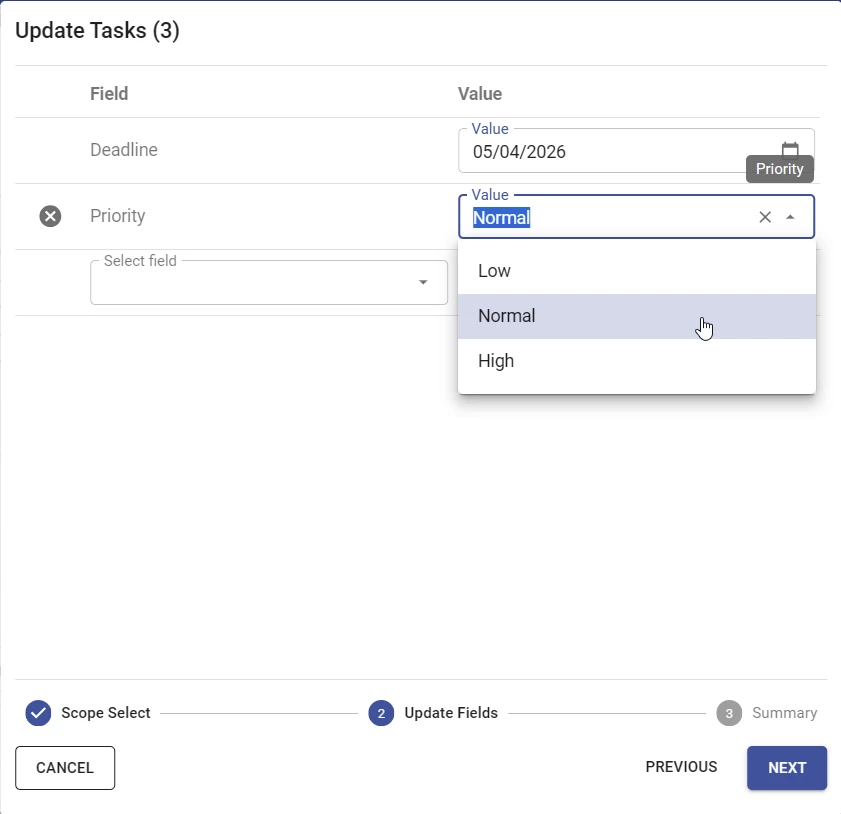
You can now update the entire dataset in a grid using Update from the overflow menu. Previously, updating data was limited to the current page.
As part of this update, we have redesigned the Update wizard to align with the Import and Export wizards. To update all data, select whether to update Selected rows or All rows. In the next step, select the fields using the dropdown and specify the new value for each field. Finally, review your changes in the summary step and select Update to apply the changes.
Editable 'Barcode scanner' control in a grid
new Universal UI
You can now also edit fields in a grid with a Barcode scanner control. The barcode and virtual keyboard icons have also been vertically centered for better readability.
Keyboard navigation for 'Card list'
new Universal UI
We have improved keyboard navigation in the Card list screen component to make it easier to navigate between cards using the keyboard.
- You can now use
↑and↓to move to the previous or next card in the list. - You can now use
Shift+Tabto navigate to the previous card. - If you press
Tabon a card's overflow menu, the focus now moves directly to the next card instead of automatically focusing the next card's overflow menu. - When you open a card's overflow menu, the focus is now automatically set to the first menu item. Pressing
EnterorSpaceon a menu item will activate that item and close the overflow menu. - When you return to a Card list via keyboard navigation, the focus is now automatically restored to the previously active card.
Open documents restored after refresh
new Universal UI
If a model refresh is triggered, the Universal UI now automatically restores previously open documents and refocuses the active document after the page reloads. Up to ten of the most recently used open documents are restored, and only those associated with the current application are included. Start objects are not reopened if the model is refreshed.
The Client-Instance-Id session variable persists across the model refresh, allowing Indicium to correlate requests from the same browser tab before and after the page reload.
If the browser is manually refreshed (F5 / Cmd + R), open documents are not restored, and a new session is started.
Updated 'Refresh model' behavior for Developer mode
change Universal UI
In Developer mode, refreshing the model no longer triggers pop-ups related to unsaved changes or edit mode.
Refresh model now cleans up any staged resources and reloads the model without any confirmation dialog. This streamlines the development process by allowing you to quickly refresh the model without interruptions.
Reorder menu items in 'Favorites'
new Universal UI 2026.2+
You can now reorder menu items in the Favorites menu group by dragging them to the desired position.
Improved experience for offline mode
change Universal UI
Previously, it was possible to use offline menu tasks in the Universal UI. This allowed users to use tasks from the menu when an internet connection was lost or unavailable. Users had to manually select Go offline or Go online to switch between these modes.
Offline mode is now automatically enabled when the Universal UI detects no internet connection. If the connection is restored, the Universal UI automatically switches back to online mode and synchronizes any changes made while offline. If any errors occur, they are listed in the profile menu > Offline status.
Offline tasks have several restrictions, these limitations apply to both online and offline mode.
Improved advanced filtering
change Universal UI
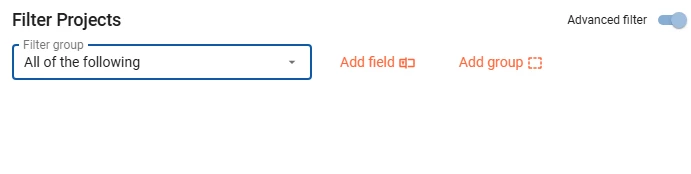
We have made several improvements to the advanced Filter pop-up that improves overall usability.
- When you open the advanced filter, the focus is set to Add field and the default Value is set to All of the following.
- When you add a Group condition, the focus shifts to the Add field in the newly created group.
- When you delete a Group, the focus shifts to the Add field button of the parent.
- If all fields in a group are deleted, the focus shifts to the Add field button of the parent.
- When an operator is selected for a field, the focus shifts to the field Value.
Improved login behavior
change Universal UI
In the Indicium 2026.1.10 release, we set AlwaysDeferLogin to true by default, forcing the Universal UI to defer to Indicium for login. This has been done to improve security and offer additional login options, such as multi-factor authentication with OAuth.
In some situations, the Universal UI would still show the Universal login form with username and password fields, instead of the Indicium login form. This could also occur after a login error. We have improved this behavior. The Universal UI now consistently shows the Indicium login form when AlwaysDeferLogin is set to true in appsettings.json. If AlwaysDeferLogin is set to false, then the Universal login form is shown instead.
In addition, changing the Indicium URL now gives the user a quicker response when an incorrectly typed URL is entered.
Hide any grid column in user preferences
change Universal UI
Previously, users with the Column visibility user preference could only hide grid columns that were set to Read only (Subject > Grid settings) in the Universal UI. Users can now hide any column, regardless of the underlying column settings. This behavior now matches the Windows GUI.
- This setting is available by default if you upgrade to the Thinkwise Platform 2026.1.14.
- For older versions, install the hotfix
20260423 - Hide any grid column via UP.sql
Improved contrast for buttons in advanced filter
change Universal UI
Certain color combinations in a theme could cause buttons in the advanced filter to have insufficient contrast. The Universal UI now checks the contrast of these buttons and automatically adjusts their color if the contrast is too low. This ensures readability and accessibility of the buttons in the advanced filter across all themes.

Fixed
Software Factory and Intelligent Application Manager
- The validation 'Conditional layout has no values' checks to see if conditional layouts changed the background color or font color, but did not check for other settings. The validation now also checks the value for bold, italic, underline, strikethrough, and font size.
- Due to oversight, dots were stripped from the extended property ID. This resulted in developers being unable to add extended properties that add session variables. This has been fixed.
- When creating a Deployment package, the Meta version listed in the generated Manifest would incorrectly be appended with a dot. This would result in an error when the application is deployed using the Thinkwise Deployment Center. This has been fixed.
- The
tsf_optimizeprocedure did not place brackets around all object names mentioned in its code. This could lead to an error upon execution. This has been fixed in thetsf_optimizeprocedure. - When upgrading the SF to a new version, the application layer of the SF in IAM would have its sequence number increased by 10. This could cause the SF to no longer be the first application when you start up, and instead open another application that has a lower sequence number. This has been fixed; the SF will keep the same sequence number upon upgrading.
Indicium
- Optimized the Redis health check to improve the performance and stability of the
/healthendpoint. - Indicium now no longer allows saving a record while an upload is in progress. This prevents possible issues with concurrent uploads and saves.
- Fixed an issue where clearing the cache could cause Indicium to crash in environments with overlapped IIS recycling or multiple running instances of Indicium in Azure. On Azure, Indicium now uses an instance-specific temporary folder for caching instead of a shared cache folder.
- In some cases, if a column in a subject was used in a context procedure and the user had no rights to that column, users could not execute tasks on multiple selected rows. This has been fixed.
- If an application model contained Execute user subflow process actions that formed a loop, for example, A calling A, or A calling B which then calls A, Indicium would crash when loading the application model. This has been fixed.
- The creation of
file_idandE-Tagvalues for the file download and preview APIs of database storage configurations has been improved. The method to create the file hashes has been made consistent across all database platforms, meaning thatfile_idandE-Tagvalues are the same for identical files on SQL Server, PostgreSQL, DB2, and Oracle. Furthermore, the performance has been greatly improved for DB2 and slightly improved for SQL Server and PostgreSQL (Oracle is unchanged). This change means that thefile_idvalues will change, so if you have hardcoded download or preview URLs with afile_id=xyzparameter, then these URLs need to be updated. For the Universal UI, there is no notable impact aside from the existing browser cache being invalidated and cached files needing to be redownloaded once.
Universal UI
Improvements for default editable grids:
- Auto refresh now works in default edit mode.
- You can now select multiple consecutive rows using the keyboard shortcut
Shift+↑orShift+↓. - In edit mode in a grid, the functionality of the keyboard shortcut
Ctrl+Ahas been improved:- Using this shortcut once will select all the content in the current cell. This allows you to edit the cell content quickly by overwriting it or copying it.
- If the full value in the cell is already selected, using this shortcut again will select all rows in the grid. If you use this shortcut again, the focus is no longer on the cell content but on the grid. Any changes made to the cell are saved before the focus is removed.
- Previously, if the multirow selection was disabled, you could still select multiple rows using
Ctrl+A. This has been fixed.
Fixed for process flows:
- In some cases, if an Open document process action had the input parameter Try use an existing document, the
document_idwas not given as an output parameter. This could especially occur if an open document was reactivated. This has been fixed. - Fixed an issue where process flows would stop after a Close document process action. This could occur if the document was not opened as a modal document or if there was no document behind the closed document.
- Fixed an issue where a process flow with an Open document process action would only continue after switching rows or after refreshing the subject. This could happen if a task was executed on an unrelated detail, where the parent subject was empty or hidden.
Fixed for cubes:
- Fixed an issue where a pie chart would always display values as a percentage, even if Show percentage was disabled (menu User Interface > Cubes > Cube views > Chart settings).
- Editable pivot tables with Show total for rows disabled and Show grand total for rows enabled, would not update the row grand totals and sibling values. This has been fixed.
- If a pivot table with a detail was opened in a pop-up, the detail would initially display the wrong record. This has been fixed.
- Fixed an issue where a chart used as a detail would briefly show incorrect data when you switched focus to another active record in the main subject. This has been fixed.
Other fixes:
- Items in the action bar are no longer duplicated in the overflow menu after resizing the screen. The overflow menu now updates correctly.
- Fixed an issue where the code editor would sometimes show no code after viewing a program object with an error in the Software Factory.
- Fixed an issue where checkboxes would be set to Unknown when adding them to a grid, even if the default settings were set to On or Off.
- Added a tooltip including the keyboard shortcut
Alt+F5to the Refresh button in the action bar. - Fixed an issue where if a user executed a task with a task parameter and a message that displays audio, the audio would not play.
- Improved badge updating behavior for the Open documents and Favorites menu groups.
- In a Scheduler, Auto refresh is now temporarily suppressed if the user is dragging an event onto a time cell. This improves the user experience and prevents the event from being reset to its original time slot during dragging.
- In some cases, when double-clicking a detail tab, the breadcrumbs could display '[object Object]' instead of the actual name of the detail. This has been fixed.
- If a lookup had a domain with elements set as its Display column, filtering in the control would be based on the database values instead of the translations of the domain elements. This has been fixed.
- Tab container, Detail tiles, Task tiles, and Report tiles screen components are now hidden from the user interface if they have no content, instead of showing empty space. Screen components may have no content, for example, if the context changes and there are no values to show, or if the user does not have access to the content. The screen components will reappear when there is content to show.
- Fixed an issue where the Barcode control did not automatically commit changes if the last visible field in a task pop-up had a '[col_id]_type' set to '-2'.
- When editing in an HTML control, the Save button is now enabled. Previously, it would only enable after the focus was moved away from the HTML control.
- If there is only one option available in the Import wizard, it is now automatically selected. For example, for a subject with only Update permissions, Only update existing rows is now automatically selected.
- Previously, changes made to a user-defined prefilter in Own prefilters would result in an error. This has been fixed.
Data model changes
There are no data model changes in this release.