Answer

What could be the reason that process action 'Activate scheduler' returns status code -1?

  • November 9, 2023
  • 13 replies
  • 199 views

Forum|alt.badge.img+14

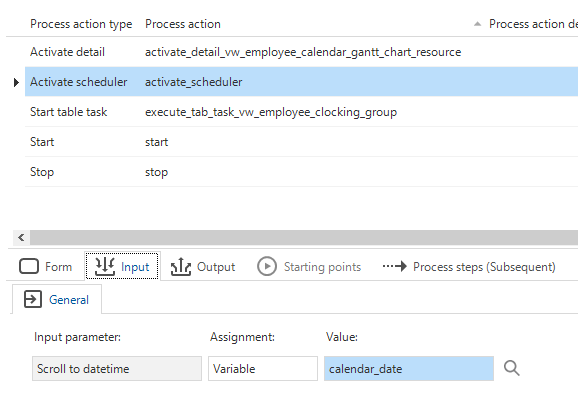
I have a task in a tree-view to jump to a given date in the scheduler (calendar). This is a detail tab of the tree view. The task starts the process flow below. 

Unfortunately the activate scheduler returns status code -1. 

What could be the reason? 

Best answer by Erwin Ekkel

I tried with a date data type, also tried with several language settings, both iam and gui. It all works like supposed to. Perhaps it would be best if you create a ticket for this and add a model extract. Then we can check if we can recreate with your model. 

This topic has been closed for replies.

13 replies

Forum|alt.badge.img+17
  • Moderator
  • November 27, 2023

Which gui are you using?


Forum|alt.badge.img+14
  • Author
  • Captain
  • November 27, 2023

We are using windows GUI 2023.2.11.


Forum|alt.badge.img+14
  • Author
  • Captain
  • December 4, 2023

Should I create a ticket for this? 


Forum|alt.badge.img+17
  • Moderator
  • December 4, 2023

I'm looking into this. I'll get back to you as soon as possible. 


Forum|alt.badge.img+17
  • Moderator
  • December 5, 2023

Seems to work for me, what is the input for the scroll to datetime parameter you are using? 


Jeroen van den Belt
Administrator
Forum|alt.badge.img+10

Hi @Andre te Raa, can you please respond to the question Erwin asked? Thank you!


Forum|alt.badge.img+14
  • Author
  • Captain
  • December 19, 2023

Hi @Andre te Raa, can you please respond to the question Erwin asked? Thank you!

I didn't receive an email, so I didn't know something was asked. 


Forum|alt.badge.img+14
  • Author
  • Captain
  • December 19, 2023

See below.

Could the reason be that the resource of the scheduler is not changing only the calendar date to jump to?

Is there an extender property that needs to be changed? 


Forum|alt.badge.img+17
  • Moderator
  • December 20, 2023

Can you try it with the yyyy-mm-dd date format? 


Forum|alt.badge.img+14
  • Author
  • Captain
  • December 21, 2023

The process variable calendar_date is a DATE data type domain.

The problem seems to be the language setting. When I start the GUI in the Dutch language (nl) it doesn't work, but when I start the GUI in English (eng) it works.   


Forum|alt.badge.img+17
  • Moderator
  • December 21, 2023

Let me test that and I will get back to you on that. If that's the case it might be a bug. 


Forum|alt.badge.img+14
  • Author
  • Captain
  • January 4, 2024

Let me test that and I will get back to you on that. If that's the case it might be a bug. 


And what are your test results?


Forum|alt.badge.img+17
  • Moderator
  • Answer
  • January 4, 2024

I tried with a date data type, also tried with several language settings, both iam and gui. It all works like supposed to. Perhaps it would be best if you create a ticket for this and add a model extract. Then we can check if we can recreate with your model.