Hi,
Indicium on our PROD environment is recycled every night at 00:00:00.
It seems indicium sometimes tries to start up and delete and recreate the temp .rpt files while they are still being held up by the old indicium, this causes the startup of indicium to fail.
We get this error at 00:00:01
“Description: The process was terminated due to an unhandled exception.
Exception Info: System.UnauthorizedAccessException: Access to the path '***.rpt' is denied.
at System.IO.FileSystem.DeleteFile(String fullPath)
at Indicium.Startup.<initializeCacheDirectory>g__TryAndDeleteFile|21_0(String filePath) in C:\azp\agent\_work\1\s\src\Indicium\Startup.cs:line 281”
In this case the old indicium was only registered as being shutdown at 00:00:08
I have checked the rights on the temp files folder, the pool user has full rights.
Does anyone know a way to prevent this from happening?
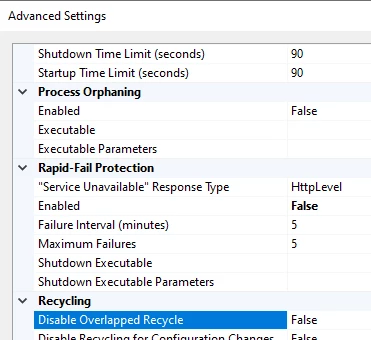
I have found the “Disable overlapping recycle” option in the advanced settings of the app pool, this will probably fix it but I haven’t found anything online regarding Indicium and this option.