

Solved

Slow field interaction when filling a form with Testwise generated controls

  • July 9, 2026
  • 2 replies
  • 39 views

Forum|alt.badge.img

Hi,

I am using Testwise generated controls to create a purchase order. The test works, but filling the form feels quite slow.

Example code:

const expectedDescription = faker.person.firstName();
const purchaseOrderMain = await page.subject.PurchaseOrderMain;

await purchaseOrderMain.form1.descriptionField.fill(expectedDescription);
await purchaseOrderMain.form1.supplierIDLookup.lookupSelect('Demo supplier');
await page.getByTestId('form-field__delivery-date__date__input').fill('01/01/2027');
await purchaseOrderMain.form1.heatNoMandatoryCheckbox.check();
await purchaseOrderMain.toolbar482460FA.getSaveButton().click();
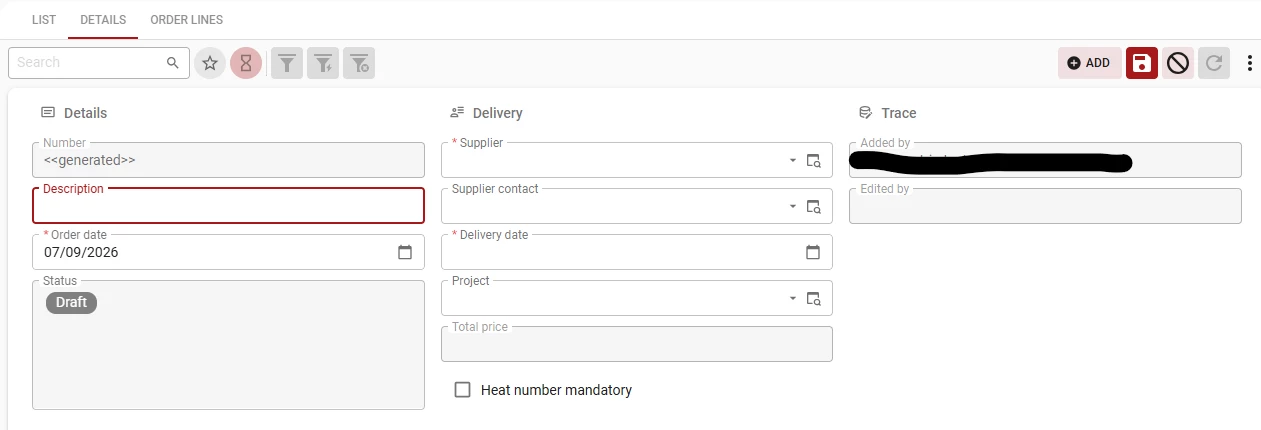
In the latest run, the purchase order was created as Purchase-0019. The form filling and saving part took roughly 35-40 seconds before the next step continued. I also see repeated warnings like:

Timeout reached while waiting for response. Proceeding anyway.

My question is about the slow interaction while filling the purchase order form.

Questions:

  1. Is this delay expected when using generated form controls and lookup controls?
  2. Is supplierIDLookup.lookupSelect('Demo supplier') known to wait for backend responses or metadata updates?
  3. Is there a recommended best practice to make this faster or more stable?

Best answer by Poonam

Hi Erkan,
Thanks for the detailed report.

  1. No, this isn't expected. This has been resolved in 0.2.103, which is now out. Release notes for this will be published soon. Your community post from last week on the same topic is also resolved by this release.
  2. Yes, supplierIDLookup.lookupSelect('Demo supplier') waits for the list of lookup options to come back from the backend which is expected behavior for the lookup control, not a bug in itself.
  3. The 0.2.103 release should fix the slowness you're seeing. Could you update and let us know how it performs for you now?

2 replies

Poonam
Moderator
Forum|alt.badge.img+2
  • Moderator
  • Answer
  • July 13, 2026

Hi Erkan,
Thanks for the detailed report.

  1. No, this isn't expected. This has been resolved in 0.2.103, which is now out. Release notes for this will be published soon. Your community post from last week on the same topic is also resolved by this release.
  2. Yes, supplierIDLookup.lookupSelect('Demo supplier') waits for the list of lookup options to come back from the backend which is expected behavior for the lookup control, not a bug in itself.
  3. The 0.2.103 release should fix the slowness you're seeing. Could you update and let us know how it performs for you now?

Forum|alt.badge.img
  • Author
  • Rookie
  • July 13, 2026

Thank you for the updates!

1. Slow form interaction: After updating to the latest version, the performance issue while filling forms has been resolved. Everything is working smoothly now.

2. Task buttons in the Action Bar: The new getTaskButtonById() methods work great and solve the issue I had accessing Action Bar tasks. 

One small suggestion: for task buttons with a fixed ID, it could be useful if Testwise also generated strongly typed properties. For example:

await <subject>.toolbar.supplierItemAddButton.click();

alongside:

await userNestingSupplierItemDetail.actionBar1.getTaskButtonById('supplier-item-add').click()

This would improve discoverability and IntelliSense while keeping getTaskButtonById() available for dynamic scenarios.