



Solved

Screen type layout

  • May 3, 2022
  • 2 replies
  • 76 views

Forum|alt.badge.img+4

Hi all,

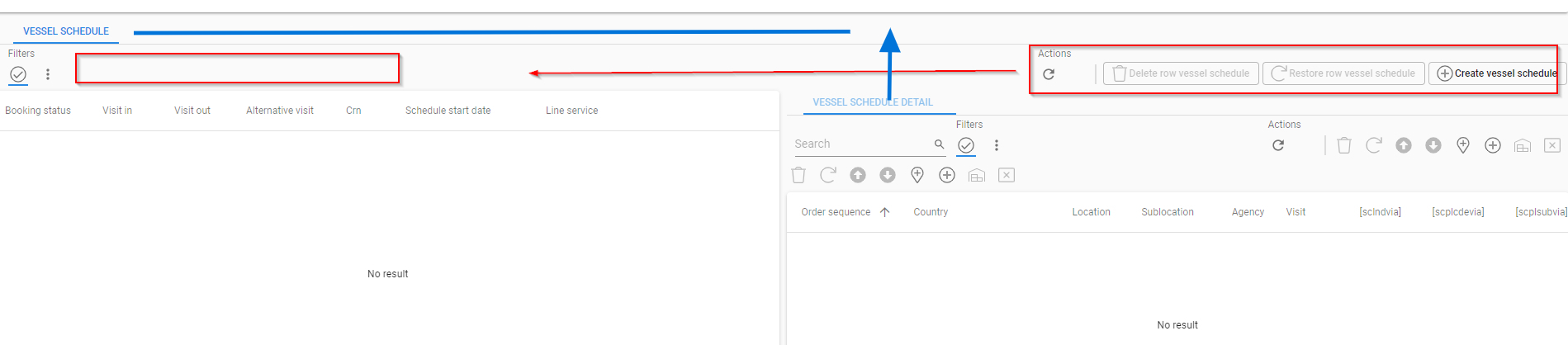
In the image below you can see that I have a section Vessel Schedule Detail (right) which is a detail component of the section Vessel Schedule (left). But in the whole context we can also see that Vessel Schedule Detail is a level lower compared to Vessel Schedule. How can I move the Vessel Schedule Detail to the same level as Vessel Schedule. I think this will also move the tasks of Vessel Schedule to the left, which are on the right now (red).

Thanks.
 

Best answer by Freddy

Don’t think this will work because of the action bar which doesn’t follow the screen definition. It will always span the whole page for the prime subject. 
 

I created an idea for a fix:


This topic has been closed for replies.

2 replies

Mark Jongeling
Administrator
Forum|alt.badge.img+23

Hi,

Could you show the screen type configuration in your model for this screen? 


Freddy
Forum|alt.badge.img+16
  • Thinkwise Local Partner Brasil
  • Answer
  • May 19, 2022

Don’t think this will work because of the action bar which doesn’t follow the screen definition. It will always span the whole page for the prime subject. 
 

I created an idea for a fix:



