


Answer

Only show color in grid without code

  • July 3, 2024
  • 2 replies
  • 56 views

Forum|alt.badge.img+5

Is it possible to show only the color, instead of color + code in grid in universal?

Compare with windows GUI
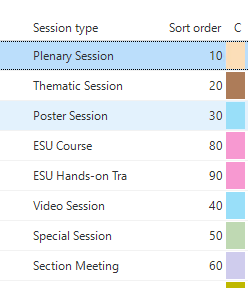
So we can hide this irrelevant info on other places


 

Best answer by Anne Buit

You can set up a bit of custom CSS to achieve this:

/* Hide the text in grid color inputs */

.tsf-grid-cell span:has(input[type="color"]) {
font-size: 0px;
}


This topic has been closed for replies.

2 replies

Mark Jongeling
Administrator
Forum|alt.badge.img+23

Hi,

I'm afraid that is currently not possible. I do think you can mimic the behavior by introducing a Conditional layout that set the backround and font color to the same value, but understandably that is a bit of a workaround. Feel free to create an idea for this.

Do not that Universal has a Light and Dark mode. Not all colors would be suitable in a Grid to be used in the way as in the Windows GUI. For instance you could use the Dark grey or Black color in a Grid to indicate an inactive situation, but that color in Dark mode in Universal would vanish.


Anne Buit
Community Manager
Forum|alt.badge.img+5
  • Community Manager
  • Answer
  • July 3, 2024

You can set up a bit of custom CSS to achieve this:

/* Hide the text in grid color inputs */

.tsf-grid-cell span:has(input[type="color"]) {
font-size: 0px;
}