


Solved

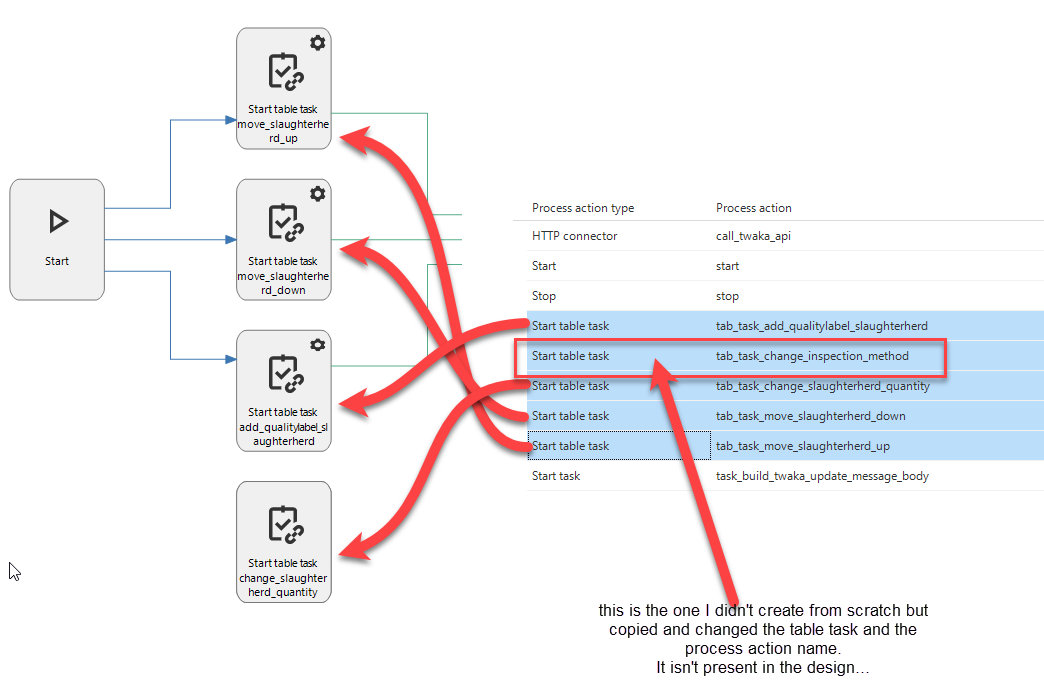
copying an existing process action doesn't show it in the design tab

  • June 29, 2023
  • 3 replies
  • 37 views

Forum|alt.badge.img+6

I noticed that when I copy one of my existing start table task process actions the new one isn't added to the design tab:



Best answer by Mark Jongeling

Hi Alban,

It most likely does, but when using the Copy process action task, the X and Y coordinates are also copied. This may cause the process action to be behind the copied action. You can try moving the copied action to see if it's indeed behind it.

This topic has been closed for replies.

3 replies

Mark Jongeling
Administrator
Forum|alt.badge.img+23
  • Administrator
  • Answer
  • June 29, 2023

Hi Alban,

It most likely does, but when using the Copy process action task, the X and Y coordinates are also copied. This may cause the process action to be behind the copied action. You can try moving the copied action to see if it's indeed behind it.


Jeroen van den Belt
Administrator
Forum|alt.badge.img+10

I also suspect that is the case. If so, feel free to submit an idea which focuses on changing the coordinates a bit so you are able to see see both the original as the copied actions.


Forum|alt.badge.img+6
  • Author
  • Hero
  • June 29, 2023

Hi Alban,

It most likely does, but when using the Copy process action task, the X and Y coordinates are also copied. This may cause the process action to be behind the copied action. You can try moving the copied action to see if it's indeed behind it.

Hahaha, yes that’s the case…..
I'll submit an idea as this is very confusing behaviour if you aren't aware of it ;)
Thanks guys!


