For one of our clients, we want to enable the ability to swap certain rows in a grid using drag-and-drop functionality. For the business logic, it is crucial to know both the ID of the selected row and the ID of the row where the selected object is dropped.
The drag-and-drop action would occur within the same grid/table.
Is this achievable using the standard drag-and-drop functionality?
Best answer by Mark Jongeling
Hey Sergio,
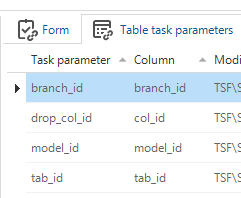
The XML will contain the drop_col_id due to the Table task parameter mapping I believe:
Table task parameter mapping
The GUI will ensure the values are placed in the XML for you to use in logic.
-- Select context and target key from the XML select top 1 @model_id = r.row.value('model_id[1]', 'varchar(100)'), @branch_id = r.row.value('branch_id[1]', 'varchar(100)'), @tab_id = r.row.value('tab_id[1]', 'varchar(128)'), @drop_col_id = r.row.value('drop_col_id[1]', 'varchar(128)') from @input_set.nodes('rows/row') r (row)
The drag record can potentially be multiple records. All is included in the XML (@input_set for us). The Top 1 ensures we only have one designated drop record.
For the Dragged record(s), we use this query to put it in a temporary table:
-- Select all dragged rows from the XML, using the order as seen on the database.
declare @rows_to_move table (
    move_order int identity(1, 1),
    drag_col_id varchar(128)
)

insert into @rows_to_move
select
    t1.col_id
from @input_set.nodes('rows/row') r (row)
join col t1
  on t1.model_id = @model_id
 and t1.branch_id = @branch_id
 and t1.tab_id = @tab_id
 and t1.col_id = r.row.value('drag_col_id[1]', 'varchar(128)')
order by t1.grid_order_no, t1.col_id
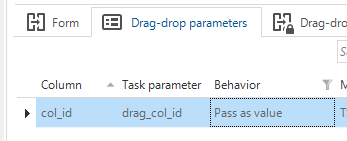
Drag_col_id is the column linked to the Task parameter in the Drag-Drop parameter setting:
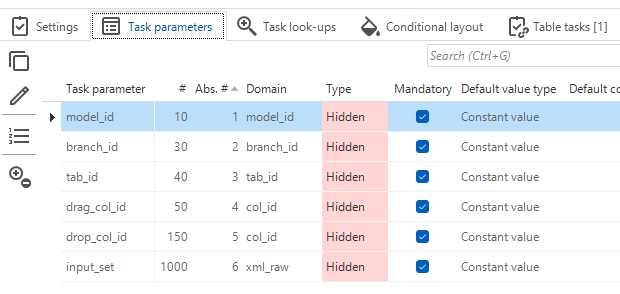
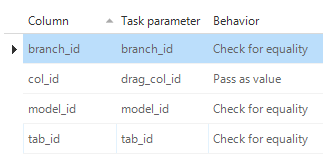
The parameters are configured as Drag-Drop as follows:
Drag-drop configuration
Since for use it is possible that multiple records are being dragged and dropped at the same time, we need to resort to using this multirow task execution method with an XML parameter. Hope this helps!
-- Select context and target key from the XML select top 1 @model_id = r.row.value('model_id[1]', 'varchar(100)'), @branch_id = r.row.value('branch_id[1]', 'varchar(100)'), @tab_id = r.row.value('tab_id[1]', 'varchar(128)'), @drop_col_id = r.row.value('drop_col_id[1]', 'varchar(128)') from @input_set.nodes('rows/row') r (row)
The drag record can potentially be multiple records. All is included in the XML (@input_set for us). The Top 1 ensures we only have one designated drop record.
For the Dragged record(s), we use this query to put it in a temporary table:
-- Select all dragged rows from the XML, using the order as seen on the database.
declare @rows_to_move table (
    move_order int identity(1, 1),
    drag_col_id varchar(128)
)

insert into @rows_to_move
select
    t1.col_id
from @input_set.nodes('rows/row') r (row)
join col t1
  on t1.model_id = @model_id
 and t1.branch_id = @branch_id
 and t1.tab_id = @tab_id
 and t1.col_id = r.row.value('drag_col_id[1]', 'varchar(128)')
order by t1.grid_order_no, t1.col_id
Drag_col_id is the column linked to the Task parameter in the Drag-Drop parameter setting: