Solved

Calculated column doesn't use domain values

  • April 20, 2022
  • 4 replies
  • 53 views

Freddy
Forum|alt.badge.img+16
  • Thinkwise Local Partner Brasil

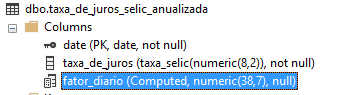
Hi. I've created a calculated column in SF and used the domain NUMERIC(16,8) ..  however apparently doesn't look to there.. it makes it NUMERIC(38,7).. however this calculation has 8 behind the decimal. How do I make it at least a precision 8?



Best answer by Erwin Ekkel

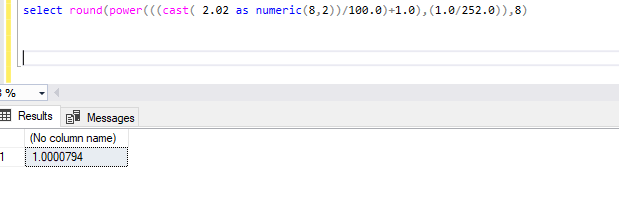
The domain for the calculated column is determined by SQL server, not by the SF. Apparently the calculation result only has 7 digits, I tried several numbers and indeed it always returns 7 digits:


This topic has been closed for replies.

4 replies

Forum|alt.badge.img+17
  • Moderator
  • April 22, 2022

The domain is based on the input. What columns (data types) are used in the calculation and what is the calculation used as input for the column?


Freddy
Forum|alt.badge.img+16
  • Author
  • Thinkwise Local Partner Brasil
  • April 22, 2022

The domain is based on the input. What columns (data types) are used in the calculation and what is the calculation used as input for the column?


It use percentage NUM(8,2) 

round(power(((taxa_de_juros/100.0)+1.0)
,(1.0/252.0)),8)


Forum|alt.badge.img+17
  • Moderator
  • Answer
  • April 22, 2022

The domain for the calculated column is determined by SQL server, not by the SF. Apparently the calculation result only has 7 digits, I tried several numbers and indeed it always returns 7 digits:


Freddy
Forum|alt.badge.img+16
  • Author
  • Thinkwise Local Partner Brasil
  • April 22, 2022

The domain for the calculated column is determined by SQL server, not by the SF. Apparently the calculation result only has 7 digits, I tried several numbers and indeed it always returns 7 digits:


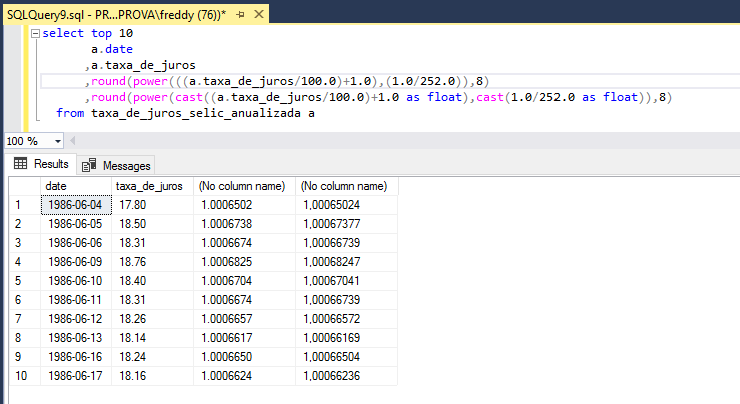
Ah, didn't see that… well the answer than is to force a cast to float of the POWER elements.. then I get my 8th digit.