

Question

Adding new fonts for Universal via the Software Factory

  • April 13, 2026
  • 2 replies
  • 32 views

Forum|alt.badge.img+3

Hi!

I’m trying to change the font used in Universal.

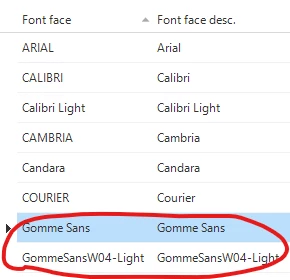
I know that this works when using custom CSS, but I noticed that the SF also has a Fonts section in the Advanced menu.

I added the fonts there and verified that the fonts are installed on my operating system. However, the Universal UI does not seem to use these fonts unless I explicitly override them via custom CSS. (I also checked the Thinkwise documentation)

Am I missing a step? I expected font configuration to be possible via the Software Factory as well, instead of only via custom CSS.


2 replies

Forum|alt.badge.img+3
  • Author
  • Vanguard
  • April 13, 2026

Note: We were able to get this working using custom CSS.


Tim de Lang
Moderator
Forum|alt.badge.img+4
  • Moderator
  • April 17, 2026

Hi ​@Ezgi Esen ,

You are not missing anything. At this point it is not possible to set this in the SF. Using custom CSS is the only way to achieve this.

Be aware that while you’ve installed the font on your device, any other device that accesses Universal will not be able to display this font.

If you’d want this in the SF, please create an idea.

Kind regards!

Tim