Working on it!

Improve Model Insight to same level or better as Windows GUI's "Path Location"

Related products:Universal UI
  • May 10, 2024
  • 11 replies
  • 469 views

During development I regularly use the Windows GUI to find relevant information regarding screens, columns, parameters, etc. with the Alt + F1 combination (Path Location). Even though the Universal GUI has “Model Insight”, it is lacking many things the other option is giving.

I think it is not the intent of ThinkWise to keep the need for using a different GUI to make your Universal GUI product complete. This idea is to make the “Model Insight” improve its usability and hopefully remove the need for a fall back GUI.

Current issues or features missing that I am aware of:

  • References more than 1 level deep, do still show the level 1 reference;
  • References more than 1 level deep, do not show table / variant information;
  • Unable to get info when a grid has no records to click on;
  • No context information (Detail, Master, etc.);
  • No Tab Control (What Detail group is being used);
  • No Domain information;
  • No Task name is mentioned, only the parameter as “Column”;
  • No Report name is mentioned, only the parameter as “Column”;
  • Lookup popups give no information, it still show the column/parameter of what it is a lookup on;
  • No Translations.

11 replies

Jeroen van den Belt
Administrator
Forum|alt.badge.img+10
NewOpen

Forum|alt.badge.img+4
  • Warrior
  • May 15, 2024

Would be great if the model insight could also provide information in columns which are not in edit mode. 


Harm Horstman
Superhero
Forum|alt.badge.img+21

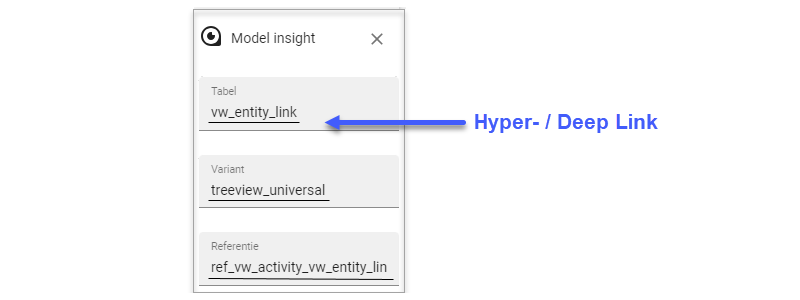
The information that Model Insights gives could be extended, but it what I think would really help the productivity, is to convert the field values in Model Insights into hyper- / deep links that takes you directly to the regarding topic in the software factory when the end application is running via SF. The topic should be opened as Floating/Modal document and with an option to to refresh the model when the document is closed.


Mark Jongeling
Administrator
Forum|alt.badge.img+23

... what I think would really help the productivity, is to convert the field values in Model Insights into hyper- / deep links that takes you directly to the regarding topic in the software factory when the end application is running via SF. ...

Wow Harm, that's a really cool suggestion 😄


Arie V
Community Manager
Forum|alt.badge.img+12
  • Community Manager
  • November 14, 2024
OpenOn the backlog

In case this will get picked up before the whole Model Insights gets changed, having the progress known:


Arie V
Community Manager
Forum|alt.badge.img+12
  • Community Manager
  • July 5, 2025

Would be great if the model insight could also provide information in columns which are not in edit mode. 

Note that this should have been fixed with Universal Release 2025.1.13.

The rest of this Idea is not yet planned, but certainly on our radar.


Arie V
Community Manager
Forum|alt.badge.img+12
  • Community Manager
  • April 9, 2026
On the backlogPlanned

Erik Brink
Moderator
Forum|alt.badge.img+5
  • Moderator
  • May 26, 2026

A little update on this: upcoming 2026.1.15.0 release will fix these two from the list of ​@Mark_Plaggenborg :

  • No Task name is mentioned, only the parameter as “Column”;
  • No Report name is mentioned, only the parameter as “Column”;

Arie V
Community Manager
Forum|alt.badge.img+12
  • Community Manager
  • June 11, 2026
Updated idea statusPlannedWorking on it!

Joshua Rietveld
Moderator
Forum|alt.badge.img

From 2026.2.11, we've made significant improvements to Model Insights.

We've added domain, translation, control, context (main/detail), screen type, breakpoint, screen area, and support for showing the active process Flow and current process action whenever that information is available.

All information is contextual, so fields are only shown when they have a value and are grouped for easier scanning. We also added a copy to clipboard button to quickly copy any value.

The screen type overlay can now be toggled manually instead of disappearing automatically.

Detection has also been improved by fixing several "dead spots" where Model Insights couldn't retrieve information. Additionally, task information is now shown simply by hovering over a task, even if the task is disabled. You no longer have to start it first.

You can now also open it using Alt + F12 (or Option + F12 on macOS).

And we're not done yet! We're currently working on adding the path field, the current message field, and collapsible sections, allowing developers to choose which information they want to keep visible and which they want to hide.