


Completed

Disable label in tree based upon grouped column

Related products:Software FactoryWindows GUIUniversal UI
  • March 30, 2021
  • 5 replies
  • 170 views

Arjan Sollie
Thinkwise blogger
Forum|alt.badge.img+15

Currently when using a tree based upon a grouped column, the label of this column is displayed on top of the value of that grouped column. I would like to be able to disabled this label. Often I do not need this label and for some users this is very confusing. 
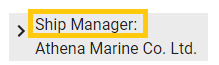
In this example I would like to hide the label text Ship Manager. All I have to see is the value “Athena Marina Co. Ltd. 

This will also keep the tree view much smaller, since currently this takes up two rows instead of one.


5 replies

Jasper
Thinkwiser
  • April 2, 2021
Updated idea status NewOpen

Jasper
Thinkwiser
  • May 26, 2021
Updated idea status OpenOn the backlog

Jeroen van den Belt
Administrator
Forum|alt.badge.img+10
Updated idea status On the backlogPlanned

Jeroen van den Belt
Administrator
Forum|alt.badge.img+10
Updated idea statusWorking on it!Next release

Jeroen van den Belt
Administrator
Forum|alt.badge.img+10
Updated idea statusNext releaseCompleted
