Solved

Custom components in Universal GUI

  • August 5, 2025
  • 2 replies
  • 54 views

Freddy
Forum|alt.badge.img+16
  • Thinkwise Local Partner Brasil

I've been playing a bit with the custom components in the Universal GUI, it's a nice step forward. I really like the available info in the component to play around with. There are a few questions:

  • In the event data you have DataRow, contains the data from the row, what is in DataSet? 
  • How do we debug? As it's in a protected iframe none of the console message reach the developer tool, unless you open up the frame separately, but that won't work as you will not have the event-data anymore. Any tips, tricks here?  
  • How to interpret: 
    • updateState - Something changed in the state of the Universal GUI; you may want to block or unblock the UI of your component.

Thanks. 
Best answer by Sebastiaan Meijerink

Great to see you are diving in!

The DataSet contains the rows Universal currently has in view, so the current page of data.

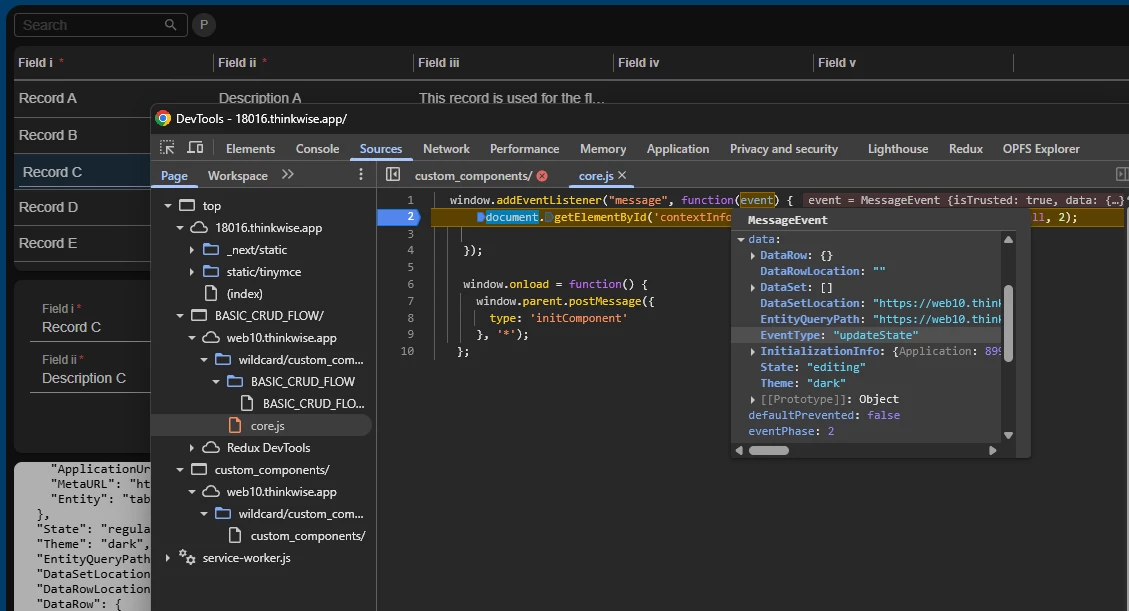
Debugging, when you look a the source panel in the developer tools (I’m using Chrome here), you should note that the navigation panel is a tree. And you can traverse down it and actually find you’re own code and put a breakpoint in it.

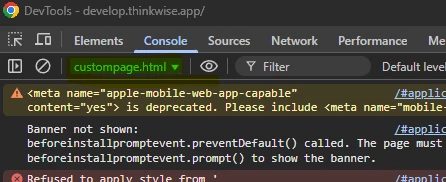
The same is true for the console. At the top, there is a dropdown that will allow you to find you’re source and select it to see its output;


And updateState should be thought of as an event that happens when the state of the Universal GUI changes in a way where Universal itself would also get a different state. This event is directly linked to the State property. That itself can have 3 states;

  • regular (all things are clickable for the user)
  • editing (a lot of stuff should be blocked)
  • locked (there is an actual model popup over the GUI)

Hope this helps!


This topic has been closed for replies.

2 replies

Forum|alt.badge.img+2

Great to see you are diving in!

The DataSet contains the rows Universal currently has in view, so the current page of data.

Debugging, when you look a the source panel in the developer tools (I’m using Chrome here), you should note that the navigation panel is a tree. And you can traverse down it and actually find you’re own code and put a breakpoint in it.

The same is true for the console. At the top, there is a dropdown that will allow you to find you’re source and select it to see its output;


And updateState should be thought of as an event that happens when the state of the Universal GUI changes in a way where Universal itself would also get a different state. This event is directly linked to the State property. That itself can have 3 states;

  • regular (all things are clickable for the user)
  • editing (a lot of stuff should be blocked)
  • locked (there is an actual model popup over the GUI)

Hope this helps!


Freddy
Forum|alt.badge.img+16
  • Author
  • Thinkwise Local Partner Brasil
  • August 7, 2025

Thanks ​@Sebastiaan Meijerink, didn't know about the ability to select source.