




Question

Why does one column show a value list with checkboxes, while another only shows a free-text filter?

  • Nov 11, 2026 1:01 PM UTC
  • 1 reply
  • 11 views

Harm Horstman
Superhero
Forum|alt.badge.img+21

In the Universal GUI, we noticed different filter behaviors between columns in the same grid.

See the two examples below, left is varchar(255), right is varchar(50), both text controls
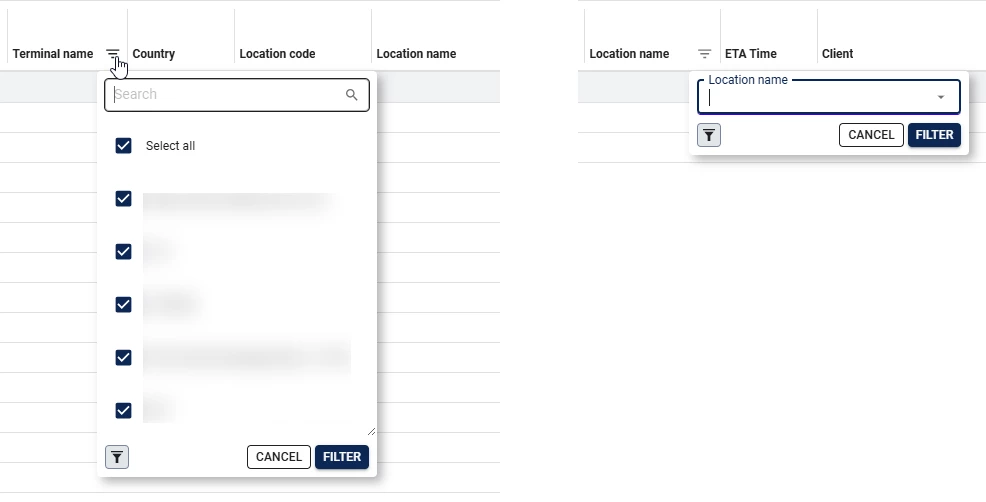

What determines which filter type is used? 

Is it related to the column data type?
Does it depend on the number of distinct values?
Can this behavior be configured?

1 reply

My buddy Claude told me the following, can you check if the assumptions he made are correct?: 

The filter type depends on how many distinct values there are, not on the data type.

  • Data type? Very likely no. Two text columns of type varchar(255) and varchar(50) should get the same filter. The column length doesn’t decide it.
  • Number of distinct values? Yes. When the grid header filter opens, the Universal GUI loads the column’s distinct values. Up to a limit (25 by default) it shows the checkbox list. Above that, it shows a search/suggestion field instead. This keeps the UI from loading too many items and stops a checkbox list from getting unusably long.
    • The count is taken under the current filters and parent context. So the same column can show checkboxes in one situation and the search field in another, depending on which parent row is selected or which other filters are on.
  • Configurable? Yes. Set the Universal GUI extended property LookupGridHeaderFilterOptionsLimit to change the threshold (default 25). Thinkwise warns that raising it costs performance, and a list with hundreds of checkboxes isn’t good UX either.

Why it fits this case: One of the two columns most likely has 25 or fewer distinct values in the current data set, and the other has more.

The docs and the earlier thread only describe this behaviour for lookup and domain-element columns. I’m assuming the newer Excel-style filter for plain text columns uses the same limit, but I haven’t confirmed that. If the counts don’t explain it, check whether one column is multiline: multiline columns use a different search pop-up.