




Solved

Why does expended properties in the SF remove the dot it needs to define session variables?

  • April 9, 2026
  • 1 reply
  • 17 views

SanderAdam
Captain
Forum|alt.badge.img+5

As the question states: when I try to register a session variable, it removes the dot needed. For instance for the session variable Session.base_url (for a custom component to use to decide whether you are in the live or dev environment), it removes the dot between Session and base_url:
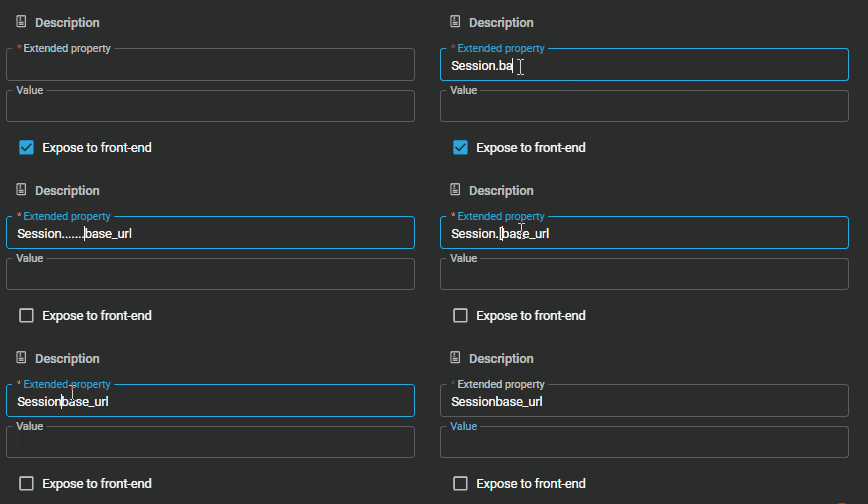
 

Is anything else but underscores illegal in this field nowadays? If so, how would I simulate session variables for the SF? I can make session variables for the test environment, as that's done via the IAM. But development is done via the SF, is this supposed to happen?


Best answer by Mark Jongeling

Hi Sander,

We have started sanitizing the Extended property field to prevent spaces and other characters. Unfortunately, the dot ".” is replaced too but should certainly not be replaced by an underscore. Due to the method we use for it, it happens. Could you create a ticket for this in TCP? 

For now, you can add the extended property via a query on the SF database, like so:

insert into runtime_extended_property
(
model_id,
branch_id,
runtime_configuration_id,
extended_property_id,
property_value,
expose_to_front_end,
insert_user,
insert_date_time,
update_user,
update_date_time
)
select
'Your model here',
'Your branch here',
'default',
'Session.base_url',
'Example',
1,
dbo.tsf_user(),
sysdatetime(),
dbo.tsf_user(),
sysdatetime()

In the ticket, we can provide you with a script to disable the replacement method so you can add dots in the name.

1 reply

Mark Jongeling
Administrator
Forum|alt.badge.img+23
  • Administrator
  • Answer
  • April 9, 2026

Hi Sander,

We have started sanitizing the Extended property field to prevent spaces and other characters. Unfortunately, the dot ".” is replaced too but should certainly not be replaced by an underscore. Due to the method we use for it, it happens. Could you create a ticket for this in TCP? 

For now, you can add the extended property via a query on the SF database, like so:

insert into runtime_extended_property
(
model_id,
branch_id,
runtime_configuration_id,
extended_property_id,
property_value,
expose_to_front_end,
insert_user,
insert_date_time,
update_user,
update_date_time
)
select
'Your model here',
'Your branch here',
'default',
'Session.base_url',
'Example',
1,
dbo.tsf_user(),
sysdatetime(),
dbo.tsf_user(),
sysdatetime()

In the ticket, we can provide you with a script to disable the replacement method so you can add dots in the name.
