Question

When two task look ups share columns, how to prevent emptying of one when other is filled in?

  • March 9, 2026
  • 7 replies
  • 17 views

Forum|alt.badge.img+1

I am facing this issue with a task default:


The task has the parameters

warehouse_id - look up table: item_warehouse; look up columns: item_id, warehouse_id

to_warehouse_location_id - look up table: warehouse_location; look up columns: warehouse_id, warehouse_location_id

item_id - look up table: item, look up column: item_id


warehouse_id and to_warehouse_location_id are filled in automatically by the table task parameters (on the warehouse_location table),

but when item_id is filled in by the user, warehouse_id and to_warehouse_location_id are emptied,

even though the item_id chosen exists as item_id + warehouse_id combination in the item_warehouse table.


I chose to show item_warehouse as look up table on warehouse_id instead of the warehouse table because the table has more useful information.


Is there a way to prevent the emptying of the warehouse_id parameter?

I have not yet added a default script.

7 replies

I believe this to be a bug. In the gui you would not be able to set warehouse_id without first setting the item_id. So assigning only the warehouse_id in task parameters does not make sense in this situation. If the goal is to let the user select a item based on the warehouse the references should be:

warehouse_id - look up table: warehouse; look up columns: warehouse_id

item_id - look up table: item_warehouse, look up column: warehouse_id, item_id

But if this reference is not unique you could create a view with all the possible combinations. To make sure you don’t get duplicates. 


Forum|alt.badge.img+1
  • Author
  • Sidekick
  • March 10, 2026

I believe this to be a bug. In the gui you would not be able to set warehouse_id without first setting the item_id. So assigning only the warehouse_id in task parameters does not make sense in this situation. If the goal is to let the user select a item based on the warehouse the references should be:

warehouse_id - look up table: warehouse; look up columns: warehouse_id

item_id - look up table: item_warehouse, look up column: warehouse_id, item_id

But if this reference is not unique you could create a view with all the possible combinations. To make sure you don’t get duplicates. 


Hi Erwin,

Thanks for the reply. I have not yet dug into what I can do for the task above, but I am facing a similar issue with look-ups on a different task:

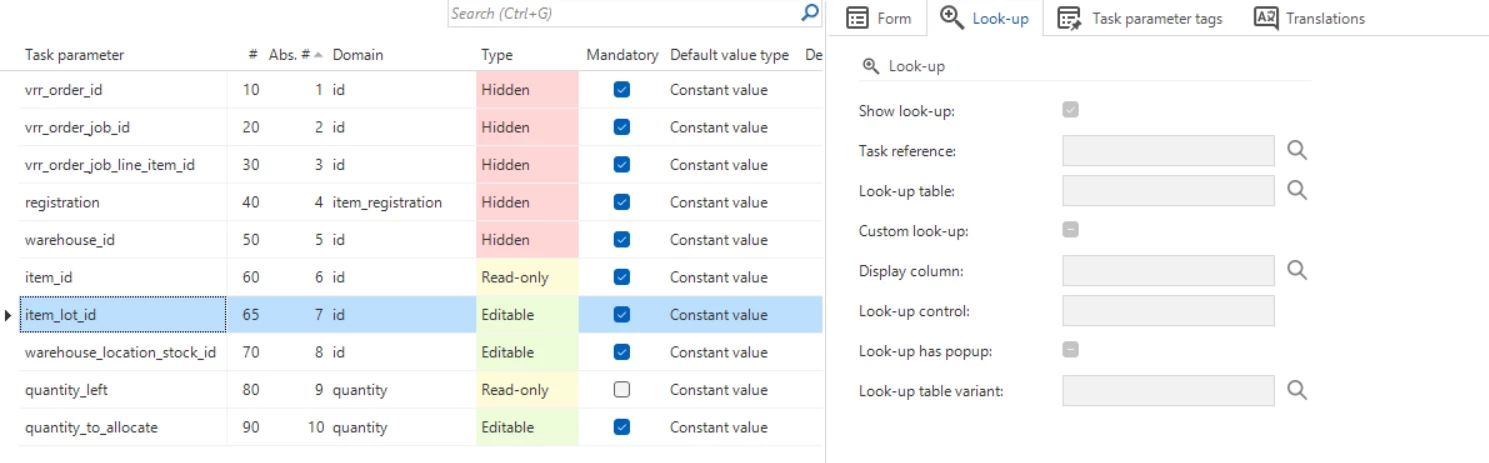
There are three parameters I want to show a look up on.

It should only be possible to fill in  item_lot_id when item_id is filled in. This works.

For warehouse_location_stock_id, as long as I have not added the column item_lot_id as a look up column, the look ups work, but I can choose warehouse_location_stock_id regardless of item_lot_id.

When I add item_lot_id as look up column, automatically the look-up on the parameter item_lot_id fields are emptied (image below) and the look-up on warehouse_location_stock_id is turned off.


Is the type of look up I want to create possible or not? What should I do to make the look-ups behave as I want?


Forum|alt.badge.img+1
  • Author
  • Sidekick
  • March 10, 2026

I have a suspicion that the behaviour around when look-ups on task parameters can be shown is dependent on the Primary Keys of the look-up table and whether they are in the look-up columns of the parameter or not, so I am going to test using views with the PK combinations I need


(Difficulty might be arising because item_lot_id is a non-mandatory key, so it cannot be a PK, and I don’t)


Forum|alt.badge.img+1
  • Author
  • Sidekick
  • March 10, 2026

@Erwin Ekkel 
I have indeed solved my problem by creating a view with PK different from my table


I still don’t understand the behavior of when look ups on parameters that are shared by look up columns conflict, but your tip about views will help me forward. Thanks very much!


Forum|alt.badge.img+1
  • Author
  • Sidekick
  • March 10, 2026

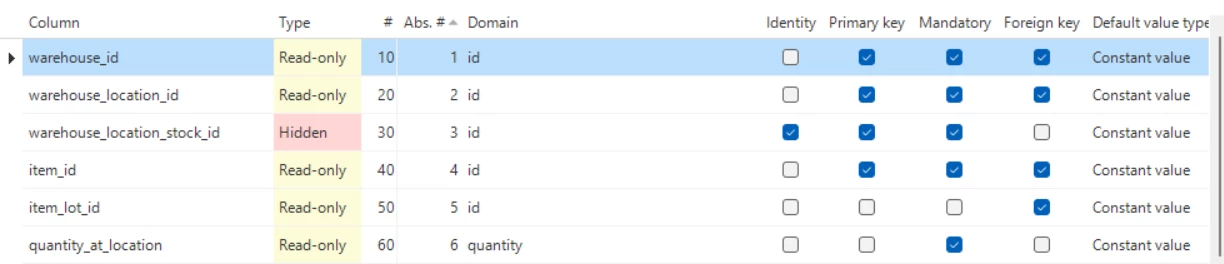
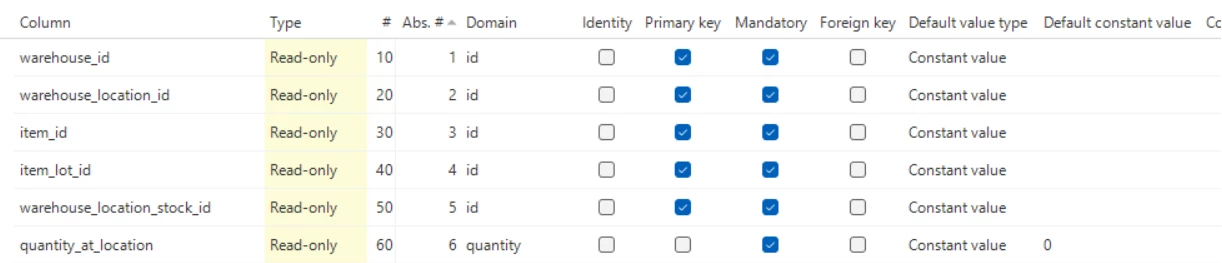
No… I still have the issue that if I let users choose any combination from the view, it works, but if I want to to let users choose an item_lot first before choosing the location (add item_lot_id), the look up no longer works...
 

I think this should work, but the look ups on both item_lot_id and warehouse_location_id_with_lot do not work when I have the look ups set up like this


Forum|alt.badge.img+1
  • Author
  • Sidekick
  • March 10, 2026

I Finally figured out what is going on: the parameter on which the look up is displayed is determined by the last PK column in the table column sequence no. Because I had both tables with item_lot_id as last PK column (after I removed warehouse_location_stock_id from the view) they tried to apply the look up on the same parameter.


Forum|alt.badge.img+1
  • Author
  • Sidekick
  • March 10, 2026

I Finally figured out what is going on: the parameter on which the look up is displayed is determined by the last PK column in the table column sequence no. Because I had both tables with item_lot_id as last PK column (after I removed warehouse_location_stock_id from the view) they tried to apply the look up on the same parameter.

I played around with this and

Small correction:  the parameter on which the look up is displayed is determined by the sequence no. in the look-up column. This is automatically generated based on the order in the table, but can be manipulated in the task look-ups, not necessary to change the table columns, and also not necessary to create a view for the second problem I posted about here.
Now my headache is clearing and I can control my look ups (I hope I am not speaking too soon :) )