

Solved

WebAssembly is blocked by Content Security Policy in Custom Components

  • August 31, 2026
  • 6 replies
  • 58 views

Forum|alt.badge.img

I am developing a Thinkwise Custom Component that uses the @thatopen/components package to load IFC files.

The package uses web-ifc, which requires WebAssembly to load and process IFC files.

The web-ifc.wasm file is successfully requested, but the browser blocks the WebAssembly module from being compiled/instantiated because of the Content Security Policy applied to the Thinkwise application.

The following errors occur:

wasm streaming compile failed: CompileError: WebAssembly.instantiateStreaming(): Compiling or instantiating WebAssembly module violates the following Content Security Policy directive because 'unsafe-eval' is not an allowed source of script in the following Content Security Policy directive: "default-src 'self'".

The package then falls back to ArrayBuffer instantiation:

falling back to ArrayBuffer instantiation

However, this is also blocked:

WebAssembly.instantiate(): Compiling or instantiating WebAssembly module violates the following Content Security Policy directive.

As a result, the IFC file cannot be loaded.

The custom component cannot override or relax the Content Security Policy from JavaScript.

To allow WebAssembly based packages in Custom Components, the Content Security Policy should allow WebAssembly evaluation, preferably using:

script-src 'self' 'wasm-unsafe-eval'

instead of requiring the broader:

'unsafe-eval'

Could anyone confirm whether Thinkwise Custom Components support WebAssembly and, if so, how the Content Security Policy should be configured to allow WebAssembly modules such as web-ifc.wasm?

 

Best answer by Sebastiaan Meijerink

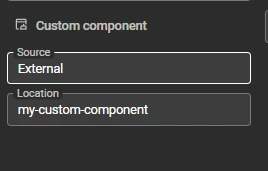
I have just checked in Indicium, and this is indeed restricted atm, but only for the custom components that are hosted through the model. What you can do however, is set the custom component configuration to ‘external’.

Then you can fill in a relative path that will be added on top of the install path of universal, and then create a web application folder under IIS on that path.

In the SF > Subjects > Defaults > Setttings

So if your Universal runs behind https://my-company.univeral.app you would have a web application under that called my-custom-component. (You can use {metasource} and {application} to keep development and production apart).

And then you can set whatever policy headers you need, on that IIS path.


6 replies

Forum|alt.badge.img+2

We are not deliberately blocking anything in the custom components. We run the <iframe> without a sandbox attribute, so it runs with full standard browser privileges and unrestricted capabilities based on its origin.

The issue I think you are encountering is https://developer.chrome.com/blog/wasm-module-sharing-restricted-to-same-origin. So you cannot just pull in web assembly modules from outside at runtime. 

You would have to include the package inside your custom component folder so it will be hosted from the same origin. Most npm package will do this, but I do not know how you are building this, so I cannot be sure.

Adding a header like ‘wasm-unsafe-eval', is not something we would do without severe caution. You might be able do this yourself in your webserver configuration, but not if Indicium is hosting the custom component.

How are you building this custom component? Is it a typescript component with a build environment like next or vite? 


Forum|alt.badge.img
  • Author
  • Rookie
  • September 1, 2026

Hello Sebastiaan,

The component consists of a Vue application built with Vite and typescript. I have placed the WASM files in the public folder and am using the recommended approach to load them from the local public directory. However, I still receive the CSP error.

await fragmentIfcLoader.setup({
autoSetWasm: false,
wasm: {
path: "wasm/",
absolute: true,
},
webIfc: {
COORDINATE_TO_ORIGIN: true,
},
});

I fully agree with not adding 'unsafe-eval' to the CSP header, and I would like to avoid that at all costs. However, at the moment, I cannot find any alternative approach that allows the WebAssembly module to work around this restriction.


Forum|alt.badge.img+2

I have just checked in Indicium, and this is indeed restricted atm, but only for the custom components that are hosted through the model. What you can do however, is set the custom component configuration to ‘external’.

Then you can fill in a relative path that will be added on top of the install path of universal, and then create a web application folder under IIS on that path.

In the SF > Subjects > Defaults > Setttings

So if your Universal runs behind https://my-company.univeral.app you would have a web application under that called my-custom-component. (You can use {metasource} and {application} to keep development and production apart).

And then you can set whatever policy headers you need, on that IIS path.


Forum|alt.badge.img
  • Author
  • Rookie
  • September 2, 2026

Hello, I still have a question about this. I noticed that it is more of a CSP issue that makes this difficult to implement, as you mentioned.

However, if the component is added as a model (a ZIP file), doenst it work much better with Thinkwise Cloud. isnt it probably the preferred way of doing this?

Would it make sense to create a ticket to make this configurable? For example, a setting where you can specify which endpoints are allowed and which actions a component is permitted to perform. This would make these types of use cases possible without having to work around the CSP restrictions, or at least make the components more flexible.


Forum|alt.badge.img+2

@TomZ You are absolutely right, this would make it difficult to use WebAssembly in the ThinkwiseCould. But you should turn this into a community idea, I think that is a better place for this. 


Arie V
Community Manager
Forum|alt.badge.img+12
  • Community Manager
  • September 2, 2026

@TomZ No need to create an Idea for this. It’s a limitation in how we implemented Custom Components that are added in the model, and we were already aware of it.

It’s our intention to improve this somewhere later this year.