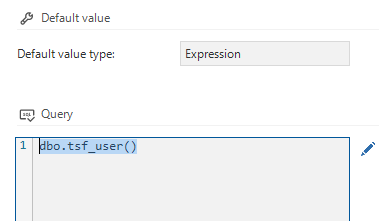
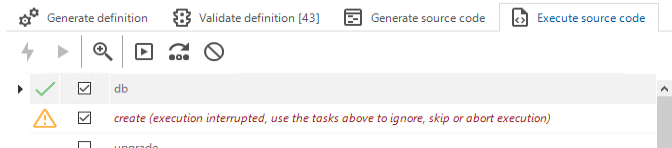
Using the dbo.tsf_user() in a default value expression (see image below) leads to an error in execution of a model (after an upgrade from SF2021.2 to SF2022.2)
We experience the following error during execution of the source code:
Error: 'Column "dbo" is not allowed in this context, and the user-defined function or aggregate "dbo.tsf_user" could not be found.'.
Any ideas?
Best answer by Freddy
Using the dbo.tsf_user() in a default value expression (see image below) leads to an error in execution of a model (after an upgrade from SF2021.2 to SF2022.2)
We experience the following error during execution of the source code:
Error: 'Column "dbo" is not allowed in this context, and the user-defined function or aggregate "dbo.tsf_user" could not be found.'.
Any ideas?
Put select dbo.tsf_user() and a proxy function will be made and it will work as a default.
Using the dbo.tsf_user() in a default value expression (see image below) leads to an error in execution of a model (after an upgrade from SF2021.2 to SF2022.2)
We experience the following error during execution of the source code:
Error: 'Column "dbo" is not allowed in this context, and the user-defined function or aggregate "dbo.tsf_user" could not be found.'.
Any ideas?
Put select dbo.tsf_user() and a proxy function will be made and it will work as a default.
Do note that the solution Freddy provides does indeed work, but for every column that uses this default value query, a separate proxy function is created. This means if you use "select dbo.tsf_user()” for 100 columns, that the SF will generate 100 proxy functions.
I highly recommend changing the default value query back to "dbo.tsf_user()” when/after upgrading to 2023.1.
Are you sure Freddy’s solution will not give problems during the DB creation/update process? Because the tsf_user function is being dropped and created every update cycle and could lead to an error when used in a default proxy.
Are you sure Freddy’s solution will not give problems during the DB creation/update process? Because the tsf_user function is being dropped and created every update cycle and could lead to an error when used in a default proxy.
I use it in several projects and I haven't got any creation/upgrade process issues yet.