


Hi all,
In an shadow environment we are trying to upgrade from IAM from 2026.2.14 to 2026.3 and we get the following error:
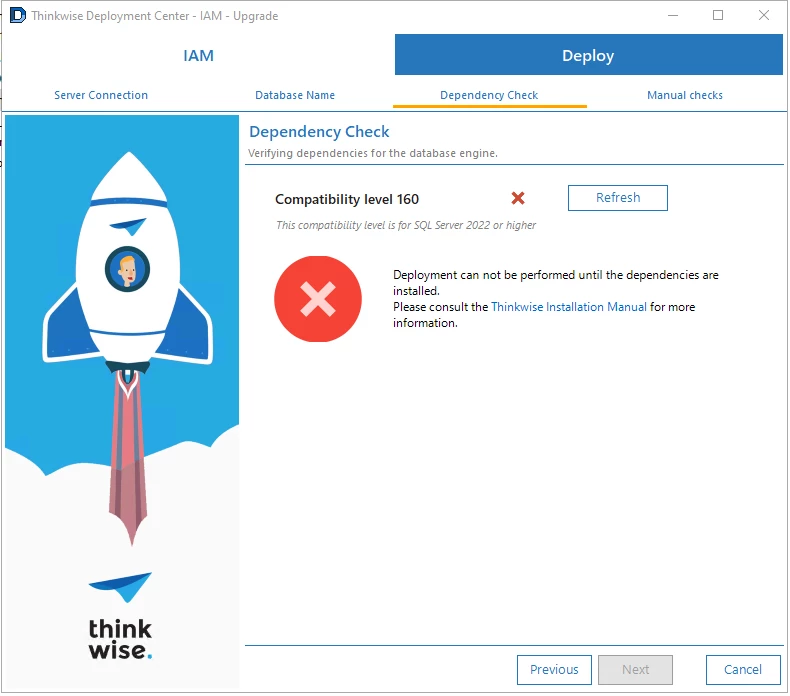
Mind you, we are using the SQL Server 2022.

Is there any workaround? Or do I need to submit a ticket?


 +23
+23Hi Zachery,
Since 2026.2.11 (STS), the platform requires the SF and IAM databases to have compatibility level set to 160 (SQL Server 2022). An upgrade script to 2026.2.11 did change the compatibility level automatically, so I'm not sure where this could have gone wrong in your situation.
To fix this, run this script on the IAM and SF database prior to the upgrade:
-- Set the compatibility level of the current database to 160 (SQL Server 2022)
declare @exec_sql nvarchar(max) = 'alter database [' + db_name() + '] set compatibility_level = 160';

begin try
    exec sp_executesql @exec_sql
end try
begin catch
    declare @error_message nvarchar(max) = error_message();
    raiserror('Error occurred while setting compatibility level: %s', 16, 1, @error_message);
end catch
go
Connecto the the SF database, then run it. Same for the IAM database.
Hope this helps!
Info:
 +1
+1Hi Mark,
Thanks for the fast reply. The script fixed it, but I have a question.
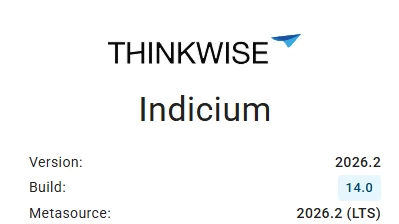
What does “Build: 14.0” mean? Is it 2026.2.14 or just 2026.2?
+23Version and Build correspond to the Indicium version and build. 2026.2.14 is not the latest release of Indicium, but can be run on any supported platform versions of 2026.2 and below (down to 2025.1 for sure).
Metasource corresponds to the platform version of IAM with which Indicium communicates with. In this case the IAM is 2026.2, which is a Long term supported version (LTS)
So yes, build 14.0 means the Indicium version/build 2026.2.14(.0)
+1Hi Mark,
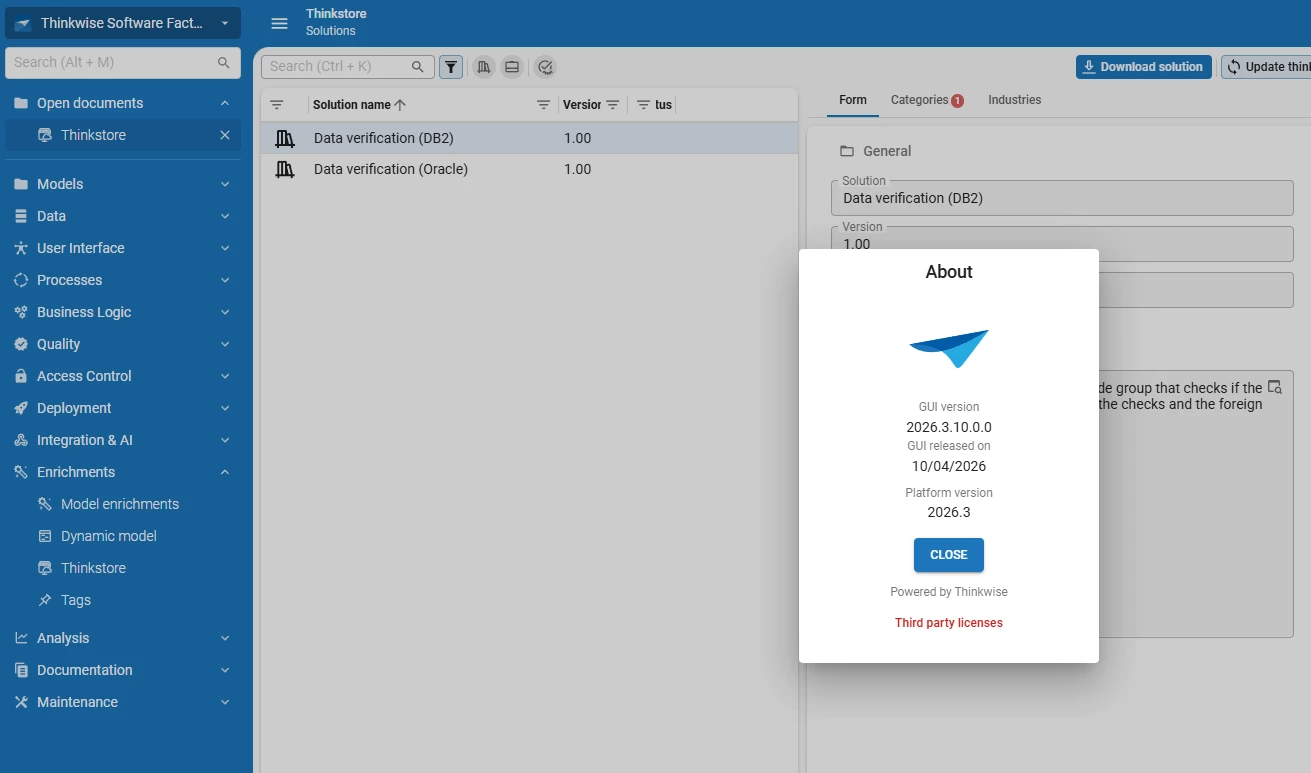
Thanks for the explantion. So now we’re fully on 2026.3. But the Thinkstore has only 2 solutions?
+23Hey Zachery,
That is correct, we ran into some technical issues releasing THinkstore solutions. These should be resolved in the coming time. Sorry for the inconvenience.
+1Hi Mark,
That’s a bummer. Is it possible to post the code for Trace Fields here?
+23SF version: 2026.3
There are two control procedures added by this base model originally:
/*
    This code adds trace columns to every table without the tag @tag_no_trace
    It also enables the default procedure for the tables which dont have the tag and have the trace columns.
    Lastly it will set the data sensitvity, user columns are sensitive, the rest are not.
*/

--Drop the temporary table if it exists, just in case it already exists.
drop table if exists #desired_tab;

--Declare the variables that we need in the procedure
declare @tag_no_trace               tag_id
       ,@dom_name                   dom_id
       ,@dom_date                   dom_id
       ,@col_trace_1                col_id
       ,@col_trace_2                col_id
       ,@col_trace_3                col_id
       ,@col_trace_4                col_id
       ,@use_for_optimistic_locking no_yes
       ,@set_data_sensitive         bit;

--Adjust according to your needs.
set @tag_no_trace = 'no_trace'; -- Name of the tag which tells that a table should not have the trace columns.
set @dom_name = 'user_name'; -- Name of the domain of insert_user and update_user
set @dom_date = 'date_time'; -- Name of the domain of insert_date_time and update_date_time
/* If you change the names of the trace columns, please change them in the control_proc and template as well. */
set @col_trace_1 = 'insert_user'; -- Name of the column which tells who added the record
set @col_trace_2 = 'insert_date_time'; -- Name of the column which tells when the record was added
set @col_trace_3 = 'update_user'; -- Name of the column which tells who made the last change to the record
set @col_trace_4 = 'update_date_time'; -- Name of the column which tells when was the last change to the record
set @use_for_optimistic_locking = 1; --Set to 1 if you want to use the @col_trace_4 as a optimistic locking.
set @set_data_sensitive = 1; -- Set to 0 if you dont want automatic data sensitivity
/*
      Trace 1 and trace 2 (insert user / date) are mandatory with a default value, this means that when you do an insert via SQL code you dont need to specify them.
      This is not possible for the update_user / date, so you have to provide them when you do an update via SQL code.
*/

/*
    We use the temp table so we only need to execute this query once instead of everywhere we need it.
    We also use the temp table so we can use the not exists clause in the next query.
*/
select t.model_id
      ,t.branch_id
      ,t.tab_id
into #desired_tab
from tab t
where t.model_id      = @model_id
  and t.branch_id     = @branch_id
  and t.type_of_table = 0 --Only for tables, no views.
  and t.generated_by_control_proc_id is null --Only for non generated tables.
  and not exists (
                 select 1
                 from tab_tag tt
                 where tt.model_id  = t.model_id
                   and tt.branch_id = t.branch_id
                   and tt.tab_id    = t.tab_id
                   and tt.tag_id    = @tag_no_trace
                 );

--Create the tag.
insert into #tag (
                 tag_id
                ,tag_description
                ,tag_value_mand
                 )
select @tag_no_trace -- tag_id
      ,'This tag tells that the table should not have trace columns.' -- tag_description
      ,0 -- tag_value_mand
--In case the tag already exists we dont want this dynamic model to create it.
where not exists (
                 select 1
                 from tag t
                 where t.model_id                     = @model_id
                   and t.branch_id                    = @branch_id
                   and t.tag_id                       = @tag_no_trace
                   and (
                       t.generated_by_control_proc_id is null --Only for non generated tags.
                    or t.generated_by_control_proc_id <> @control_proc_id
                       ) -- Only if the tag was not generated by this control procedure.
                 );

--Create the domains we need for the columns.
insert #dom (
            dom_id
           ,control_id
           ,show_local_time
           ,mand
           ,alignment
           ,sort_order_elemnt
           ,type_of_default_value
           ,case_type
           ,default_include_in_global_filter
           ,default_visible_for_filter
           ,default_visible_for_search
           ,show_action_button
            )
select @dom_name -- dom_id
      ,null -- control_id
      ,0 -- show_local_time
      ,0 -- mand
      ,0 -- alignment
      ,0 -- sort_order_elemnt
      ,0 -- type_of_default_value
      ,0 -- case_type
      ,0 -- default_include_in_global_filter
      ,0 -- default_visible_for_filter
      ,0 -- default_visible_for_search
      ,2 -- show_action_button
where not exists (
                 select 1
                 from dom d
                 where d.model_id                     = @model_id
                   and d.branch_id                    = @branch_id
                   and d.dom_id                       = @dom_name
                   and (
                       d.generated_by_control_proc_id is null --Only for non generated domains.
                    or d.generated_by_control_proc_id <> @control_proc_id
                       ) -- Only if the domain was not generated by this control procedure.
                 )
union all
select @dom_date -- dom_id
      ,'DATETIME' -- control_id
      ,1 -- show_local_time --When using UTC time this will make sure the time will be shown in local time for the user. When not using UTC time you can set this to 0.
      ,0 -- mand
      ,0 -- alignment
      ,0 -- sort_order_elemnt
      ,0 -- type_of_default_value
      ,0 -- case_type
      ,0 -- default_include_in_global_filter
      ,0 -- default_visible_for_filter
      ,0 -- default_visible_for_search
      ,2 -- show_action_button
where not exists (
                 select 1
                 from dom d
                 where d.model_id                     = @model_id
                   and d.branch_id                    = @branch_id
                   and d.dom_id                       = @dom_date
                   and (
                       d.generated_by_control_proc_id is null --Only for non generated domains.
                    or d.generated_by_control_proc_id <> @control_proc_id
                       ) -- Only if the domain was not generated by this control procedure.
                 );

insert into #dom_query (
                       dom_id
                      ,rdbms_type
                      ,dttp_id
                      ,length
                      ,dttp
                      ,user_defined_dttp
                       )
select @dom_name -- dom_id
      ,0 -- rdbms_type
      ,'VARCHAR' -- dttp_id
      ,128 -- length
      ,'varchar(128)' -- dttp
      ,@dom_name -- user_defined_dttp
where not exists (
                 select 1
                 from dom d
                 where d.model_id                     = @model_id
                   and d.branch_id                    = @branch_id
                   and d.dom_id                       = @dom_name
                   and (
                       d.generated_by_control_proc_id is null --Only for non generated domains.
                    or d.generated_by_control_proc_id <> @control_proc_id
                       ) -- Only if the domain was not generated by this control procedure.
                 )
union all
select @dom_date -- dom_id
      ,0 -- rdbms_type
      ,'DATETIME2' -- dttp_id
      ,null -- length
      ,'datetime2' -- dttp
      ,@dom_date -- user_defined_dttp
where not exists (
                 select 1
                 from dom d
                 where d.model_id                     = @model_id
                   and d.branch_id                    = @branch_id
                   and d.dom_id                       = @dom_date
                   and (
                       d.generated_by_control_proc_id is null --Only for non generated domains.
                    or d.generated_by_control_proc_id <> @control_proc_id
                       ) -- Only if the domain was not generated by this control procedure.
                 );

--Add the 4 trace columns into the model.
insert into #col (
                 tab_id
                ,col_id
                ,order_no
                ,dom_id
                ,mand
                ,type_of_col
                ,type_of_default_value
                ,grid_col_width
                ,filter_order_no
                ,search_order_no
                ,form_order_no
                ,field_no_of_positions_further
                ,grid_order_no
                ,card_list_order_no
                ,include_in_copy
                ,grid_type_of_col
                ,card_list_type_of_col
                ,field_on_next_tab
                ,next_tab_label
                ,form_field_in_next_grp
                ,form_next_grp_label
                ,form_next_grp_icon_id
                ,next_tab_default_expanded
                ,include_in_global_filter
                ,visible_for_filter
                ,use_for_optimistic_locking
                 )
select t.tab_id
      ,@col_trace_1
      ,9990
      ,@dom_name
      ,1 --mand
      ,1 -- type_of_col
      ,1 -- type_of_default_value
      ,98 -- grid_col_width
      ,9990 -- filter_order_no
      ,9990 -- search_order_no
      ,9990 -- form_order_no
      ,1 -- field_no_of_positions_further
      ,9990 -- grid_order_no
      ,9990 -- card_list_order_no
      ,0 -- include_in_copy
      ,3 -- grid_type_of_col
      ,3 -- card_list_type_of_col
      ,1 -- field_on_next_tab
      ,'trace' -- next_tab_label
      ,0 -- form_field_in_next_grp
      ,null -- form_next_grp_label
      ,null -- form_next_grp_icon_id
      ,0 -- next_tab_default_expanded
      ,0 -- include_in_global_filter
      ,1 -- visible_for_filter
      ,0 --use_for_optimistic_locking
from #desired_tab t
union all
select t.tab_id
      ,@col_trace_2
      ,9992
      ,@dom_date
      ,1 --mand
      ,1 -- type_of_col
      ,1 -- type_of_default_value
      ,150 -- grid_col_width
      ,9992 -- filter_order_no
      ,9992 -- search_order_no
      ,9992 -- form_order_no
      ,0 -- field_no_of_positions_further
      ,9992 -- grid_order_no
      ,9992 -- card_list_order_no
      ,0 -- include_in_copy
      ,3 -- grid_type_of_col
      ,3 -- card_list_type_of_col
      ,0 -- field_on_next_tab
      ,null -- next_tab_label
      ,0 -- form_field_in_next_grp
      ,null -- form_next_grp_label
      ,null -- form_next_grp_icon_id
      ,0 -- next_tab_default_expanded
      ,0 -- include_in_global_filter
      ,1 -- visible_for_filter
      ,0 --use_for_optimistic_locking
from #desired_tab t
union all
select t.tab_id
      ,@col_trace_3
      ,9994
      ,@dom_name
      ,0 --mand
      ,1 -- type_of_col
      ,0 -- type_of_default_value
      ,98 -- grid_col_width
      ,9994 -- filter_order_no
      ,9994 -- search_order_no
      ,9994 -- form_order_no
      ,1 -- field_no_of_positions_further
      ,9994 -- grid_order_no
      ,9994 -- card_list_order_no
      ,0 -- include_in_copy
      ,1 -- grid_type_of_col
      ,3 -- card_list_type_of_col
      ,0 -- field_on_next_tab
      ,null -- next_tab_label
      ,0 -- form_field_in_next_grp
      ,null -- form_next_grp_label
      ,null -- form_next_grp_icon_id
      ,0 -- next_tab_default_expanded
      ,0 -- include_in_global_filter
      ,1 -- visible_for_filter
      ,0 --use_for_optimistic_locking
from #desired_tab t
union all
select t.tab_id
      ,@col_trace_4
      ,9996
      ,@dom_date
      ,0 --mand
      ,1 -- type_of_col
      ,0 -- type_of_default_value
      ,150 -- grid_col_width
      ,9996 -- filter_order_no
      ,9996 -- search_order_no
      ,9996 -- form_order_no
      ,0 --field_no_of_positions_further
      ,9996 -- grid_order_no
      ,9996 -- card_list_order_no
      ,0 -- include_in_copy
      ,1 -- grid_type_of_col
      ,3 -- card_list_type_of_col
      ,0 -- field_on_next_tab
      ,null -- next_tab_label
      ,0 -- form_field_in_next_grp
      ,null -- form_next_grp_label
      ,null -- form_next_grp_icon_id
      ,0 -- next_tab_default_expanded
      ,0 -- include_in_global_filter
      ,1 -- visible_for_filter
      ,@use_for_optimistic_locking --use_for_optimistic_locking
from #desired_tab t;

insert into #col_query (
                       tab_id
                      ,col_id
                      ,rdbms_type
                      ,default_value_query
)
select t.tab_id
      ,@col_trace_1
      ,0 --rdbms_type
      ,'dbo.tsf_original_login()' --default_value_query
from #desired_tab t
union all
select t.tab_id
      ,@col_trace_2
      ,0 --rdbms_type
      ,'sysutcdatetime()' --default_value_query /* Save as UTC time and show it as local time by default, you can change it to sysdatetime() if you want to use server times. */
from #desired_tab t

--Update the table that we want to use default procedure to fill the trace columns.
update t
set t.use_defaults = 1
from tab t
where t.model_id     = @model_id
  and t.branch_id    = @branch_id
  and t.use_defaults = 0
  and (
      t.allow_add    = 1
   or t.allow_update = 1
      ) --Allows for user interaction
  and exists (
             select 1
             from #desired_tab t1
             where t1.model_id  = t.model_id
               and t1.branch_id = t.branch_id
               and t1.tab_id    = t.tab_id
             );

--Set the data sensitity for the trace columns
if @set_data_sensitive = 1
begin
    insert into #col_data_sensitivity (
                                      tab_id
                                     ,col_id
                                     ,data_sensitive
                                     ,anonymize_type
                                     ,delay_expression
                                      )
    select c.tab_id as tab_id
          ,c.col_id as col_id
          ,case (c.col_id) --Only the users are sensitive
                when @col_trace_1 then 1 --Yes
                when @col_trace_3 then 1
                else 0 --No
           end      as data_sensitive
          ,case (c.col_id) --Only the users are sensitive
                when @col_trace_1 then 2 --Expression
                when @col_trace_3 then 2
                else null
           end      as anonymize_type
          ,0        as delay_expression
    from #col c;

    insert into #col_data_sensitivity_query (
                                            tab_id
                                           ,col_id
                                           ,rdbms_type
                                           ,expression
                                            )
    select c.tab_id as tab_id
          ,c.col_id as col_id
          ,0 --rdbms_type
          ,case (c.col_id) --Only the users are sensitive
                when @col_trace_1 then '''Added user'''
                when @col_trace_3 then '''Updated user'''
           end      as expression
    from #col c
    where c.col_id = @col_trace_1
       or c.col_id = @col_trace_3;
end;

--Delete roles for columns that we want to delete.
delete rc
from role_col rc
where rc.model_id  = @model_id
  and rc.branch_id = @branch_id
  and rc.generated_by_control_proc_id is null --Only for non generated roles.
  and exists (
             select 1
             from col d
             where d.model_id                     = rc.model_id
               and d.branch_id                    = rc.branch_id
               and d.tab_id                       = rc.tab_id
               and d.col_id                       = rc.col_id
               and d.generated_by_control_proc_id = @control_proc_id
               and not exists (
                              select 1
                              from #col s
                              where d.tab_id = s.tab_id
                                and d.col_id = s.col_id
                              )
             );

--Clean up the temp tables, this could have a performance impact.
drop table if exists #desired_tab;
/*     Please note that if you changed column names in the dynamic model, you should adjust them here as well. */
insert into #prog_object_item (
    rdbms_type
   ,prog_object_id
   ,prog_object_item_id
   ,order_no
   ,template_id
)
select 0
      ,concat_ws('_', 'default', t.tab_id)
      ,concat_ws('_', @control_proc_id, t.tab_id)
      ,900
      ,@control_proc_id
from tab t
where t.model_id = @model_id
  and t.branch_id = @branch_id
  and t.use_defaults = 1 --Only add when enabled.
  and t.type_of_table = 0 --Only for tables.
  and t.tab_id in (
                      select c.tab_id
                      from col c
                      where c.model_id = @model_id
                        and c.branch_id = @branch_id
                        and c.col_id in (
                                            'insert_user'
                                           ,'insert_date_time'
                                           ,'update_user'
                                           ,'update_date_time'
                                        )
                        and c.generated_by_control_proc_id is not null
                      group by c.tab_id
                      having count(*) = 4
                  )
I believe this is all you need, feel fee to modify it to your liking 😄
Enter your E-mail address. We'll send you an e-mail with instructions to reset your password.