Solved

Update Workspace Folder

  • February 20, 2026
  • 5 replies
  • 77 views

Harm Horstman
Superhero
Forum|alt.badge.img+21

How can I change the workspace folder in TSF and in the Workspace Listener?

And what is the right approach when working with different TSF instances?

 

Best answer by bflachs

Hi ​@Harma Everts ,

Ah I see. Unfortunately there is not yet an easy way to do this from the SF itself. However, there are multiple workaround:

  • Delete the current workspace folder.
  • Delete the browser cash (cookies and website data).
  • Open the browser devtools (F12) > Application > IndexedDB > delete fs-handle-db

Any of these solutions should prompt the same workspace folder selection method as when installing it for the first time. 

A more principled solution to this has been put on the backlog and will definitely be a good future improvement!

Please let me know if none of these workarounds work out for you!
 

5 replies

  • Moderator
  • February 20, 2026

Hi ​@Harm Horstman ,

You can change the workspace listener when you open the Thinkwise Workspace Listener, this is further described in the 2026.1 release notes (https://docs.thinkwisesoftware.com/blog/2026_1#generic---thinkwise-workspace-listener).

It should not be a problem if you have multiple SF instances, as each could use the same Workspace Listener (with the same workspace folder). 

I hope this helps!


Harm Horstman
Superhero
Forum|alt.badge.img+21
  • Author
  • Superhero
  • February 20, 2026

Thank you, but this doesn’t answer my question.

I still miss any instructions in the documentation on how to change the workspace folder in TSF and in Workspace Listener afterwards.

The documentation only describes installation of the Workspace Listener.


  • Moderator
  • Answer
  • February 20, 2026

Hi ​@Harma Everts ,

Ah I see. Unfortunately there is not yet an easy way to do this from the SF itself. However, there are multiple workaround:

  • Delete the current workspace folder.
  • Delete the browser cash (cookies and website data).
  • Open the browser devtools (F12) > Application > IndexedDB > delete fs-handle-db

Any of these solutions should prompt the same workspace folder selection method as when installing it for the first time. 

A more principled solution to this has been put on the backlog and will definitely be a good future improvement!

Please let me know if none of these workarounds work out for you!


Harm Horstman
Superhero
Forum|alt.badge.img+21
  • Author
  • Superhero
  • February 20, 2026

Ok, it is clear now for me, but it should be more clear/easy and at least all available in the documentation

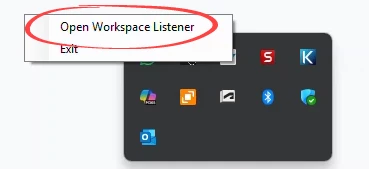
I just found out this myself:


This is also not mentioned in the documentation


Dani
Moderator
Forum|alt.badge.img+2
  • Moderator
  • February 23, 2026

Hey, ​@Harm Horstman,

Thank you for clarifying and for the input, we will improve the documentation about this in the future.
 

For now, I will mark the workaround mentioned by my colleague as an answer.