

Solved

Task popup window

  • Jan 31, 2020 1:16 PM UTC
  • 5 replies
  • 203 views

Forum|alt.badge.img+3

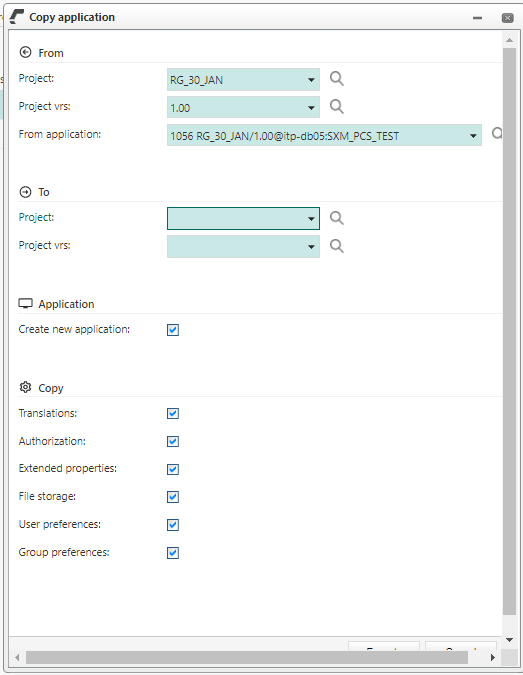
We have an strange probleem with the popup field on the web by an task; In IAM the same problem exists that the buttons will disappear, so please advise me what to do?



Best answer by Arjan Sollie

Hi everyone,

I have seen these kind of pop-ups before. This is often caused due to the fact that the user has enhanced their zoom within their browser. If you would reset the zoom setting to a 100%, it should solve the issue.

View original
This topic has been closed for replies.

5 replies

Erik Brink
Moderator
Forum|alt.badge.img+5
  • Moderator
  • Jan 31, 2020 3:20 PM UTC

Hi Roland,

Seems like the popup width calculation misses a few pixels due to its actual context. Could you please report this issue in TCP?

Regards, Erik


Forum|alt.badge.img+3
  • Author
  • Apprentice
  • Jan 31, 2020 3:56 PM UTC

Can you contact TCP for me? I have no contact information


thanks 


Regards, Ronald


Mark Jongeling
Administrator
Forum|alt.badge.img+23

Hey Ronald,

If you have access to TCP, you can use this link to navigate to TCP: https://tcp.thinkwise.app/web/Login.aspx

Login here and navigate to ‘Issues’ and create a new one.

Hope this helps you.

Kind regards,
Mark Jongeling


Arjan Sollie
Thinkwise blogger
Forum|alt.badge.img+15
  • Thinkwise blogger
  • Answer
  • Feb 3, 2020 10:38 AM UTC

Hi everyone,

I have seen these kind of pop-ups before. This is often caused due to the fact that the user has enhanced their zoom within their browser. If you would reset the zoom setting to a 100%, it should solve the issue.


Forum|alt.badge.img+3
  • Author
  • Apprentice
  • Feb 12, 2020 10:29 AM UTC

Thanks this works