


Question

Size-fitting calculation value total and field width

  • April 3, 2026
  • 1 reply
  • 15 views

Good afternoon,

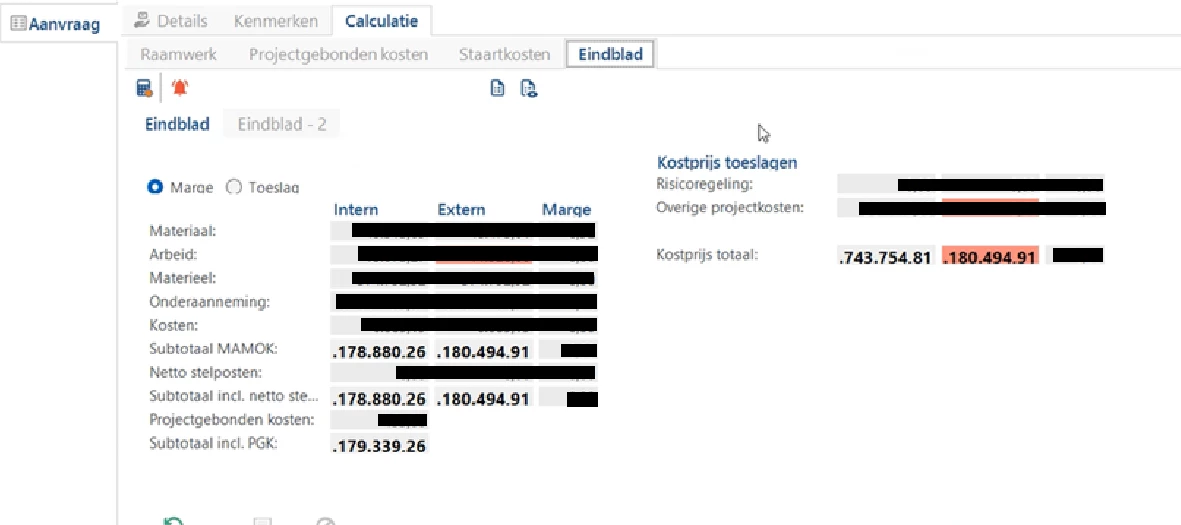
Users of our (cost estimate) software experience an interface problem when coming onto large estimate totals: the number will not fit the field in which it is displayed (see screenshot). All the visible numbers are in the millions. Beyond the sixth figure, it is too wide for the field to display. How can this be fixed? I hope to hear soon!



1 reply

Forum|alt.badge.img

Hi,

You can choose a font with a smaller font size for the columns at “subjects → data → conditional layout”.

It seems editing is not allowed in this screen, you could make a calculated column to remove the decimals for huge numbers since they probably aren’t that relevant.

Also normally you can go to “subjects → components → form” to change the field width of columns, but this wont help in this case since there are already 3 columns next to eachother

