I want to know if/what custom CSS I can use in order to show clearly that the user is working in a non-production environment. Preferably I'd like to show something in the left hand menu bar so it will be always visible.

Solved
Show clearly if you're working in a non-production environment


 +7
+7Best answer by Leroy Witteveen
Hi
In the listbar, you can achieve this text:
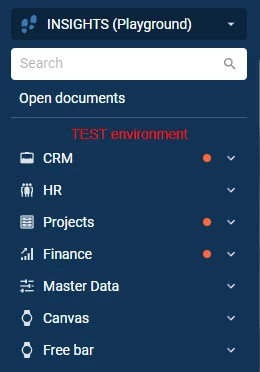
Using this CSS:
.tsf-list-bar:before {
	color: red;
	content: 'TEST environment';
}
If you want to do the color dark/light mode specific, it can be done like this (make sure it aligns with your menu color):
.tsf-list-bar:before {
	content: 'TEST environment';
}

.dark .tsf-list-bar:before {
	color: white;
}

.light .tsf-list-bar:before {
	color: black;
}
Of course, if you want to make the font bigger, you can just add something like this in the same block as the content property is in:
font-size: 20px;
Do be aware though that on a mobile device, by default, the listbar is collapsed and this text thus won't initially be shown.
Kind regards,
Leroy Witteveen






Enter your E-mail address. We'll send you an e-mail with instructions to reset your password.