Since the next platform release will support the SF on the Universal GUI, I was wondering if we could get some info/screenshots on the progress. What concessions or limitations in comparison with the Windows GUI SF will be made? Will it still be possible to edit template code in SMSS for example?
It would be cool if a demo SF (beta version) could be published like https://insights.thinkwise.app/ so the community can play around and maybe notice any shortcomings before the actual release.
Best answer by Arie V
@PeterKeeris Good that you ask! We’re still busy with a few important topics due to which we cannot share a fully-functioning SF on Universal just yet.
Our ambition is to get almost every feature working in the SF on Universal, including an integration with your Code editor! One exception is the Specification module, which will be phased out.
The Modelers are still in development, and there's quite some polishing going on related to Action bars, Task grouping, and optimizing Screens f.e.
Nevertheless, there's 2 things that I'm proud to share:
A short demo of the new Process Flow modeler:
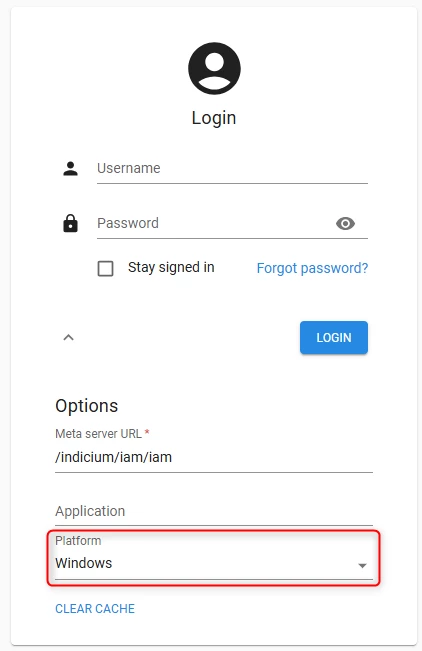
If you want, you can in fact already access most of the Software Factory on the Universal UI, by setting Platform to Windows on the Universal login screen. DISCLAIMER: most changes need to be made in the SF model itself. It works fairly fine with Platform releases in 2025 (don’t even try with older versions), but we haven’t optimized for Universal-usage in those releases. There’s no need to raise tickets for any bugs/errors you might encounter (unless it’s a very obscure one for which you consider it unlikely for us to encounter it).
@PeterKeeris Good that you ask! We’re still busy with a few important topics due to which we cannot share a fully-functioning SF on Universal just yet.
Our ambition is to get almost every feature working in the SF on Universal, including an integration with your Code editor! One exception is the Specification module, which will be phased out.
The Modelers are still in development, and there's quite some polishing going on related to Action bars, Task grouping, and optimizing Screens f.e.
Nevertheless, there's 2 things that I'm proud to share:
A short demo of the new Process Flow modeler:
If you want, you can in fact already access most of the Software Factory on the Universal UI, by setting Platform to Windows on the Universal login screen. DISCLAIMER: most changes need to be made in the SF model itself. It works fairly fine with Platform releases in 2025 (don’t even try with older versions), but we haven’t optimized for Universal-usage in those releases. There’s no need to raise tickets for any bugs/errors you might encounter (unless it’s a very obscure one for which you consider it unlikely for us to encounter it).
@PeterKeeris Good that you ask! We’re still busy with a few important topics due to which we cannot share a fully-functioning SF on Universal just yet.
Our ambition is to get almost every feature working in the SF on Universal, including an integration with your Code editor! One exception is the Specification module, which will be phased out.
The Modelers are still in development, and there's quite some polishing going on related to Action bars, Task grouping, and optimizing Screens f.e.
Nevertheless, there's 2 things that I'm proud to share:
A short demo of the new Process Flow modeler:
If you want, you can in fact already access most of the Software Factory on the Universal UI, by setting Platform to Windows on the Universal login screen. DISCLAIMER: most changes need to be made in the SF model itself. It works fairly fine with Platform releases in 2025 (don’t even try with older versions), but we haven’t optimized for Universal-usage in those releases. There’s no need to raise tickets for any bugs/errors you might encounter (unless it’s a very obscure one for which you consider it unlikely for us to encounter it).
Thanks for sharing this.
I hope you are also planning to improve the data density. Right now I need to zoom out to about 75% to get a decent overview, but this makes the action bar really small and grid text vague.
On Data density: I did a follow up with @PeterKeeris and the biggest difference between Windows GUI and Universal UI data density was in the Grid column width. This is due to a known ‘issue’ where the default column width in combination with Auto column width = No in the Universal UI is much wider than in the Windows GUI.
We do however recommend to use Auto column width = Headers and data in the Universal UI (we even offer an Enrichment for it). So that will be applied to the SF from Release 2026.1 onwards and should resolve the Data density issue.