


Question

Set filter condition "IN" as default filter condition

  • June 15, 2026
  • 3 replies
  • 17 views

Arjan Sollie
Thinkwise blogger
Forum|alt.badge.img+15

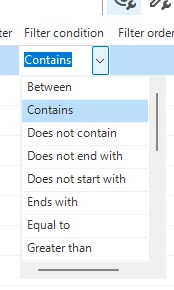
Is it possible to set the default Filter Condition of a column to the “IN” condition?

I am working on 2025.3 and do not see this option. Next to this, the docs do not provide any information about this feature as well. 

If this is not possible, I would advise having this implemented asap.
 

3 replies

Mark Jongeling
Administrator
Forum|alt.badge.img+23

Hi Arjan,

We're working on it as we speak! Intended to release with 2026.2.11.


Arjan Sollie
Thinkwise blogger
Forum|alt.badge.img+15
  • Author
  • Thinkwise blogger
  • June 15, 2026

@Mark Jongeling 

Would it be possible to also make this backwards compatible to the 2025.3 version?

Because this is a very powerful feature and will help my customers with convincing their users that the upgrade to Universal is more than just a necessary maintenance update.


Mark Jongeling
Administrator
Forum|alt.badge.img+23

That will sadly not be an option.

2025.3 also has support for Windows 2-tier, and adding a new Filter condition that this GUI does not support, could lead to the GUI not being able to start up at all.

Besides that, the filter condition field currently shares the domain with elements with several other fields,such as Conditional layout conditions and prefilter conditions. These entities will not support the IN condition, therefore a new domain is created solely for the Default filter condition for Columns.


