



Solved

Set a default grid row height (in theme)

  • Apr 13, 2021 1:00 PM UTC
  • 2 replies
  • 78 views

Forum|alt.badge.img

I want to set a default grid row height for all tables in a project.

I found an option to set it for every table separately under the settings tab of Subjects
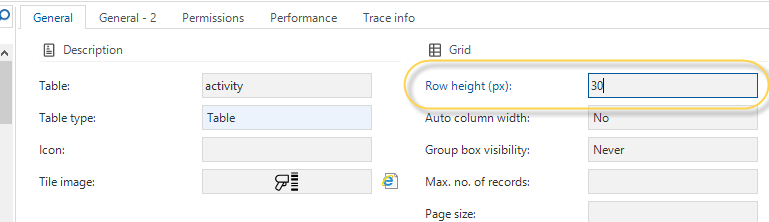


But is there somewhere an option to set a default for all tables/views?

I tried to find it in Themes, but maybe I overlooked it?
 

Best answer by Mark Jongeling

Hi Stefan,

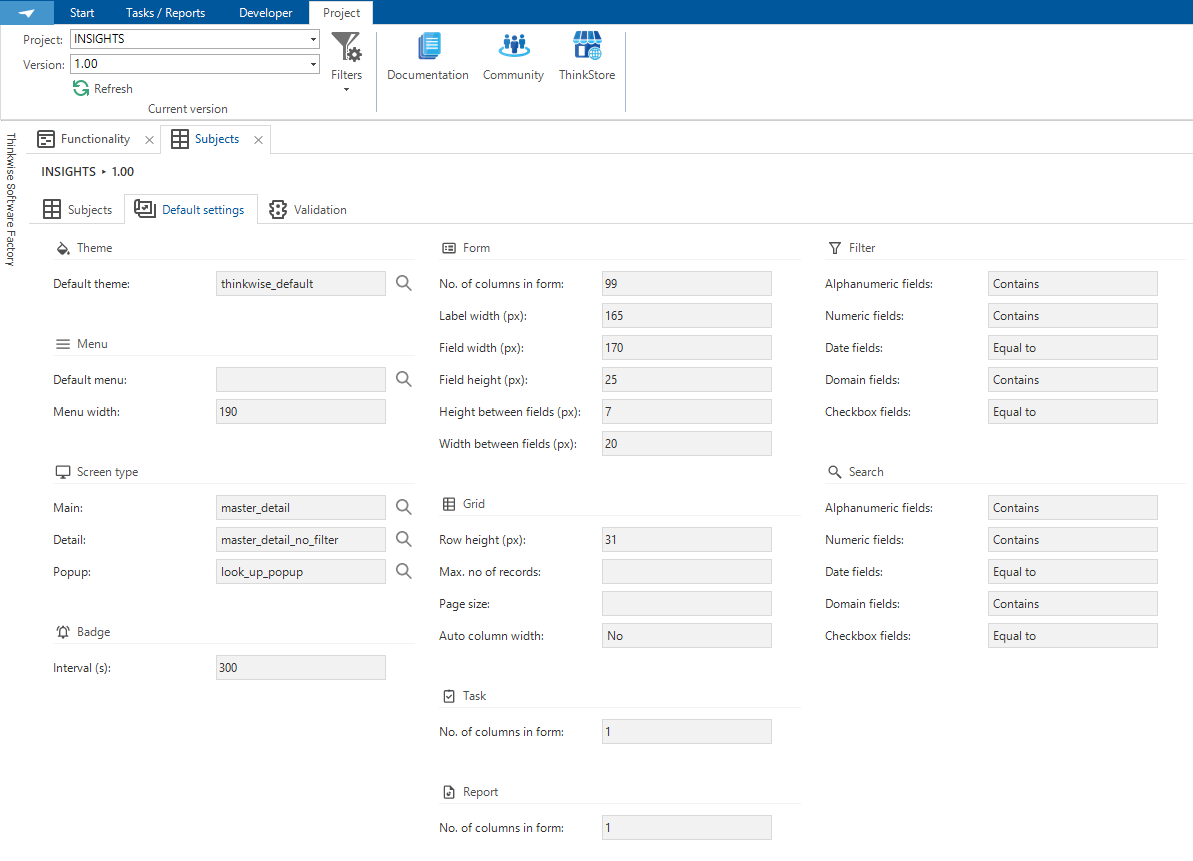
We have a Default setting tab in Subjects. This will be the Default setting for all subjects unless deviated from. Here you also can find Row height (px):

Software factory → Subjects → Default settings


View original
This topic has been closed for replies.

2 replies

Mark Jongeling
Administrator
Forum|alt.badge.img+23
  • Software Architect
  • Answer
  • Apr 13, 2021 1:06 PM UTC

Hi Stefan,

We have a Default setting tab in Subjects. This will be the Default setting for all subjects unless deviated from. Here you also can find Row height (px):

Software factory → Subjects → Default settings


Forum|alt.badge.img
  • Author
  • Apprentice
  • Apr 13, 2021 1:12 PM UTC

So I obviously overlooked it.

Tnx