Solved

Process Flow rights, checkbox Available not clear

  • September 1, 2025
  • 3 replies
  • 23 views

Harm Horstman
Superhero
Forum|alt.badge.img+21


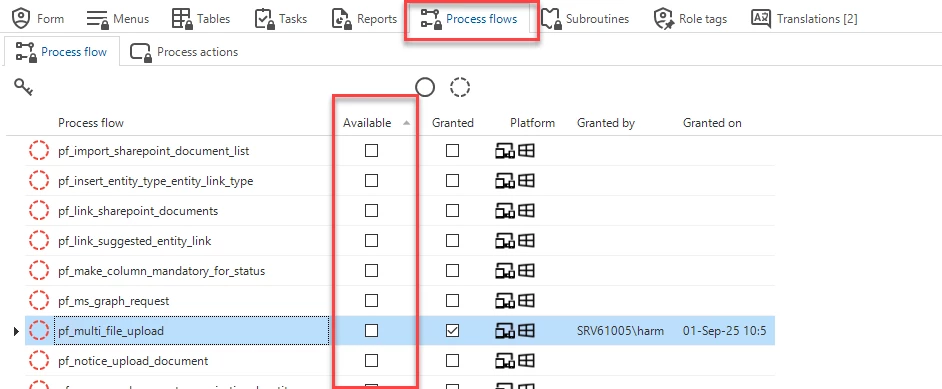
It is not clear on what the checkbox ‘Available’ depends. And there is the option ‘Make Available’ is also not visible when using the Grant task.

Can someone explain this?

Best answer by Tim de Lang

Hi Harm,

Available depends on whether all process actions and related entities are available. You have another tab ‘process actions’ on that screen that’ll tell you that. 

Note, if you have a process action ‘Open document’, then the subject you want to open should also be available. This goes for all actions.

Hopes this clears things up.

Kind regards,

Tim de Lang

This topic has been closed for replies.

3 replies

Tim de Lang
Moderator
Forum|alt.badge.img+4
  • Moderator
  • Answer
  • September 1, 2025

Hi Harm,

Available depends on whether all process actions and related entities are available. You have another tab ‘process actions’ on that screen that’ll tell you that. 

Note, if you have a process action ‘Open document’, then the subject you want to open should also be available. This goes for all actions.

Hopes this clears things up.

Kind regards,

Tim de Lang


  • Rookie
  • September 1, 2025

Thank you Tim!

It is clear, but I think it is too complicated and easy to forget required rights. 

Would it be an idea to switch on process flow rights by default in case the start action of a process flow is a table task?


Tim de Lang
Moderator
Forum|alt.badge.img+4
  • Moderator
  • September 1, 2025

Hi Harm,

If that process flow then performs process actions on a different entity (e.g. ‘open document’ on a subject you do not have the rights to), the process flow would not work, even if the start action is a table task.

So not just the start action, but all actions do matter in this case.

Kind regards,

Tim de Lang