Question

Issues connecting to MCP with ChatGPT on version 2026.3


Hello, guys. How are you?


I need your help with the configuration of the MCP on Thinkwise.

I configured the client app, the applications and user to have delegated access. I also configured chatGPT (when I set the connection it finds everything automatically). The thing is: ChatGPT can connect to the applications with the correct scopes, but it says that there are no tools available for him: 

"I can see your plugin selection, but its callable tools were not exposed.

That doesn’t prove the MCP server has no tools—only that I cannot currently list or invoke them. I also can’t determine the cause from the information available."

On version 2026.2.14 it was working just fine.

My indicium environment runs on podman and is behind a reverse proxy (NGINX).

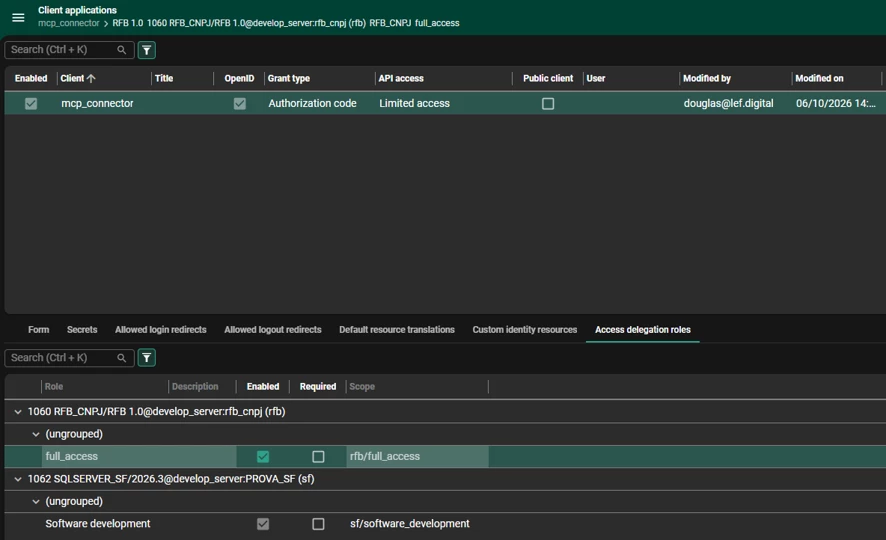
This is my client application configuration:
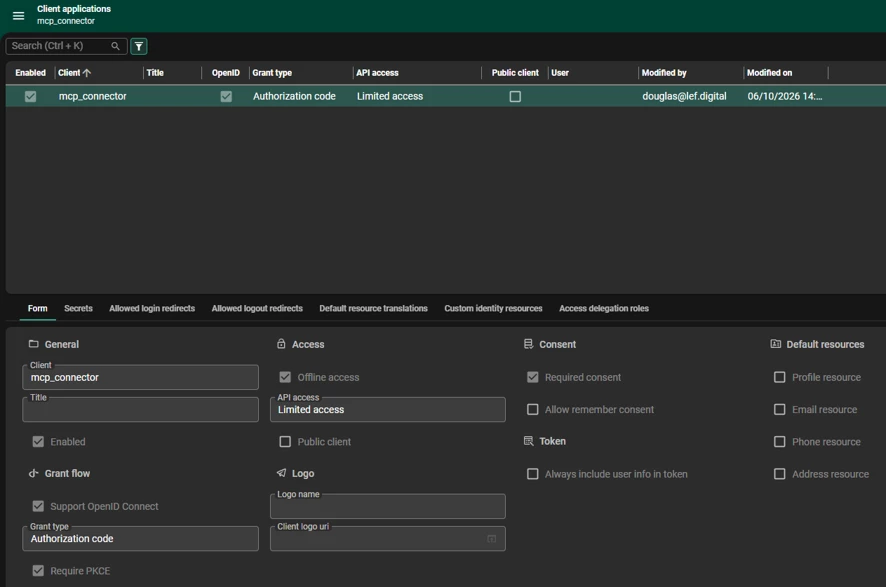
Client Application Forms
Client Application Access Delegation


6 replies

Mark Jongeling
Administrator
Forum|alt.badge.img+23

Hi ​@douglas_silva,

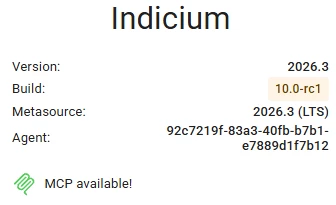
If 2026.2.14 it did work but on 2026.3 not, I'm wondering if it could be due to licensing. On you Indicium homepage, this should appear:

MCP is available to use

If this is not as shown, you are missing the license that enables MCP usage.

You may need to reload or update the license. On the Indicium homepage, you can open up License, then click to get an updated license. This should make MCP become available.

If it is enabled, then it is a little strange that it has worked before. Are you certain the only variable that changed is the platform upgrade?


Freddy
Thinkwiser
Forum|alt.badge.img+16
  • Thinkwise Local Partner Brasil
  • October 14, 2026

​@Mark Jongeling i have been checking with an MCP inspector, we can connect and load the tools, all 13 if correct. But 3 (stage_resource, patch_resource, stage_task) give portability errors with the same mention:

ERROR

inputSchema.properties.properties.items.properties.value

Bare `true` used where a schema object is expected.

Fix: Declare what the value actually is — e.g. `{"type": "object", "additionalProperties": true}` for a free-form object. That is a deliberate change of contract, not an equivalent rewrite: `true` accepts any JSON value at all.

These constructs are legal JSON Schema but are refused or mishandled by some MCP clients, so a tool can work here and fail there.


Did something change between latest STS and this LTS? 

Others also give warnings the once with an error and also get_entity_definition, search_capabilities, search_domain_capabilities with the following mention:


`type` is an array (["string","null"]). This is legal JSON Schema, and some model providers recommend it for nullable fields, but it is less portable: a client that maps tool schemas onto a single-`type` dialect (such as the OpenAPI subset used for Gemini function declarations) may reject the tool or drop the constraint.

Fix: Split it into `anyOf` branches, each with a single `type` — `{"anyOf": [{"type": "string"}, {"type": "null"}]}`. (Making the property optional instead is a different contract: absent is not the same as `null`.) A dialect with no `null` type, such as OpenAPI 3.0, still cannot express the `null` branch directly; there nullability is written `nullable: true`, which is not JSON Schema, so no single spelling is portable to both.


Can this be fixed? 

It appears that ChatGPT fails to load the tool list due to the errors.


Hey ​@Freddy,


These warnings do not have anything to do with the MCP not working. I see the warnings/errors as well on MCP inspector, but on our side Claude and ChatGPT work fine. MCP inspector has a stronger opinion on how things should be done, but as mentioned in the messages the tool schemas are legal JSON. It is something we will take a closer look at, but it is not related to the earlier mentioned problem.


What environment are you trying to connect the MCP inspector to?


Mark Jongeling
Administrator
Forum|alt.badge.img+23

Hey, heard from another colleague that there is the possibility that the Application Gateway in Azure is set up in such way that all calls from Claude were blocked; possibly also Codex calls. Can you check the Application Gateway in Azure?


Freddy
Thinkwiser
Forum|alt.badge.img+16
  • Thinkwise Local Partner Brasil
  • October 15, 2026

Hey ​@Freddy,


These warnings do not have anything to do with the MCP not working. I see the warnings/errors as well on MCP inspector, but on our side Claude and ChatGPT work fine. MCP inspector has a stronger opinion on how things should be done, but as mentioned in the messages the tool schemas are legal JSON. It is something we will take a closer look at, but it is not related to the earlier mentioned problem.


What environment are you trying to connect the MCP inspector to?

Hi ​@Maurits Naber, 

We have a sandbox and there it's working, we also have a concepts environment and there it's not working yet with an apparent similar setup. However in the concepts on the indicium landing page it continues to mention MCP Unavailable while the other environment says MCP Available. 

I did notice that the documentation mentions base url/indiicum/mcp as server address, this for ChatGPT doesn't seem to be correct, at least for our environments where it's working the server url needs to the the baseurl/indicium (where the .well-known/openid-configuration is hosted) and then it pre-fills the various fields correctly.

when I then install MCP as a plugin it works up to the consent, when it then goes back to ChatGPT it fails to discover the tools.   


Freddy
Thinkwiser
Forum|alt.badge.img+16
  • Thinkwise Local Partner Brasil
  • October 15, 2026

Hey, heard from another colleague that there is the possibility that the Application Gateway in Azure is set up in such way that all calls from Claude were blocked; possibly also Codex calls. Can you check the Application Gateway in Azure?


We don't use Azure, but the call is not blocked.  When I hit the refresh tools in ChatGPT I see in Indicium

info: Duende.IdentityServer.Hosting.IdentityServerMiddleware[0]
      Invoking IdentityServer endpoint: "Duende.IdentityServer.Endpoints.TokenEndpoint" for "/connect/token"
info: Duende.IdentityServer.Validation.TokenRequestValidator[0]
      Token request validation success, TokenRequestValidationLog { ClientId: "mcp_connector", ClientName: null, GrantType: "refresh_token", Scopes: null, AuthorizationCode: "********", RefreshToken: "****AD-1", UserName: null, AuthenticationContextReferenceClasses: null, Tenant: null, IdP: null, Raw: [("grant_type": "refresh_token"), ("refresh_token": "***REDACTED***"), ("client_id": "mcp_connector"), ("client_secret": "***REDACTED***")] }
info: General[0]
      [OpenID] Loaded IdentityServer signing certificate from Current User Certificate Store.
info: Duende.IdentityServer.Hosting.IdentityServerMiddleware[0]
      Invoking IdentityServer endpoint: "Duende.IdentityServer.Endpoints.DiscoveryEndpoint" for "/.well-known/openid-configuration"
warn: Indicium.Middleware.Authentication.GlobalAuthenticationHandler[0]
      An access token for user '"***REDACTED***"' and client application '"mcp_connector"' contained a scope '"offline_access"', but the role represented by this scope is no longer allowed for this client application. The scope will be skipped and the role will not be granted.
warn: Indicium.Middleware.Authentication.GlobalAuthenticationHandler[0]
      An access token for user '"***REDACTED***"' and client application '"mcp_connector"' contained a scope '"offline_access"', but the role represented by this scope is no longer allowed for this client application. The scope will be skipped and the role will not be granted.
warn: Indicium.Middleware.Authentication.GlobalAuthenticationHandler[0]
      An access token for user '"***REDACTED***"' and client application '"mcp_connector"' contained a scope '"offline_access"', but the role represented by this scope is no longer allowed for this client application. The scope will be skipped and the role will not be granted.


In the plugin manager it says "Couldn't update the app. Try again"

I do see in our access logs:

191.234.167.151 - - [15/Oct/2026:11:36:22 -0300] "GET /.well-known/oauth-protected-resource/api HTTP/1.1" 404 104 "-" "Python/3.14 aiohttp/3.14.4" xff="-" host="concepts.lab.lef.software" http_host="concepts.lab.lef.software" server_name="concepts.lab.lef.software" upstream="192.168.20.xx:8310" upstream_status="404" request_time="0.001" upstream_connect_time="0.000" upstream_header_time="0.001" upstream_response_time="0.001"
191.234.167.151 - - [15/Oct/2026:11:36:22 -0300] "GET /.well-known/oauth-authorization-server/api HTTP/1.1" 404 104 "-" "Python/3.14 aiohttp/3.14.4" xff="-" host="concepts.lab.lef.software" http_host="concepts.lab.lef.software" server_name="concepts.lab.lef.software" upstream="192.168.20.xx:8310" upstream_status="404" request_time="0.001" upstream_connect_time="0.000" upstream_header_time="0.000" upstream_response_time="0.000"
191.234.167.151 - - [15/Oct/2026:11:36:22 -0300] "GET /.well-known/oauth-authorization-server HTTP/1.1" 404 104 "-" "Python/3.14 aiohttp/3.14.4" xff="-" host="concepts.lab.lef.software" http_host="concepts.lab.lef.software" server_name="concepts.lab.lef.software" upstream="192.168.20.xx:8310" upstream_status="404" request_time="0.001" upstream_connect_time="0.000" upstream_header_time="0.001" upstream_response_time="0.001"


Apparently it calls /.well-known/oauth-protected-resource/api which is forwarded to our upstream (indicium) which says it cannot find it.