


Solved

Image upload Universal

  • Nov 18, 2022 1:05 PM UTC
  • 2 replies
  • 186 views

rbiram
Thinkwiser
Forum|alt.badge.img+4

Hi,

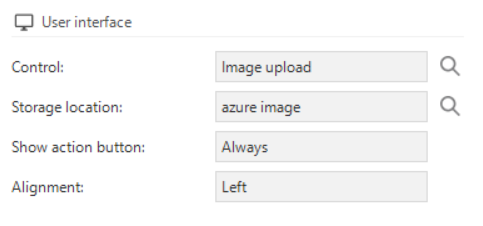
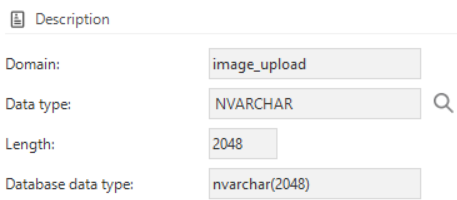
I've set up an image column with an image_upload domain.

This is how the domain is set up:
The ‘azure image’ storage location is configured like this:
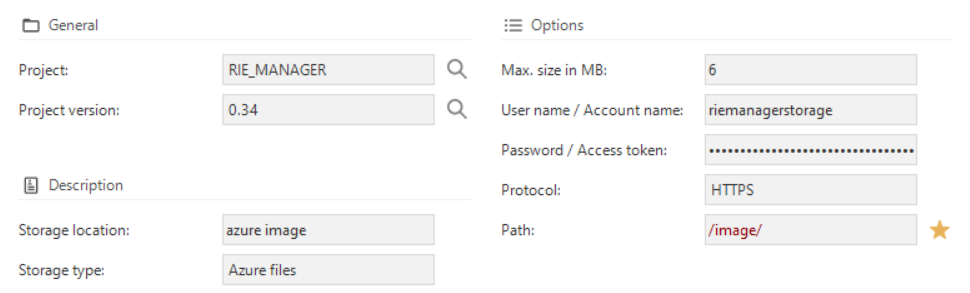
Where the user name is the storage account name and the password is key 1 from the Acces keys page for that particular storage. 


All seems right to me so far. But when I opend the tab where this column is located I get an unknown error:

This error can't be found in the logs and Redux isn't showing me anything to fix either.


I know it's the image column that causes the error, because when I change the domain to something random like a varchar, the page loads fine.


I'm on Universal GUI 2022.2.15


Anyone has an idea what it could be?
 

Best answer by rbiram

I have good news and I have bad news.


It works, sadly I don't have an answer as to why. 

View original
This topic has been closed for replies.

2 replies

Erik Brink
Moderator
Forum|alt.badge.img+5
  • Moderator
  • Nov 22, 2022 1:17 PM UTC

Hi,

Could you check the Network tab of the browsers DevTools to see what request to Indicium is coloring red with status 500?

It is pretty strainge the error couldn't be found in the error log of the corresponding Indicium instance.

Best regards,
Erik


rbiram
Thinkwiser
Forum|alt.badge.img+4
  • Author
  • Thinkwiser
  • Answer
  • Nov 24, 2022 10:37 AM UTC

I have good news and I have bad news.


It works, sadly I don't have an answer as to why.