Question

how to not show empty report in loop

  • February 5, 2026
  • 5 replies
  • 23 views

Forum|alt.badge.img+1

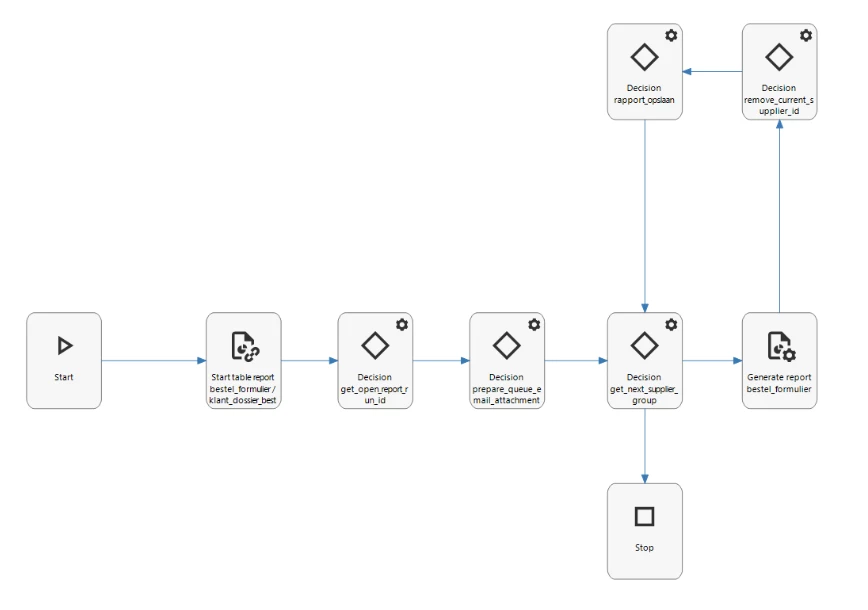
In our application, we have a process flow loop to generate reports. when the customer places an order he can select 1 or more order lines. Attached to the order lines are suppliers. The report loop groups the order lines per supplier to generate 1 report per supplier.


This all goes well, but the report that is shown as a pop-up at the end is empty (because the loop ran out of suppliers and stopped). this empty report is the only generated report that is shown. how can I prevent this empty report to be shown?




5 replies

Tim de Lang
Moderator
Forum|alt.badge.img+4
  • Moderator
  • February 9, 2026

Hi ​@Mike Heijstee ,

could you show the process flow? And what is the logic of the loop?

My initial though is to change the loop to only do work while there are still suppliers left, so you’d never get the empty report.

Kind regards,

Tim


Forum|alt.badge.img+1
  • Author
  • Sidekick
  • February 9, 2026

Hi Tim,


this is the process flow:


Tim de Lang
Moderator
Forum|alt.badge.img+4
  • Moderator
  • February 9, 2026

Hi ​@Mike Heijstee ,

I can’t see what the content of the decisions are, are you able to implement the suggestion to only generate the report if there is a next supplier, else go to the stop node?

Kind regards,

Tim


Forum|alt.badge.img+1
  • Author
  • Sidekick
  • February 9, 2026

Hi Tim,


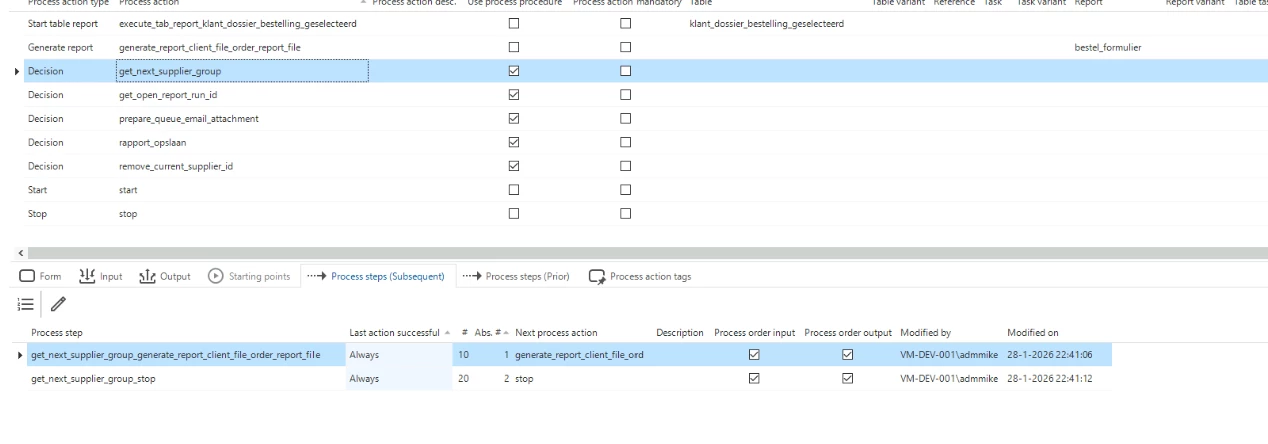
I intend to do so with:


IF @next_id IS NULL
BEGIN
    -- nothing left
    SET @get_next_supplier_group_generate_report_client_file_order_report_file = 0;
    SET @get_next_supplier_group_stop = 1;
    RETURN;
END


Forum|alt.badge.img+1
  • Author
  • Sidekick
  • February 9, 2026