Solved

how to fill bearer token in multitennant situation when token is stored in SQL table

  • November 26, 2025
  • 11 replies
  • 70 views

Forum|alt.badge.img+1

we have a web connection where we (temporarily) receive the bearer tokens via another way (yes i know, not ideal, hence temporary) and store them in a table.


i have modelled the web connection with authentication type: bearer token and the bearer token as {token}.

my question is: how do i fill this with the value in the table for every tennant?

Best answer by Mark Jongeling

Without knowing the complete process, I'm guessing here.

You most likely have a task that initiates the process flow. I assume this is a Table task and inherits the tenant_id from the selected record.

The Process flow, most likely, should be like this:

Start → Start table task* → Web connection → something else / Stop

Or Start → Start table task* → Decrypt → Web connection → something else / Stop

* (Process procedure), but you could opt to add a decision instead as next process action.

In the Process procedure, whether it is on the Start table task or a separate decision, it should take care of obtaining the Bearer token, by selecting it from the table based on the tenant_id and presumably customer_id. 

If you do opt to apply encryption, the Decrypt process action is necessary to decrypt the obtained token. When obtaining the token, it first need to be placed in an varbinary(max) process variable as the encrypted value is varbinary. Then be given to the Decrypt action as Input. The Output value should be mapped on the next process variable...

The (decrypted) token should then be placed in a process variable, let's say token.

Then in the Web connection process action input parameters, bind parameter token with variable token.

Now, your {token} will be replaced at runtime with the value of the process variable token.

Does this help enough to build it successfully?

This topic has been closed for replies.

11 replies

Mark Jongeling
Administrator
Forum|alt.badge.img+23
  • Administrator
  • November 26, 2025

Hi Mike,

To use the {token}, you will need a Web connection parameter to map the parameter onto a process variable. Then in the Web connection process action, map the process variable that holds the tenant specific bearer token onto the token input parameter.

Prior to this Web connection process action, you most like have a Decision process action in which the Bearer must be obtained from the database for a specific tenant (based on some conditions) and be placed in the process variable.

More info on it here: Web connections | Thinkwise Documentation

Hope this helps!

Edit; for the time being if you really have to store the credentials in a table, you could opt to use Encrypt and Decrypt. This way, the bearer token can be initially stored encrypted in the database and only Indicium can decrypt it. In your process flow, that calls the web connection, the Decrypt process action ccan decrypt the bearer token.


Forum|alt.badge.img+1
  • Author
  • Sidekick
  • November 26, 2025

Hi Mark,


thanks!


had a look at the documentation also prior to asking. the how to was just not clear for me.

I tried it via a task, but that didn't work, since the task put it in the body, not the header.

should I run the task and the decision in a particular order?


and thanks also for the encryption tip!


Mark Jongeling
Administrator
Forum|alt.badge.img+23
  • Administrator
  • Answer
  • November 26, 2025

Without knowing the complete process, I'm guessing here.

You most likely have a task that initiates the process flow. I assume this is a Table task and inherits the tenant_id from the selected record.

The Process flow, most likely, should be like this:

Start → Start table task* → Web connection → something else / Stop

Or Start → Start table task* → Decrypt → Web connection → something else / Stop

* (Process procedure), but you could opt to add a decision instead as next process action.

In the Process procedure, whether it is on the Start table task or a separate decision, it should take care of obtaining the Bearer token, by selecting it from the table based on the tenant_id and presumably customer_id. 

If you do opt to apply encryption, the Decrypt process action is necessary to decrypt the obtained token. When obtaining the token, it first need to be placed in an varbinary(max) process variable as the encrypted value is varbinary. Then be given to the Decrypt action as Input. The Output value should be mapped on the next process variable...

The (decrypted) token should then be placed in a process variable, let's say token.

Then in the Web connection process action input parameters, bind parameter token with variable token.

Now, your {token} will be replaced at runtime with the value of the process variable token.

Does this help enough to build it successfully?


Forum|alt.badge.img+1
  • Author
  • Sidekick
  • December 1, 2025

Hoi Mark,


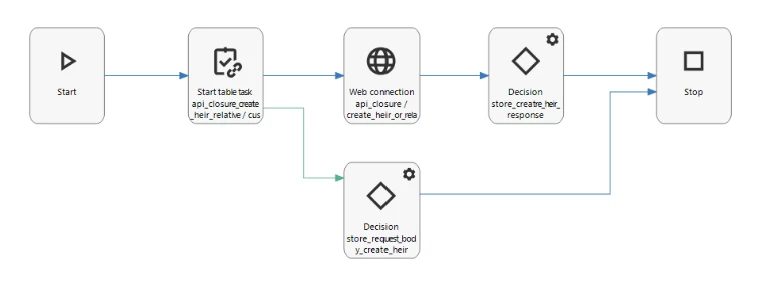
Thanks. This is how is have set it up.


I intend to add encryption, once i have this part running correctly.


What went wrong is that i had the token included in the json body.

I fixed that by seperating them in the query for the table task.


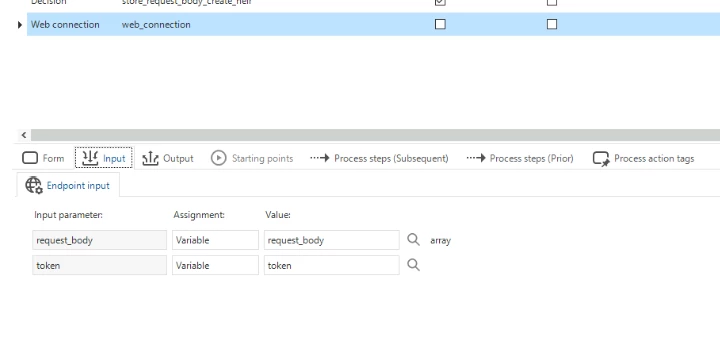
I have bound the token in the web connection process action input parameters.


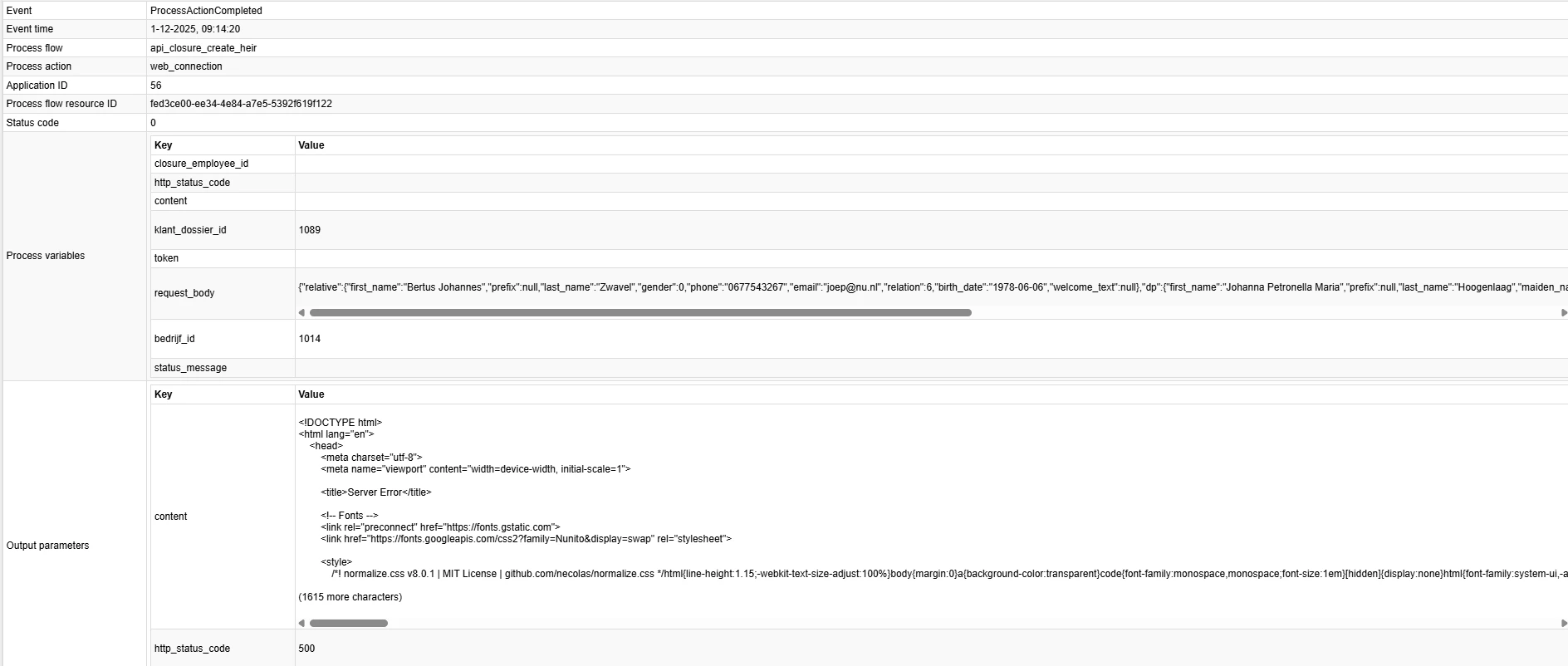
Yet, still, it stays empty.


Any suggestions?

I will be in TEC tomorrow, to hopefully fix it.


Kind regards, Mike


Mark Jongeling
Administrator
Forum|alt.badge.img+23

Hi Mike,

I'll come by tomorrow and help out! 

The token somehow needs to obtain its value. Can I assume correctly that the Start table task provides the value? Make sure the output parameters of the Start table task indeed map the Token from the Start table task to the Token process variable (that will be used as input parameter for the Web connection)


Forum|alt.badge.img+1
  • Author
  • Sidekick
  • December 1, 2025

Hi Mark,


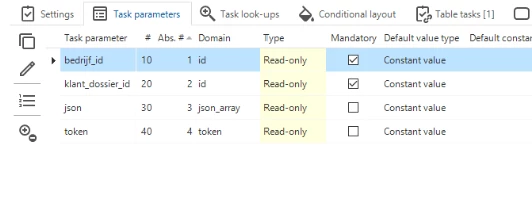
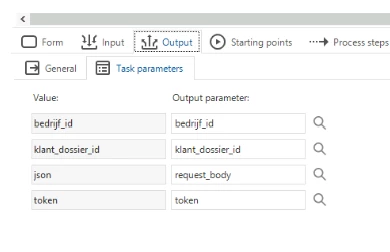
 these are the table task parameters.


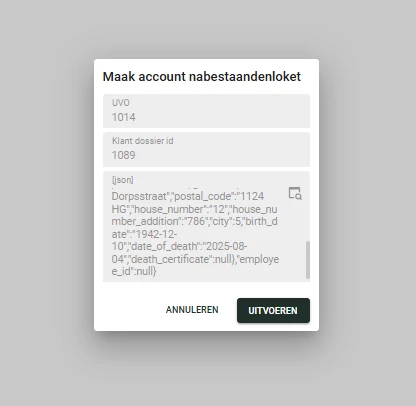
this is what is see as input for the table task.


it seems that somehow the task is not performing as i would like it to do.


kind regards, Mike


Forum|alt.badge.img+1
  • Author
  • Sidekick
  • December 1, 2025

Hi Mark,


thanks again.


had a look at the process flow, table task and indeed token was not connected as output variable (even though i am quite sure i connected it earlier)


but,  ……


still empty when running process..


Mark Jongeling
Administrator
Forum|alt.badge.img+23

Hi Mike,

In the SF under menu Processes > Tasks > tab Table tasks > tab Table task parameters, is the token task parameter bound to a table column? If not, does the Task logic ensure the Task parameter receives a value? If that is also not the case, then the token parameter will indeed remain empty.

You must fill @token in some way, and that can be by either obtaining it from the underlying table using a Table task parameter link, or by selecting a value into it in the Task logic.


Forum|alt.badge.img+1
  • Author
  • Sidekick
  • December 1, 2025

Hi Mark,


token is not a column (and neither is jason) of the table that the table task is attached to.

in a default, i try to fill the values.


SET @json =
(
    SELECT 
        -- Relative information
        relative = JSON_QUERY
        (
            (
                SELECT  kc.voornaam               AS first_name
                       ,kc.tussenvoegsel          AS prefix
                       ,kc.achternaam             AS last_name
                       ,kc.geslacht               AS gender
                       ,kc.telefoonnummer         AS phone
                       ,kc.emailadres             AS email
                       ,kc.relatie_tot_overledene AS relation
                       ,kc.geboorte_datum         AS birth_date
                       ,NULL                      AS welcome_text
                FOR JSON PATH, WITHOUT_ARRAY_WRAPPER, INCLUDE_NULL_VALUES
            )
        )

        -- Deceased person data
       ,dp = JSON_QUERY
        (
            (
                SELECT  kd.voornaam         AS first_name
                       ,kd.tussenvoegsel    AS prefix
                       ,kd.achternaam       AS last_name
                       ,kd.gehuwde_naam     AS maiden_name
                       ,kd.roepnaam         AS nickname
                       ,kd.geslacht         AS gender
                       ,kd.straatnaam       AS street
                       ,kd.postcode         AS postal_code
                       ,kd.huisnummer       AS house_number
                       ,kd.appartement      AS house_number_addition
                       ,kd.woonplaats_id    AS city
                       ,kd.geboorte_datum   AS birth_date
                       ,kd.datum_overlijden AS date_of_death
                       ,NULL                AS death_certificate
                FOR JSON PATH, WITHOUT_ARRAY_WRAPPER, INCLUDE_NULL_VALUES
            )
        )

        -- Employee ID
       ,bc.closure_employee_id AS employee_id
    FROM klant_dossier kd
    JOIN klant_contactpersoon kc
      ON kc.bedrijf_id       = kd.bedrijf_id
     AND kc.klant_dossier_id = kd.klant_dossier_id
    JOIN bedrijf_contactpersoon bc
      ON bc.bedrijf_id                 = kd.bedrijf_id
     AND bc.bedrijf_contactpersoon_id  = kd.uitvaartleider_id
    WHERE kd.bedrijf_id       = @bedrijf_id
      AND kd.klant_dossier_id = @klant_dossier_id
      AND kc.opdrachtgever    = 1 -- yes
    FOR JSON PATH, WITHOUT_ARRAY_WRAPPER, INCLUDE_NULL_VALUES
);

SELECT
    ct.access_token AS token
FROM company_token ct
WHERE ct.bedrijf_id = @bedrijf_id;


Mark Jongeling
Administrator
Forum|alt.badge.img+23

SELECT
    ct.access_token AS token
FROM company_token ct
WHERE ct.bedrijf_id = @bedrijf_id;

This does indeed select the token, but it does not set the @token parameter. The code should liike something like this:

SELECT @token = ct.access_token
FROM company_token ct
WHERE ct.bedrijf_id = @bedrijf_id;

This way @token is filled with the value from ct.access_token. Hope this fixes it!


Forum|alt.badge.img+1
  • Author
  • Sidekick
  • December 1, 2025

Hoi Mark,


helaas is nu systeem vastgelopen bij creation. ik ga er vanuit zonder link met bovenstaande wijziging 😉


hopelijk morgen laatste puntje op de i.


dank voor je hulp!


groet, Mike