
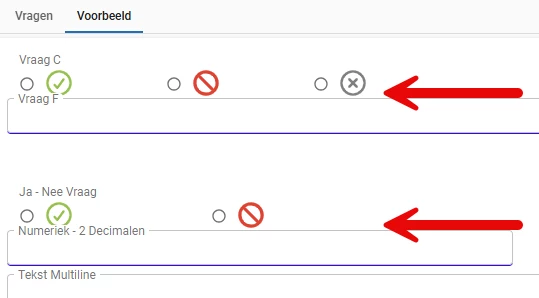
I try to create more space between fields in a Form List.
For some reason the setting ‘Height between fields’ has no effect.
Is the setting not yet implemented in Universal? Wat can we do with custom css?



 +21
+21
I try to create more space between fields in a Form List.
For some reason the setting ‘Height between fields’ has no effect.
Is the setting not yet implemented in Universal? Wat can we do with custom css?
Best answer by Nigel Smit
Hello Harm,
At this time, this setting has not yet been implemented in the Universal GUI.
As a workaround for the icons being too close to the next field, you could enable the "Field in next section" setting for the "Numeriek - 2 Decimalen" field, if this fits your use case.
Kind regards,
Nigel Smit
Enter your E-mail address. We'll send you an e-mail with instructions to reset your password.