



Answer

formatted tooltip

  • January 14, 2021
  • 4 replies
  • 136 views

Forum|alt.badge.img+5

I'm trying to include a formatted tooltip on a translation. I've seen that HTML-formatting is (or at least was) possible. Unfortunately in my current environment (2021.1 and Windows GUI) this doesn't seem to work.
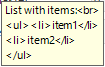
Tooltip in action

Just tried to include </br>, which result is better, but still not an unordered list:

Am open to receive suggestions to formatting (un)ordered lists.
And if not all formatting is supported to know which ones are.
Best answer by Erwin Ekkel

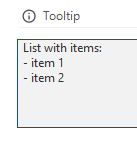
A subset of HTML is used, this means that basic format options like bold and italic will work. List however is not supported. I’ve created a wish to change the documentation to show all supported options. 

Perhaps you could format your tooltip like this: 


Which will result in something like this: 


This topic has been closed for replies.

4 replies

Forum|alt.badge.img+17
  • Moderator
  • Answer
  • January 15, 2021

A subset of HTML is used, this means that basic format options like bold and italic will work. List however is not supported. I’ve created a wish to change the documentation to show all supported options. 

Perhaps you could format your tooltip like this: 


Which will result in something like this: 


Forum|alt.badge.img+5

Thanks Erwin,

Is there also an option to show an image in the tooltip? And is this image then stored on the database, or should it be a reference to an image on the web?

I've already created an idea to have more options.


Forum|alt.badge.img+17
  • Moderator
  • January 15, 2021

Images are not currently supported. Creating an idea would be my next suggestion, good to hear you already did this! 


Forum|alt.badge.img
  • Apprentice
  • January 15, 2021

Exactly the same thing I struggled with the tooltip in the scheduler extender. There's an option to enable HTML-formatting in a tooltip. Tried several things but to no avail. 

I upvoted your idea



