


Solved

Find all roles that have access to a table from the SF

  • April 3, 2026
  • 4 replies
  • 9 views

Forum|alt.badge.img+2

I often use the query

`select * from role_tab

where tab_id = 'my_tab'
and branch_id = 'my_branch'

`

when adjusting rights for a certain table (eg. new column added)

to check if I have not missed any tables that have rights to the table.


It would be convenient if in the Software Factory I could select a table and access type (hidden/read/edit, available) and then get a list of all roles that have the specified access on the active branch.

Same could be useful for not just tables but columns, tasks, etc.
Best answer by Mark Jongeling

Hi Robin,

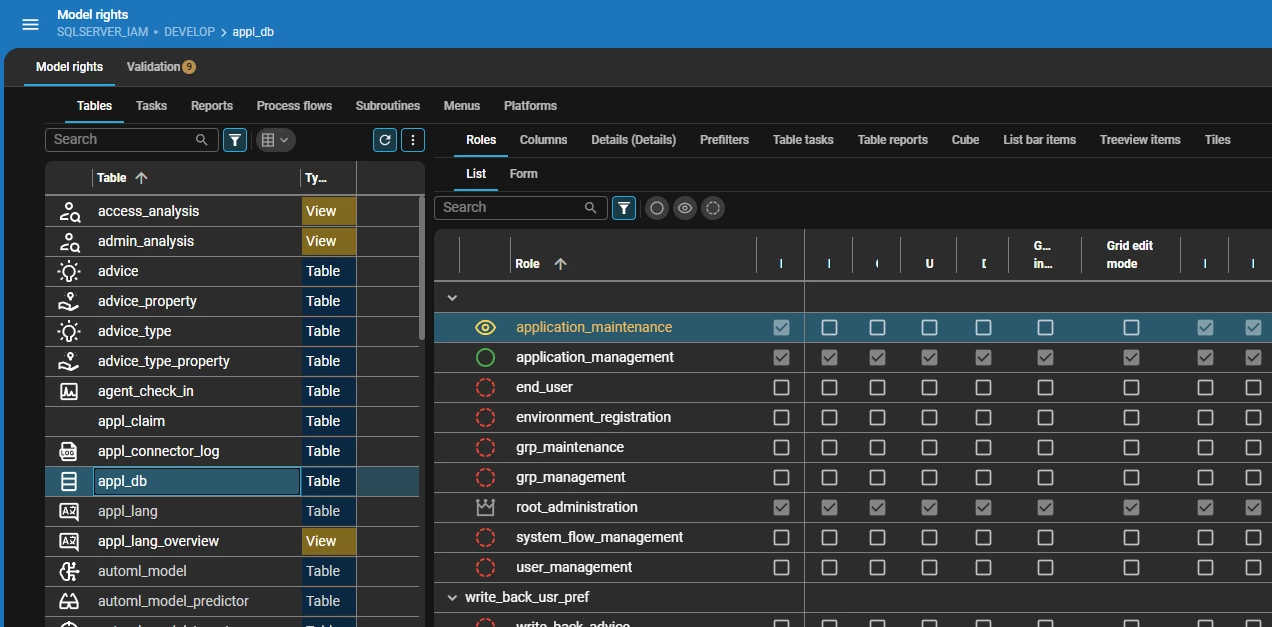
Like Model rights?: 

We also offer New objects, which shows all new objects (like tables, tasks etc.) and allow you to verify their rights and approve if so.

4 replies

Mark Jongeling
Administrator
Forum|alt.badge.img+23

Hi Robin,

Like Model rights?: 

We also offer New objects, which shows all new objects (like tables, tasks etc.) and allow you to verify their rights and approve if so.


Forum|alt.badge.img+2
  • Author
  • Sidekick
  • April 3, 2026

@Mark Jongeling 

wow thanks that’s exactly what i was looking for,

had never opened any of the menu items in access control besides roles in my life yet lmao


thanks for answering my question and making my work easier! (this post can be closed)


Forum|alt.badge.img+2
  • Author
  • Sidekick
  • April 3, 2026

btw ‘New Objects’ doesn’t seem to have a documentation page yet and maybe could use a little pointer to devs that you’re supposed to look at the badges


Mark Jongeling
Administrator
Forum|alt.badge.img+23

Seems to be part of the Model rights page: Model rights | Thinkwise Documentation

Prior to 2025.3, I believe, it was a detail tab page available in the Model rights screen.

Glad you found what you’re looking for!