



Question

Export: choose to translate Headers and Data separately in Universal GUI

  • July 15, 2026
  • 3 replies
  • 31 views

Robin Liu
Sidekick
Forum|alt.badge.img+3

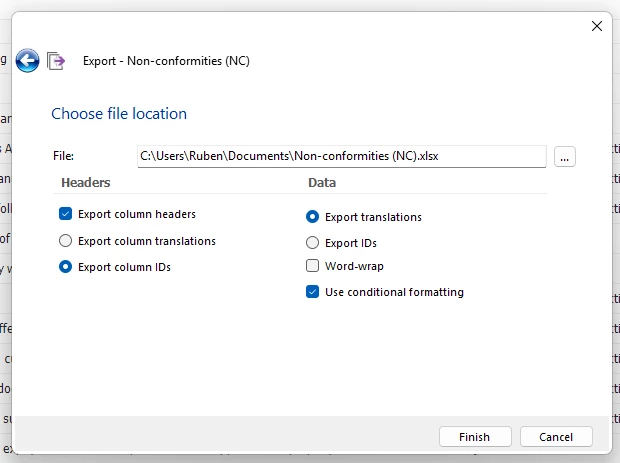
In the Windows GUI when exporting data it is possible to choose whether to export database values or translated values separately for the Headers and the Data.

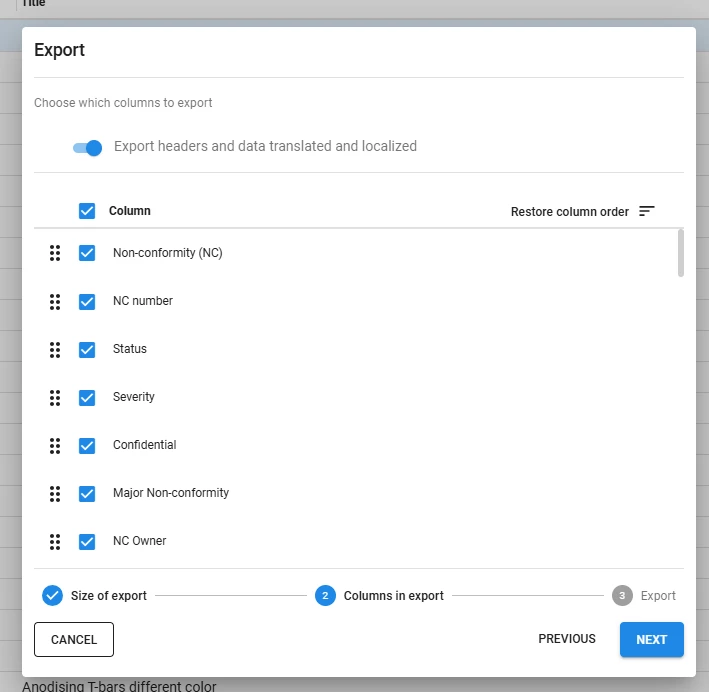
I’m not sure if this already possible in a newer version of the Universal GUI. In version  2026.1.12.0.0 this cannot be chosen separately.

So, my question is whether this is already available or whether it might be added back in the future.
3 replies

Forum|alt.badge.img

Hi Robin,

Currently, it is not possible to choose this separately in the Universal GUI. The export wizard only has one combined setting, Export headers and data translated and localized. I haven't been able to find an existing Idea for this, so feel free to create one if you'd like to see this added.


Arie V
Community Manager
Forum|alt.badge.img+12
  • Community Manager
  • July 16, 2026

@Robin Liu we’re not really inclined to add this as separate options in Universal. Could you clarify the Use Case for which this is an important setting to you?


Robin Liu
Sidekick
Forum|alt.badge.img+3
  • Author
  • Sidekick
  • July 16, 2026

​Hi @Arie V 

It’s not really an important feature for us.

One of our users was using column IDs instead of translations with translated data values and built his dashboard with that, but he’s going to use the translated column names now.

The reason he did that in the first place was that there were two columns with the same translation, so I’ve changed the translation to be unique.

Another thing that is a somewhat troublesome change for him is that HTML text is now exported with all the texts, but I directed him to some scripts he can run that can turn it into plain text...