



Solved

DevExpress scripting report error in Universal

  • April 14, 2026
  • 1 reply
  • 17 views

Forum|alt.badge.img+6

Hi, 

To support display of certain texts on first or last page in our DevExpress generated reports in case of multiple pages, we use scripts to show/hide those texts. This is working fine in the Windows GUI.
We implemented it like mentioned here
 

But now in Universal we are getting an error that script execution is disabled.
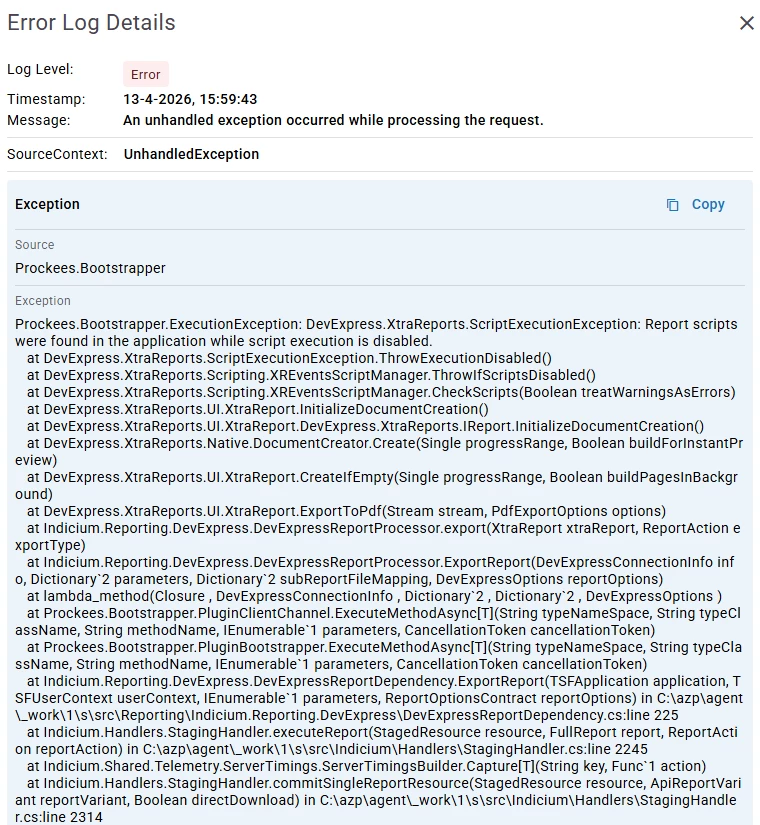


Is there a setting in IAM that scripting can be enab​led for DevExpress or is there another option to show / hide texts based on the current page number / page count?

We are using the 2025.3 release of Indicium and Universal​​​​​​

Best answer by Arie V

@HJ van Dalfsen There’s a setting you need to use to enable scripting in Indicium in the appsettings.json:

  "Reporting": {
"DevExpress": {
"UnsafeScripts": true
}
}

See more details in:


1 reply

Arie V
Community Manager
Forum|alt.badge.img+12
  • Community Manager
  • Answer
  • April 14, 2026

@HJ van Dalfsen There’s a setting you need to use to enable scripting in Indicium in the appsettings.json:

  "Reporting": {
"DevExpress": {
"UnsafeScripts": true
}
}

See more details in:


