

Solved

Data import error in the upcycler (2025.3).

  • October 13, 2025
  • 2 replies
  • 69 views

Forum|alt.badge.img+2

Hello!

I’m currently working through the ‘How to Use the Upcycler - Specialist’ course, and all steps have gone smoothly except for the data import part.

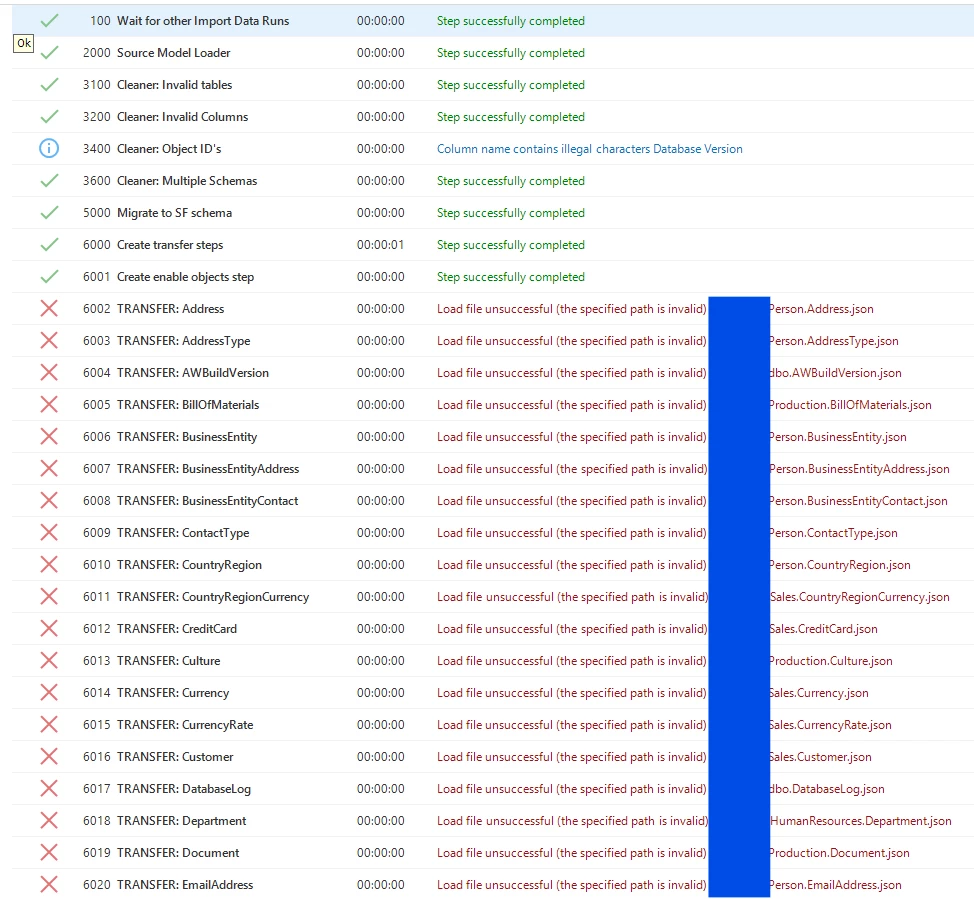
During the Data Import Run, I get stuck at the ‘Create Transfer Steps’ step.
I’ve attached a screenshot of the error messages below.

I’ve hidden part of the paths for privacy, but I’ve verified that the JSON files exist — I can open and read them without any issues.
I’ve also updated the ‘Data folder’ in the ‘Application’ tab in the Upcycler menu and defined the same path in the ‘File storage locations’ IAM. 

Does anyone know what could be causing this? 
 

Best answer by Kevin Horst

Hi Ezgi, 

The transfer steps are being performed by Indicium, does the pool account of your environment have access and rights to read the files? 

2 replies

Kevin Horst
Thinkwise blogger
Forum|alt.badge.img+5
  • Thinkwise blogger
  • Answer
  • October 14, 2025

Hi Ezgi, 

The transfer steps are being performed by Indicium, does the pool account of your environment have access and rights to read the files? 


Forum|alt.badge.img+2
  • Author
  • Sidekick
  • October 15, 2025

Thank you for your response! The data import run worked after I placed the json files on the server and ran the upcycler from there.