Solved

Columnfilter from checkbox to suggestion

  • September 26, 2025
  • 3 replies
  • 33 views

Forum|alt.badge.img+2

When using the filter on grid columns (via the three dots in the column header), we encounter the following issue: on the same screen, for the same column, the filter behaves differently depending on which parent item is selected.

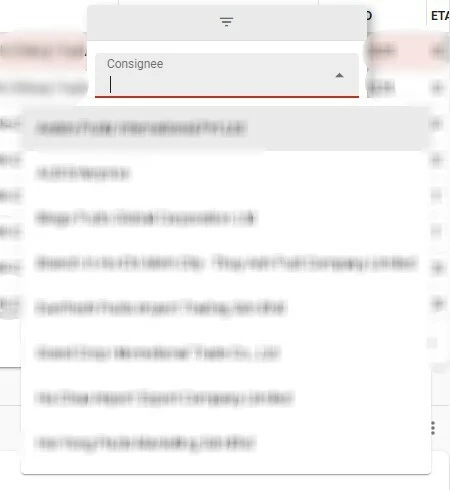
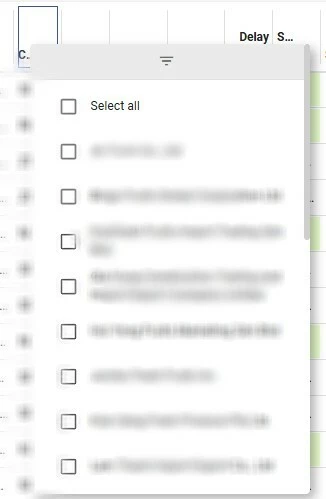
In some cases, the filter appears as a dropdown with checkboxes, while in others it shows as a search bar. I suspect this difference is related to the number of available options, but for end users it feels confusing and inconsistent.
 

‘Search field’ as filter
‘Dropdown’ as filter for the same column


Best answer by Anne Buit

Hi Allard,

This is indeed to limit the number of items loaded by the UI for easy checking via checkboxes. Depending on the current filters, the numbers of options may vary wildly.


You can change this behavior using an extended property.

LookupGridHeaderFilterOptionsLimit Universal GUI Defines the flip-over point: the number of items to switch from a list of checked items to a dropdown list with search functionality. Default: 25. Application
This topic has been closed for replies.

3 replies

Anne Buit
Community Manager
Forum|alt.badge.img+5
  • Community Manager
  • Answer
  • September 29, 2025

Hi Allard,

This is indeed to limit the number of items loaded by the UI for easy checking via checkboxes. Depending on the current filters, the numbers of options may vary wildly.

You can change this behavior using an extended property.

LookupGridHeaderFilterOptionsLimit Universal GUI Defines the flip-over point: the number of items to switch from a list of checked items to a dropdown list with search functionality. Default: 25. Application

Forum|alt.badge.img+2

@Anne Buit 

Thanks for the reply. Are there performance issues with setting the value higher? 


Anne Buit
Community Manager
Forum|alt.badge.img+5
  • Community Manager
  • October 2, 2025

Hi Allard,

There are some performance implications for higher values, yes. The actual impact depends a lot on your application and environment.

UX-wise, it may also be not preferable to have hundreds of options available here.