



Answer

Button placement

  • July 29, 2025
  • 2 replies
  • 47 views

Forum|alt.badge.img

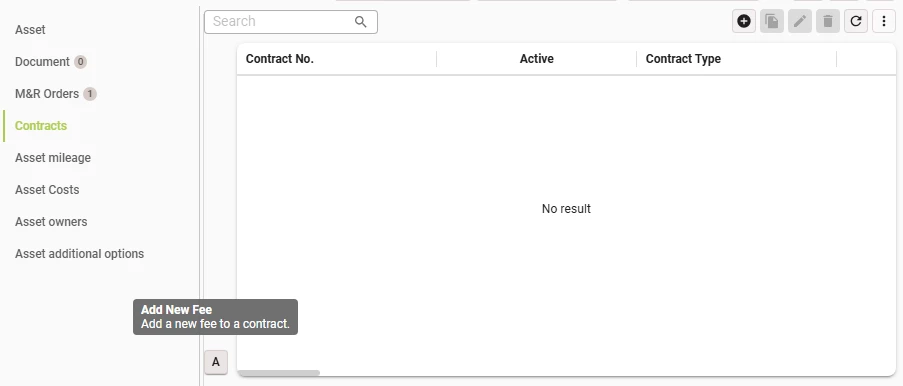
I have a button in a screen tab that is derived from another screen. Now I saw something odd happening and I wanted to fix it so users can also add a fee here without having to spend time looking for the button. I tried changing different things within the related task hoping that it would somehow change positioning and looked into the original screentype, but with no results apart from minor changes (meaning I do have the right task, but minor change is about all I could do..). How I can make the button appear next to the other standard buttons above? What would be something I can try out? 


Best answer by Lufiene

Hi Lufiene,

Could you share the screen type designs for these screens? I'm trying to understand where you would like the button to be placed.

Hi, to get back to you. I wanted to have the button placed next to the Add button above. It turned out the derived screen from which the details came had no “Detail screen type” assigned yet, when I assigned the same as the rest of the tabs had, the button was placed as I wanted. So it has been solved for me. 

This topic has been closed for replies.

2 replies

Mark Jongeling
Administrator
Forum|alt.badge.img+23

Hi Lufiene,

Could you share the screen type designs for these screens? I'm trying to understand where you would like the button to be placed.


Forum|alt.badge.img
  • Author
  • Rookie
  • Answer
  • July 30, 2025

Hi Lufiene,

Could you share the screen type designs for these screens? I'm trying to understand where you would like the button to be placed.

Hi, to get back to you. I wanted to have the button placed next to the Add button above. It turned out the derived screen from which the details came had no “Detail screen type” assigned yet, when I assigned the same as the rest of the tabs had, the button was placed as I wanted. So it has been solved for me.


