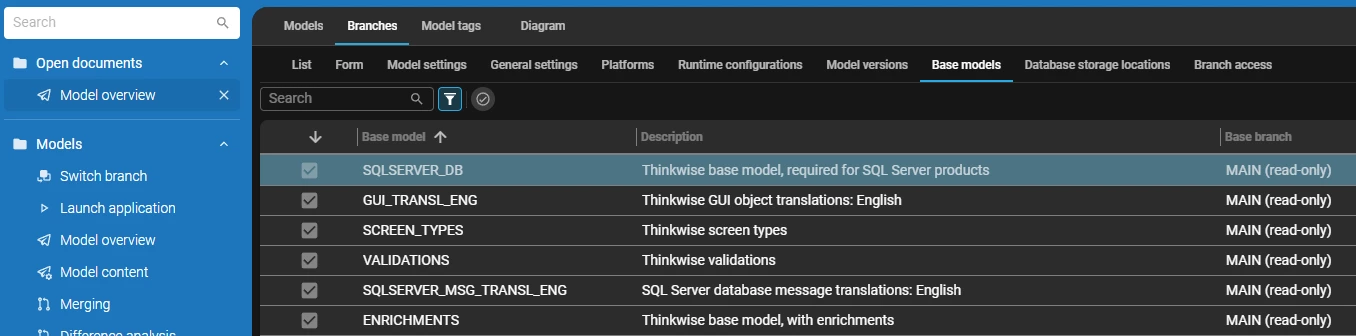



After upgrading from 2023.2 to 2025.3, we are aiming to swiftly upgrade to 2026.1, to transition to Universal GUI completely.
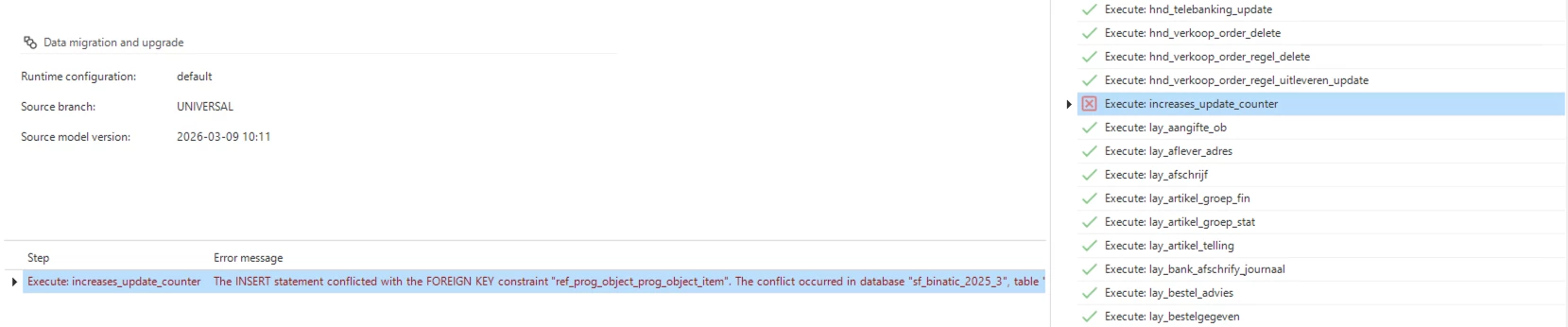
However, after upgrading to the newer platform version, our existing models tend to have the following problem.
As a start, see the image above. During creation (Generate definition), the following error is given.
The code for this is placed in a Control procedure called `increases_update_counter`. The code is as follows:
------------------------------------------------------------
--
-- This control procedure increases column update_counter, or
-- gives an error when the counter was increased by another process or user.
--
-- If you add the tag 'no_update_counter' to a table, this functionality will not be added to that table.
--
-- This code does the following steps:
-- 1. Configure id's
-- 2. Prog object item for each table with trace fields
-- 3. Translate parameters. In the CTE the order of the primary key fields is determined.
------------------------------------------------------------

---------------------
-- 1. Configure id's
---------------------

declare @tag_no_counter tag_id
       ,@dom_name       dom_id
       ,@col_name       col_id

select @tag_no_counter  = 'no_update_counter'
      ,@dom_name        = 'update_counter'
      ,@col_name        = 'update_counter'

------------------------------------------------------------
-- 2. Prog object item for each table with trace fields
------------------------------------------------------------

insert prog_object_item
(
    model_id
   ,branch_id
   ,prog_object_id
   ,prog_object_item_id
   ,order_no
   ,control_proc_id
   ,template_id
)
select model_id
      ,branch_id
      ,t.tab_id + '_tu'
      ,@control_proc_id
      ,10
      ,@control_proc_id
      ,@control_proc_id
from tab t
where model_id       = @model_id
  and branch_id = @branch_id
  and type_of_table  = 0
  and not exists (select 1
                    from tab_tag tt
                   where tt.model_id         = t.model_id
                     and tt.branch_id        = t.branch_id
                     and tt.tab_id           = t.tab_id
                     and tt.tag_id           = @tag_no_counter)


------------------------------------------------------------
-- 3. Translate parameter. In the CTE the order of the primary key fields is determined.
--    This is necessary for constructing the on clause.
------------------------------------------------------------

;with pkcols
(
    prog_object_id
   ,prog_object_item_id
   ,parmtr_value
   ,order_no
)
as
(
   select t.tab_id + '_tu'                                     as prog_object_id
         ,@control_proc_id                                     as prog_object_item_id
         ,pk.col_id                                            as parmtr_value
         ,row_number() over (partition by pk.model_id,
                                          pk.branch_id,
                                          pk.tab_id
                             order     by pk.order_no)         as order_no
   from tab t
        join col pk
          on pk.model_id       = t.model_id
         and pk.branch_id = t.branch_id
         and pk.tab_id         = t.tab_id
   where t.model_id       = @model_id
     and t.branch_id = @branch_id
     and t.type_of_table  = 0
     and pk.primary_key   = 1
     and not exists (select 1
                       from tab_tag tt
                      where tt.model_id         = t.model_id
                        and tt.branch_id        = t.branch_id
                        and tt.tab_id           = t.tab_id
                        and tt.tag_id           = @tag_no_counter)
)
insert into prog_object_item_parmtr
(
    model_id
   ,branch_id
   ,prog_object_id
   ,prog_object_item_id
   ,parmtr_id
   ,parmtr_value
   ,order_no
   ,no_line_when_empty
)
select @model_id                                                 as model_id
      ,@branch_id                                                as branch_id
      ,pk.prog_object_id                                         as prog_object_id
      ,pk.prog_object_item_id                                    as prog_object_item_id
      ,'ON_CLAUSE'                                               as parmtr_id
      ,case
          when pk.order_no = 1
          then '  on '
          else ' and '
       end + 'i.' + pk.parmtr_value + ' = d.' + pk.parmtr_value  as parmtr_value
      ,pk.order_no                                               as order_no
      ,0                                                         as no_line_when_empty
from pkcols pk

;with pkcols
(
    prog_object_id
   ,prog_object_item_id
   ,parmtr_value
   ,order_no
)
as
(
   select t.tab_id + '_tu'                                     as prog_object_id
         ,@control_proc_id                                     as prog_object_item_id
         ,pk.col_id                                            as parmtr_value
         ,row_number() over (partition by pk.model_id,
                                          pk.branch_id,
                                          pk.tab_id
                             order     by pk.order_no)         as order_no
   from tab t
        join col pk
          on pk.model_id       = t.model_id
         and pk.branch_id = t.branch_id
         and pk.tab_id         = t.tab_id
   where t.model_id       = @model_id
     and t.branch_id = @branch_id
     and t.type_of_table  = 0
     and pk.primary_key   = 1
     and not exists (select 1
                       from tab_tag tt
                      where tt.model_id         = t.model_id
                        and tt.branch_id        = t.branch_id
                        and tt.tab_id           = t.tab_id
                        and tt.tag_id           = @tag_no_counter)
)
insert into prog_object_item_parmtr
(
    model_id
   ,branch_id
   ,prog_object_id
   ,prog_object_item_id
   ,parmtr_id
   ,parmtr_value
   ,order_no
   ,no_line_when_empty
)
select @model_id                                                 as model_id
      ,@branch_id                                                as branch_id
      ,pk.prog_object_id                                         as prog_object_id
      ,pk.prog_object_item_id                                    as prog_object_item_id
      ,'WHERE_CLAUSE'                                            as parmtr_id
      ,case
          when pk.order_no = 1
          then 'where '
          else '  and '
       end + 't.' + pk.parmtr_value + ' = i.' + pk.parmtr_value  as parmtr_value
      ,pk.order_no                                               as order_no
      ,0                                                         as no_line_when_empty
from pkcols pk
The dynamic model of this model has an entry called `update_counter`, which holds the following code:
-----------------------------------------------------------------------------
--
-- This code adds column to all tables to provide optimistic locking
--
-- If you add the tag 'no_update_counter' to a table, no column is added.
--
-- This code does the following steps:
-- 1. Configure id's
-- 2. Add tags
-- 3. Add domains
-- 4. Add columns
--
-----------------------------------------------------------------------------

---------------------
-- 1. Configure id's
---------------------

declare @tag_no_counter tag_id
       ,@dom_name       dom_id
       ,@col_name       col_id

select @tag_no_counter  = 'no_update_counter'
      ,@dom_name        = 'update_counter'
      ,@col_name        = 'update_counter'

-----------------
-- 2. Add tags
-----------------

insert into tag (
                   model_id
                  ,branch_id
                  ,tag_id
                  ,tag_description
                  ,tag_value_mand
                )
select @model_id
      ,@branch_id
      ,@tag_no_counter
      ,null
      ,0
where not exists (
                    select 1
                    from tag
                    where tag_id = @tag_no_counter
                    )

-----------------
-- 3. Add domains
-----------------

if not exists (select 1
               from dom
               where model_id     = @model_id
               and branch_id = @branch_id
               and dom_id         = @dom_name)
begin

    insert dom
    (
        model_id
       ,branch_id
       ,dom_id
       ,prog_lang_id
       ,dttp_id
       ,length
       ,prec
       ,dttp
       ,insert_user
       ,insert_date_time
       ,update_user
       ,update_date_time
    )
    select @model_id        as model_id
          ,@branch_id       as branch_id
          ,@dom_name        as dom_id
          ,'SQL'            as prog_lang_id
          ,'INT'            as dttp_id
          ,100              as length
          ,0                as prec
          ,'INT'            as dttp
          ,dbo.tsf_user()   as insert_user
          ,sysdatetime()    as insert_date_time
          ,dbo.tsf_user()   as update_user
          ,sysdatetime()    as update_date_time

end

-----------------
-- 4. Add columns
-----------------

-- Update_counter

insert col
(
    model_id
   ,branch_id
   ,tab_id
   ,col_id
   ,order_no
   ,dom_id
   ,type_of_col
   ,mand
   ,default_value
   ,field_on_next_tab
   ,next_tab_label
   ,visible_for_filter
   ,visible_for_search
   ,filter_order_no
   ,search_order_no
   ,form_order_no
   ,form_type_of_col
   ,grid_order_no
   ,grid_type_of_col
   ,card_list_order_no
   ,card_list_label
   ,file_offline_available
   ,default_input
   ,default_output
   ,layout_input
   ,layout_type_output
   ,layout_mand_output
   ,context_input
   ,insert_user
   ,insert_date_time
   ,update_user
   ,update_date_time
)
select t.model_id          as model_id
      ,t.branch_id         as branch_id
      ,t.tab_id            as tab_id
      ,@col_name           as col_id
      ,10000               as order_no
      ,@dom_name           as dom_id
      ,3                   as type_of_col
      ,1                   as mand
      ,0                   as default_value
      ,0                   as field_on_next_tab
      ,null                as next_tab_label
      ,0                   as visible_for_filter
      ,0                   as visible_for_search
      ,10000               as filter_order_no
      ,10000               as search_order_no
      ,10000               as form_order_no
      ,3                   as form_type_of_col
      ,10000               as grid_order_no
      ,3                   as grid_type_of_col
      ,10000               as card_list_order_no
      ,0                   as card_list_label
      ,0                   as file_offline_available
      ,1                   as default_input
      ,1                   as default_output
      ,1                   as layout_input
      ,1                   as layout_mand_output
      ,1                   as context_input
      ,1                   as context_input
      ,dbo.tsf_user()      as insert_user
      ,sysdatetime()       as insert_date_time
      ,dbo.tsf_user()      as update_user
      ,sysdatetime()       as update_date_time
from tab t
where model_id       = @model_id
  and branch_id = @branch_id
  and type_of_table  = 0
  and not exists (select 1
                  from col c
                  where c.model_id     = t.model_id
                  and c.branch_id = t.branch_id
                  and c.tab_id         = t.tab_id
                  and c.col_id         = @col_name)
  and not exists (select 1
                    from tab_tag tt
                   where tt.model_id         = t.model_id
                     and tt.branch_id        = t.branch_id
                     and tt.tab_id           = t.tab_id
                     and tt.tag_id           = @tag_no_counter)

update col
set order_no = 10000
where model_id          = @model_id
  and branch_id         = @branch_id
  and col_id            = @col_name
  and order_no         <> 10000
Assistance on this matter is highly appreciated, thanks in advance!