

January 19, 2026
- Full release (from release candidate 2025.3.14)
- Additional fixes this release:
- Executing an action on a full dataset would result in a Bad Request error when the subject contained an image. This has been fixed.
- Fixed an issue where a process flow could be canceled before executing a task when the task definition was not yet loaded. This issue was introduced in Universal UI 2025.3.12.0 and only occurred when a context stored procedure was running, typically after a subject refresh.
Hello everyone,
In this release, you can now filter on blank values in grids, edit code fields directly in your IDE, and see aggregations for each group in grouped grids. We now support using the new Refresh table process action as a starting action for process flows, allowing you to start process flows after a manual or automatic refresh. Note that this release includes a breaking change, so read the release notes carefully before upgrading.
Do you have any questions or suggestions? Let us know in the Thinkwise Community!
Demo
As always, we have made a demo for you: try it here. Before trying it out, press 'Clear Cache' on the login screen.
Read the Universal UI user interface guide to get familiar with the GUI.
Universal UI version 2025.3.14
For more information about setting up the Universal UI, see the Universal UI setup guide.
Note:
- Use a modern browser to access the Universal UI, for example, a recent version of Chrome, Firefox, Edge, or Safari mobile.
- Deploy the Universal UI on the same server as Indicium or an allowed origin in
appsettings.json. - Run all hotfixes on IAM and the Software Factory that you plan to use for the Universal GUI.
- Use the latest version of Indicium.
Download the Universal GUI version 2025.3.12 here
Contents
Process flow API changed
breaking
We have made a change to the process flow API to support a new feature for process flows. This feature will be introduced in Thinkwise platform version 2026.1.
This change affects Indicium running against older platform versions. If your Indicium, Universal UI, or Windows GUI 3-tier is older than version 2025.3.14, you may encounter issues with process flows that have multiple starting points.
Keep your Indicium and Universal UI or Windows GUI 3-tier on the same version and upgrade to the latest version to prevent any issues.
New and changed
Edit code locally in IDE
new
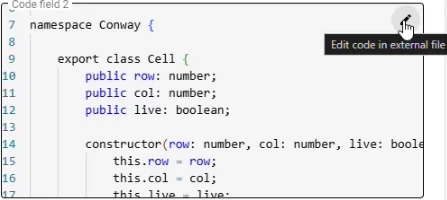
You can now edit code in code fields directly in your preferred IDE. This feature was already available in the Windows GUI and has now been reintroduced in the Universal UI.
To ensure a smooth experience, install the Thinkwise Workspace Listener from TCP here. This tool automatically opens the code files in your IDE when you select Edit in the Universal UI.
Then, to set up code editing for the first time, select Edit. A pop-up appears, asking you to Select workspace folder. This folder must match the workspace folder configured in the Thinkwise Workspace Listener. After you have selected a workspace, a file is either opened automatically by the Thinkwise Workspace Listener or can be opened manually in your IDE. Any changes saved in the IDE are automatically synchronized back to Universal.
Filter on blank values
Community idea new
You can now filter on blank values in column header filters and using Quick filter. This allows you to easily find records where a specific column has no value.
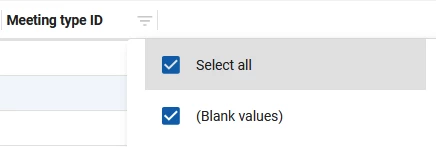
To filter on blank values using the column header, select Filter from the grid header of a column:
- For domains with elements: select the checkbox (Blank Values).
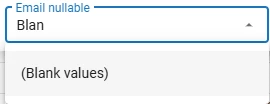
- For domains without elements, select Filter and enter (Blank Values) in the field.
To filter on blank values using Quick filter, select a grid cell with an empty value. Then select Quick filter from the action bar (or use the shortcut CTRL + ALT + R). The filter is then applied to the column of the selected cell.
Use 'Refresh table' as starting action
new
You can now use the Refresh table process action as a starting action for process flows. When a table is refreshed manually by selecting Refresh in the action bar or automatically, the process flow will start. This is useful for scenarios where you want to perform additional actions after refreshing the data in a table.
Minor fixes and tasks
- If detail tabs have a tooltip, they are now displayed when the user hovers over them.
- In some cases, when hovering over grid rows, the conditional layout background color would not be applied throughout the entire grid row. This has been fixed.
- If you used the Numeric datatype for checkboxes to filter, the checkbox in the filter popup was not clickable, resulting in a
bad_requesterror. This has been fixed. - In certain situations, Multiline controls in form lists claimed too much width and were misaligned. This has been fixed.
What we will be working on next sprint
The next sprint we will be working on:
- Enhanced date interval filtering in filter pop-ups.
- Cube view filters available directly from the filter pop-up.
- Group summary support added to grids.
- Automatic row height calculation for grids.
- Support for user-defined start objects.
- Configurable checkbox values for true and false (for example J/N or Y/N).
- Ability to delete the full data set in a single action.
- Improved offline support, including opening subjects marked as available offline.