


Hi everyone,
This release brings the community-requested inline action bar to grids, improves IAM synchronization for separated environments, and continues to expand DB2 support. Note that this release includes several breaking changes, including updates to CI/CD invocations, DB2 trigger code groups, and Scheduler and grid behavior.
Grids now support an inline action bar, letting users access action buttons directly from the active row without a dedicated toolbar.
The Software Factory can now synchronize to IAM using the API instead of requiring direct database access, enabling synchronization in environments where the IAM and Software Factory are separated, such as in the Thinkwise Cloud. Synchronizing is now also available directly from the Creation screen.
DB2 support continues to expand towards feature parity with other database types, with null exclusion for unique indexes, DYNAMIC RESULT SETS for procedures, and data-driven enrichments now supported.
Several behavioral improvements are also included. Multi-row selection now correctly updates the active record, read-only fields are now focusable, and grid column headers behave more consistently when filtering, sorting, or scrolling. The Scheduler now evaluates all records for conditional time cell formatting, enabling more precise coloring conditions based on all matching records for a resource.
This is a short-term support (STS) release of the Thinkwise Platform. STS release support expires as soon as a new release is made available. For example, support for version 2026.1.12 ends when version 2026.1.13 is released. See our Lifecycle policy for information about supported versions.
Contents
Breaking
Check CI/CD invocation of 'Verify' for 'Synchronize to IAM'
Software Factory
As a result of adding Synchronize to IAM using the API, a breaking change has been introduced. The task parameter Verify has been removed from the task Synchronize to IAM because it is no longer possible to disable it.
Verification is now always performed when synchronizing to IAM. This change affects synchronization using CI/CD. Check your CI/CD pipelines to ensure they are compatible with this change.
Synchronization using the Software Factory is not affected, as the parameter was already hidden.
Check CI/CD invocation of 'Execute all creation steps' task
Software Factory
As a result of adding 'Synchronize to IAM' functionality to the 'Creation' screen, several parameters and task inputs have been added, renamed, moved, or excluded from the task Execute all creation steps. If you use CI/CD to invoke this task, upgrading to this version introduces a breaking change.
Previously, all parameters in the task Execute all creation steps were mandatory, even when they were not used during task execution. Which parameters are mandatory now depends on the creation steps you select.
- Leave out parameters that are not used during task execution, as the task now rejects them if you provide a value.
- If a conditionally required parameter is missing, the task returns a message telling you which parameter is missing. These checks have also been extended to the standalone tasks to keep behavior consistent.
When calling the task through an API, the default procedure may already supply a value for empty parameters, so omitting a parameter does not always trigger a validation message. Parameters with a lookup, such as runtime_configuration_id and sync_target_iam_id, may also be rejected by CI/CD before the task's own validation is reached if you provide an invalid value. When calling directly from the database, neither of these applies and the task's own validation messages are always shown.
Use the example below for a correct invocation:
POST [indicium]/iam/sf/add_job_to_do_complete_creation
{
    "model_id": "MY_MODEL",
    "branch_id": "1.12",
    "execute_complete_creation": 0,
    "model_vrs_name": "1.13",
    "generate_definition": true,
    "generate_definition_error_handling": 1,
    "validate_definition": true,
    "validate_definition_error_handling": 3,
    "generate_source_code": true,
    "write_code_files": false,
    "write_prog_objects": false,
    "upgrade_method": 0,
    "execute_source_code": false,
    "execute_unit_tests": false,
    "execute_smoke_test": false,
    "run_sync": true,
    "sync_run_type": 0,
    "sync_target_iam_id": 1,
    "debug": 1
}
Moved trigger code group for DB2 models
Software Factory DB2
Previously, INSTEAD OF triggers were part of the TRIGGERS code group for DB2 models. This code group has been moved to the new code group INSTEAD_OF_TRIGGERS, aligning it with other supported RDBMS types. This change helps prevent possible issues when using multiple RDBMS types in a model.
When you upgrade, the upgrade script automatically adds the new code group to models that use DB2 and have INSTEAD OF triggers. The upgrade script also updates the code group of control procedures that have statically assigned templates.
The upgrade script cannot automatically modify the code group from TRIGGERS to INSTEAD_OF_TRIGGERS for control procedures that use SQL assignments in combination with the TRIGGERS code group. Modify the code group of these control procedures manually and inspect the control procedure code to make any necessary adjustments.
Changed default communication method in DevExpress
Indicium
In some environments, generating a report on Azure Web Apps (Windows) caused failures starting the reporting child process (prockees.exe). As a result, the default communication method used by the DevExpress reporting child process (prockees.exe) has been changed from Named Pipes to Sockets.
No action is required for existing deployments that already use Socket.
If desired, the previous behavior can be restored by configuring this in the appsettings.json file of Indicium:
"Reporting": {
  "DevExpress": {
    "TransportMode": "NamedPipe"
  }
}
Improved performance of SFTP file storage types
Indicium
The performance of SFTP file storage type connections has been improved. Connections are now pooled and remain open for up to 5 minutes, allowing subsequent requests to reuse the same connection.
Up to 100 connections can be open simultaneously. Connections that remain idle for 5 minutes are closed automatically by Indicium.
You can configure the behavior of SFTP connection pooling by adding the following configuration to the appsettings.json file of Indicium:
    "Storage":{
        "Sftp": {
            "PoolSize": 100,
            "IdleTime": "00:05:00"
        }
    }
Changed column width behavior for grids
Universal UI
You can determine whether the user interface automatically sets the column width in grids. Previously, setting Auto column width to No in grids could cause columns to appear wider than expected. The behavior has been updated to now render columns narrower than before, aligning with the behavior of previous generations of Thinkwise user interfaces. This change only affects the grid screen component; other components are unaffected.
This change introduces a breaking change for existing grids, as data that previously fit within the column width may now be truncated or displayed differently. Check your existing grids after upgrading and adjust column widths where necessary.
Verify conditional formatting in Scheduler resources
Universal UI
As a result of updating the behavior of conditional time cell formatting in the Scheduler, all records related to a resource are now evaluated for conditional time cell formatting.
Verify existing Schedulers that use conditional time cell formatting after upgrading to this version. If any unexpected behavior occurs, add extra conditions to the cell color to ensure that only the intended cells are colored.
New and changed
Data - Exclude null values from unique index in DB2
New Software Factory DB2
When you create a unique index on a DB2 database, the index considers null as a unique value by default. This means only one record with a null value can exist in the table.
You can now exclude null values from the unique index for DB2 by selecting the checkboxes Unique and Exclude null values (menu Data > Data model > tab Tables > tab Indexes). Enabling these settings creates the index using UNIQUE WHERE NOT NULL, and nulls are no longer enforced for uniqueness. These settings were already available for other RDBMS types.
User interface - Inline action bar
Community idea New Software Factory Universal UI Beta
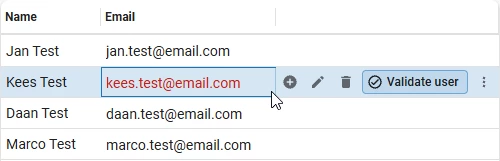
Action bar buttons in a grid are typically placed in a toolbar above or beside the grid. You can now also place them directly within the active row using the Inline action bar, keeping actions close to the data the user is working with. It becomes visible when hovering over the active row, and follows the active row as users navigate through the grid.
The inline action bar is only available for grid screen components. To enable it, go to menu User Interface > Screen types > tab Design. In the form of the grid screen component, select the checkbox Enable inline action bar.
Once this setting is enabled, a new action bar is added to the tab Action bars. Here, you can configure how the buttons are arranged, such as which buttons appear near the start, near the end, or in the overflow menu of the inline action bar. This is similar to how a custom action bar is set up.
This feature is launched in Beta. The actions now only show on hover on the selected row, which is not the most intuitive behavior. We are currently evaluating alternative solutions.
Business logic - Support for DYNAMIC RESULT SETS in DB2 procedures
New Software Factory DB2
For a procedure header, DB2 requires a DYNAMIC RESULT SETS and a value equal to the maximum number of returned result sets before it can return a result. For example, to return rows from customer_table as a single query result in a procedure, the header must include DYNAMIC RESULT SETS 1.
These options can now be configured in the Software Factory for DB2 procedures. To do this, go to Business logic > Subroutines (procedures) > Subroutine options and select DYNAMIC RESULT SETS. Then, in the field Value, enter the maximum number of returned result sets.
Deployment - Synchronize to IAM using the API
New Software Factory
Previously, synchronizing a model to IAM required the Software Factory to have direct access to the IAM database. This approach was not ideal for environments where the IAM and Software Factory are separated, such as in the Thinkwise Cloud. To address this, a new synchronization method has been added that uses the IAM API instead of direct database access.
A main administrator or a user with the role Developer mode in IAM must act as a pool user to set the necessary pool user credentials for the API method as described below. The new and required role Model synchronization is automatically assigned to Developer mode users in IAM.
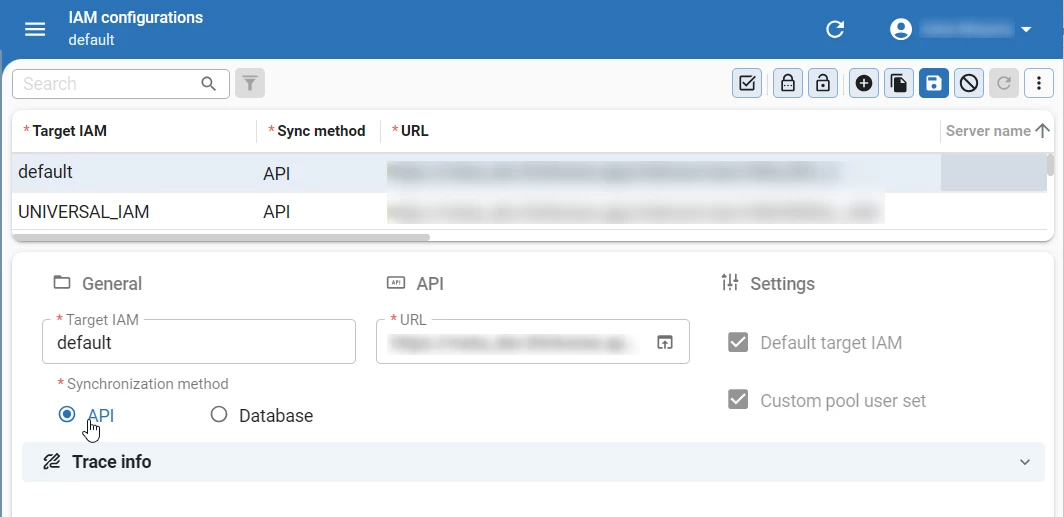
In the menu Maintenance > IAM configurations you can select whether the Synchronization method is set to Database or API. For the API method, you must provide an API URL pointing to the target IAM environment (for example, https://server/indicium/iam/iam). Then, execute the task Set pool user credentials to set up the necessary credentials. All existing configurations are automatically set to Database when upgrading.
You can only set one synchronization method per IAM configuration. To synchronize with the same IAM using both methods, you need to create two separate IAM configurations.
As part of this update, the field Custom version name has been removed. The field As version is still available to specify a different version name. It is prefilled with the most recently used version name, or the branch name if no previous version name is available.
A breaking change was introduced as part of this feature. See Check CI/CD invocation of 'Verify' for 'Synchronize to IAM' for more information.
Deployment - Added 'Synchronize to IAM' functionality to 'Creation' screen
Change Software Factory
After executing the source code of your application using Creation, you also need to synchronize the changes to IAM. These two steps were previously done in separate screens in the Software Factory, Creation and Synchronize to IAM respectively. To improve the development workflow, we have added Synchronize to IAM functionality into the Creation screen, allowing you to synchronize directly to IAM or to storage from Creation.
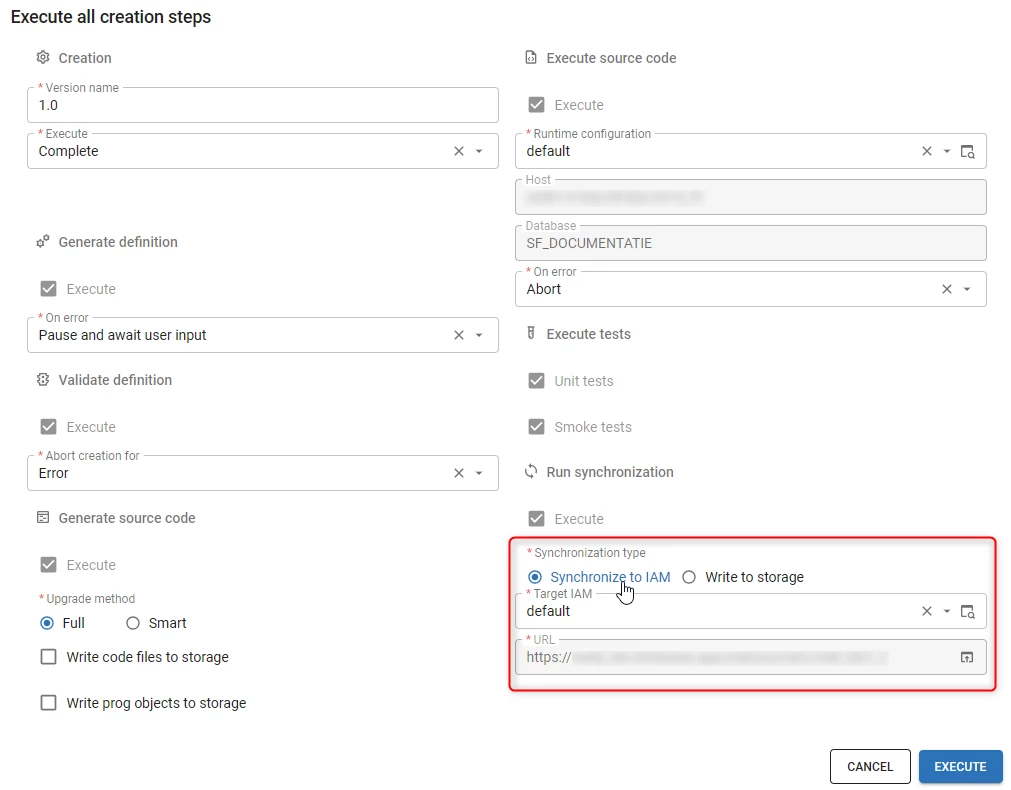
You can now include synchronization as part of the Creation when you execute the task Execute all creation steps (menu Deployment > Creation > tab Generate definition). Several controls for existing parameters in the task pop-up have been changed from Radio button to Combo to accommodate the new synchronization settings.
To configure the synchronization settings, select Synchronize to IAM in the task pop-up. After selecting this option, the field Version name becomes mandatory because it is used as the name under which the branch is synchronized. Synchronization runs after all preceding creation steps have completed. When synchronizing, the process now also checks for duplicate synchronization runs, missing pool user credentials, and an invalid synchronization type.
Known issue: When you start a synchronization without configured pool user credentials, an error message states that it has been cancelled for this reason. However, the run still starts, generates all synchronization objects, and only stops afterwards. It is then reported as successful, even though no actual synchronization with IAM has taken place. This will be solved in the next STS version.
Furthermore, the tab Synchronization to IAM has been added to menu Deployment > Creation. This tab provides the same functionality and layout as the tab Synchronization in menu Deployment > Synchronize to IAM. Changing which modules or roles are synchronized, or modifying the post-synchronization code, still requires using the Synchronize to IAM menu.
Finally, Creation presets (menu Maintenance) have been updated with the option to include or exclude synchronization in a creation preset. The screen has been redesigned to make better use of the available space, and logic has been added to ensure that certain fields become mandatory when related fields are populated. Existing presets are left unchanged, so the synchronization option is not automatically enabled for them. If you want to include the synchronization step in a preset, create a new preset or update an existing one, optionally renaming it to reflect the change.
As part of this change, several parameters and task inputs have been added, renamed, moved, or excluded from the task Execute all creation steps. If you use CI/CD to invoke this task, upgrading to this version introduces a breaking change. For more information, see Check CI/CD invocation of 'Execute all creation steps' task.
Deployment - Improved layout of Deployment screens
Change Software Factory
The following screens in menu Deployment have been updated for consistency and usability: Creation > tab Generate Definition, Creation > tab Generate Source Code, Synchronization to IAM, and Deployment Package.
- Action bar - The action bar in Creation > tab Generate Definition has been moved to tab Current and changed to a custom action bar with only relevant actions.
- Search - The Search component in tabs History and Steps now only searches relevant columns.
- Tab headers - Tab headers for tab Steps are now displayed consistently across all affected screens. The tab header for tab Progress in Deployment Package is also now shown.
- Step-related tasks - On-error tasks (Retry, Skip, Abort) and follow tasks (Follow active step, Unfollow active step) have been moved to tab Steps and their display type updated to Icon + text.
Enrichment - Support for data-driven enrichments for DB2
New Software Factory DB2
Support has been added for data-driven enrichments in DB2 models. To create a data-driven enrichment, select the checkbox Data driven (menu Enrichment > Model enrichments > tab Maintenance > tab Enrichment > tab Form). After selecting the checkbox, select a RDBMS type from the dropdown. The selected RDBMS type determines on which environment the enrichment will be executed.
New session variable 'tsf_is_delegated_request'
New Indicium
The session variable tsf_is_delegated_request has been added to Indicium, indicating whether a request is authenticated using access delegation roles.
It has the following possible values:
1- The request is authenticated via a Client Application or a PAT that is scoped using access delegation roles.0- The request is authenticated via any other method, including a Client Application configured with Full access.
The session variable has been introduced as part of the recently added access delegation roles for a client application. This feature allows you to scope user-delegated API access for a client application, which is particularly useful for setting up MCP integrations.
Preserving application settings during Indicium upgrades
New Indicium
Previously, upgrading Indicium could cause the appsettings.json file on the current installation to be reset, resulting in a loss of the application settings. To address this issue, Indicium now comes with an appsettings.sample.json file, instead of appsettings.json. The appsettings.json file is no longer overwritten when a new version of Indicium is installed, preserving any custom application settings.
Endpoints return additional results for PATs
Change Indicium
Previously, the $metadata and openapi endpoints always returned 403 Forbidden for PATs, regardless of the token's actual permissions. These endpoints now return results for applications within the PAT's permissions. Applications outside the PAT's permissions still return 403 Forbidden as expected.
Updated MessagePack NuGet package
Change Indicium
We have updated the MessagePack NuGet package from version 3.1.4 to version 3.1.8. Indicium uses MessagePack internally for communication with components such as reporting and printing. A previous version of this package was reported to have security vulnerabilities. Although Indicium was not affected, we updated the package to include the latest security fixes.
Support for 'Time cell min width' for lower versions
New Universal UI
Previously, the setting Time cell min width was only available in Thinkwise Platform version 2026.1 and higher. Entering a value for this setting adds a minimum width for time cells in the Scheduler. This is useful in Schedulers with many columns, where the time cells can become very small and hard to read.
The extended property SchedulerTimeCellMinWidth has been added to make this setting available in Thinkwise Platform version 2025.3 and lower.
Added extended property 'AlwaysShowBarcodeKeyboard'
Community idea New Universal UI
By default, Barcode scanner and Cortex barcode scanner controls do not show the virtual keyboard when focused. Users can select the keyboard icon to show the virtual keyboard and enter data manually. You can configure this using the Show action button setting.
In some cases, suppressing the virtual keyboard is not desired or could cause compatibility issues on specific devices. You can now set the extended property AlwaysShowBarcodeKeyboard to True to always show the virtual keyboard. When enabled, the keyboard icon is hidden, as it is no longer needed.
Additional improvements to 'Model insight' panel
New Universal UI
The Model Insight panel can now be resized. To reset it to its original size, double-click the panel's header. During a model refresh, the current size and position of the panel is maintained.
Furthermore, the Message field has been added to the panel. Whenever a message or notification is shown, the message identifier is displayed in this field.
All records now evaluated for Scheduler time cell formatting
Change Universal UI
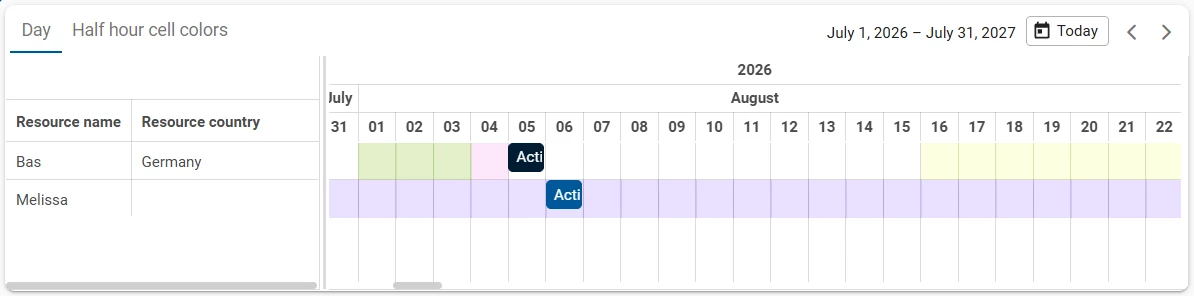
You can add conditional formatting to time cells in a Scheduler to highlight certain time cells based on conditions. This allows you to highlight time cells based on a column value, for example, to color time cells red when a resource is unavailable.
Previously, this functionality was limited in the Universal UI. It only evaluated time cell formatting for the first matching record for a resource. Subsequent matching records for the same resource were ignored and time cell formatting would not be evaluated for those records.
Now, all records related to a resource are evaluated for conditional time cell formatting. This allows for more complex conditions, such as using a work time table to show when a resource is available or unavailable.
This also makes it possible to use the worktime table functionality from the Windows GUI Scheduler in the Universal UI. Unlike the Windows GUI, the Scheduler in Universal UI only uses one table or view. To achieve the same result, create a view that combines resources, activities, and worktimes. Use this view as the data source for the Scheduler and then add conditions for time cell formatting as needed.
Conditional formatting for time cells is now displayed for all time steps and resources if there are no conditions defined, aligning it with the behavior of conditional layout in other components.
This change may introduce unexpected behavior in existing Schedulers that use conditional time cell formatting. See Verify conditional formatting in Scheduler resources for more information.
Support for video files in the Preview screen component
Change Universal UI
The Preview screen component now supports video files in the Universal UI. Previously, a file column in the Preview screen component that contained an .mp4, .webm or .ogv file would display the message "No preview available". These formats are now shown in a video player inside the Preview screen component, in the same way images are already displayed. All other file types behave as before.
Updated behavior of active record in multi-row selection
Change Universal UI
Previously, selecting multiple rows in a grid did not update the active row. This meant form and detail tabs still showed the data of the originally active record, rather than the record last added to the selection.
The active row now always follows the last record added to a multi-row selection. If the active record is removed from the selection, the first remaining selected record becomes the new active record.
This behavior also applies in grids with Auto-edit enabled, but editing is suspended if more than one row is selected. Additionally, Auto refresh is now disabled during multi-row selection to prevent records from dropping out of the selection when the dataset updates.
Improved focus behavior for read-only fields
Change Universal UI
Previously, read-only fields in the Form and Formlist screen components could not be focused. Read-only fields are now focusable, both outside of edit mode and when set to read-only while in edit mode. Focused read-only fields display a distinct focus style, separate from editable fields.
This also changes focus behavior when switching to edit mode:
- The focused field is retained when switching into edit mode.
- When using
F6orShift+F6to switch to a form, or when entering edit mode with no focused field, focus moves to the first focusable field instead of the first editable field. - When adding a new record, the first editable field is focused, as before.
In addition, if you focus a read-only field and then open the filter pop-up (CTRL + R or the filter button in the action bar), the same field is now focused in the filter pop-up.
Image, videolink, and signature fields remain non-focusable.
Improved grid column header behavior
Change Universal UI
Filtering, sorting, or horizontally scrolling in a grid could sometimes cause unwanted behavior. For example, column header labels could be truncated or wrapped, or column widths could change unexpectedly.
To ensure more consistent behavior of column headers, the following changes have been made:
- Space is no longer reserved for the Filter icon in the column header if no filter is applied, or if filtering is not allowed.
- When scrolling horizontally, the column width is now cached. Columns no longer dynamically resize when scrolling back and forth.
- The column width no longer changes when sorting is applied or removed.
Additionally, for columns with right-aligned content, the Filter icon has moved from the right side of the column header to the left side. Previously, the space reserved for the icon on the right prevented the header text from being fully aligned to the right. This change applies to all grids, including pivot grids.
Improved behavior when a newly added record is hidden by filters
Change Universal UI
Previously, if a newly added record triggered a process flow but was hidden by active filters, the process flow would abort. The message "The saved data can not be displayed on this screen." would appear with a Show button to navigate to the record.
The active document's filters are now automatically replaced with a filter matching the primary keys of the newly added record. This allows the process flow to continue without any action from the user.
Fixed
Software Factory and Intelligent Application Manager
DB2Previously, running smoke tests on a DB2 database that includedBLOBorDBBLOBcolumns would result in an error. This was caused by a deficiency in the DB2 database driver, which did not support the declaration of variables for these column types. This has been fixed. Smoke tests on DB2 that declare variables are now compiled into a stored procedure namedtsf_smoke_testand called during the test run. Note that this procedure persists in the database after the smoke test has finished.- Fixed a performance issue when loading comments in the Code review screen (menu Quality > Code review > tab All comments). When a comment contained many HTML tags, generating the Title shown in the grid was slow. This has been fixed.
- During the validation process, errors could occur indicating non-unique primary keys in the dataset on refresh. This has been resolved.
- An incorrect error could occur when upgrading a SQL Server datatype. Error: Domain ".." already exists with a different datatype configuration. This would only occur on nchar/nvarchar datatypes. This has been resolved.
- Platform version 2026.2 introduced the capability to download a deployment package from within the Software Factory. To be able to download a deployment package, the folder location of the Deploy folder is required. Due to an oversight, the registration of the folder location only succeeded for file locations using backslashes (
\). This has been fixed. Now, back and forward slashes are properly handled.
Indicium
- The
$applyquery parameter is now included in the OpenAPI specification, enabling code generators to produce clients that support it. - Previously, searching for a date or time value did not respect the user's configured date format. For example, a user with the format
dd-mm-yyyycould not find results by searching for14-08or2026. This also occurred when using the Starts with, Contains, or Ends with conditions in the Filter pop-up. This has been fixed.
Universal UI
- Fixed an issue for custom prefilters and cube views that included reference filters in Manage prefilters. If a user tried to save after creating or changing a custom prefilter or cube view, it would result in an error.
- Clicking the drag-handle column header in a grid would cause a runtime error. This has been fixed.
- Previously, if a user pressed
Tabin a grid, the user would skip past editable grid columns. This would occur only if the grid column was set to Read-only in layout_mode "navigate", but Editable in layout_mode "update". This has been fixed. - If a user adds a record in a grid that was not directly visible due to applied filters, a notification appears. Users can select Show to navigate to a new screen where the newly added record is visible. Previously, using keyboard shortcuts would affect the incorrect record and screen. For example, deleting the record using
Ctrl+-, would delete the active record of the previous screen. The affected keyboard shortcuts now work as expected. - Fixed an issue where if a user typed a decimal number starting with the decimal separator (for example ',25' instead of '0,25') would cause the cursor to jump to the beginning of the field after the first digit was entered.
- Fixed an issue where the IN field in an inline filter form would remain editable. It is now set to Read-only, as expected.
- Fixed an issue where invalid options entered into a domain control with domain control elements, or a report action combo would remain in the input field after deselecting the field. The field now reverts to the latest selected valid option immediately upon deselecting the field.
- Previously, if a user closed a document with a pivot grid in edit mode, it could cause the application to crash. This has been fixed.
- If a user tried to edit a record that was already deleted by another user, or directly from the database, it would cause the interface to crash. Users would have to restart the application to continue working. This has been fixed.
- Fixed an issue where activities in a Scheduler would not be shown for subjects with a column named 'id'.
- In some cases, clicking the outer cell of a grid or using the keyboard to navigate the grid would cause the domain and its control to not show or update. This has been fixed.
- Previously, a process flow could get stuck on the process action Go to first/previous/next/last row or Go to row if the record was not on the current grid page. This has been fixed.
- Fixed an issue in which the grid summary row would sometimes not be displayed.
- Fixed an issue where partially typing a value in a lookup field and deselecting it before the options finished loading would reset the field to its original value. Now, the first matching option is selected, sorted by Starts with then Contains. If no options match the entered value, the field still resets as expected.
- Fixed an issue where lookup values were not shown when the lookup's underlying column used a Datetime control with the Time zone set to Local.
- Previously, if a model update was available, selecting Update from the profile menu > About would not clear the model cache or reload the page. Additionally, if a user interface update was available, selecting Update now from the pop-up would sometimes not reload the page. This has been fixed.
- Previously, after exiting edit mode in a grid using a keyboard shortcut (for example,
EscapeorCtrl+Enter), users could no longer use the arrow keys to navigate the grid. This has been fixed. - Fixed an issue where detail references in the advanced Filter pop-up were displayed inconsistently.
- Fixed an issue where holding down the ↑ or ↓ arrow key in a paginated grid would cause the application to freeze. In addition, holding ↑ or ↓ while on a record other than the first or last no longer switches pages.
Data model changes
Data model changes for the Software Factory and IAM meta-models are listed here. This overview can be used as a reference to fix dynamic control procedures, dynamic model code or custom validations after an upgrade.
Changes Software Factory
Table changes
| SF - From table | SF - To table |
|---|---|
| - | message_broker_subscription |
| - | message_broker_subscription_mapping_mqtt |
| - | message_broker_subscription_mqtt |
| - | sync_object |
| generate_sync_scripts | generate_sync_object |
| generate_sync_scripts_step | generate_sync_object_step |
| sync_script | - |
Column changes
| SF - Table | SF - From column | SF - To column | Mandatory | Default value |
|---|---|---|---|---|
| creation_preset | - | run_sync | 1 | 1 |
| creation_preset | - | sync_run_type | 0 | 0 |
| creation_preset | validation_result_creation | validate_definition_error_handling | 0 | 0 |
| deployment_run | verify | - | - | - |
| enrichment | - | rdbms_type | 0 | - |
| generate_sync_object | generate_sync_scripts_status | generate_sync_object_status | 0 | 0 |
| generate_sync_object_step | generate_sync_scripts_step_id | generate_sync_object_step_id | 1 | - |
| generate_sync_object_step | generate_sync_scripts_name | generate_sync_object_name | 1 | - |
| generate_sync_object_step | generate_sync_scripts_step_status | generate_sync_object_step_status | 1 | - |
| iam_sync_job_step | - | sync_object_pk_hash | 0 | - |
| iam_sync_job_step | - | iam_sync_job_step_type | 1 | - |
| message_broker_message_mqtt | - | correlation_data | 0 | - |
| query_conv | model_id | - | - | - |
| query_conv | branch_id | - | - | - |
| sync_run | - | sync_url | 0 | - |
| sync_run | verify | - | - | - |
| sync_run | sync_as_branch_id | vrs_name | 0 | - |
| sync_run | generate_sync_scripts_job_id | generate_sync_object_job_id | 0 | - |
| sync_target_iam | - | sync_method | 1 | - |
| sync_target_iam | - | sync_url | 0 | - |
| sync_target_iam | server_name | server_name | 0 | - |
| sync_target_iam | db_name | db_name | 0 | - |
| tab | work_flow_tab_id | - | - | - |
| tab | priority | - | - | - |
Changes Intelligent Application Manager
Table changes
| IAM - From table | IAM - To table |
|---|---|
| - | post_sync_code |
| - | sf_message_broker_subscription |
| - | sf_message_broker_subscription_mapping_mqtt |
| - | sf_message_broker_subscription_mqtt |
Column changes
| IAM - Table | IAM - From column | IAM - To column | Mandatory | Default value |
|---|---|---|---|---|
| sf_message_broker_message_mqtt | - | correlation_data | 0 | - |